- Backlinks
- Tutorial
Sitewide Backlinks: Check the Placement Before Acting
Editorial responsibility: SearchCub
Sitewide backlinks repeat through a shared part of a website; inspect that placement before deciding whether anything needs to change. You’ll finish with a short record showing where the link appears and whether the right next action concerns one article, a shared component or neither. Start with SearchCub Backlinks, then read the source pages themselves.
“Sitewide” usually describes a link reused across a website, such as a sidebar blogroll, navigation item or footer credit. A contextual link sits within the particular article that recommends or discusses its destination. The practical distinction is where the link comes from: a shared block can repeat while the articles around it change.
The same destination and wording on several URLs is a lead to investigate. It doesn’t establish the placement by itself. Your goal is a statement you can defend, such as “the same favorite blogs list appears beside both reviews,” rather than a verdict based on how many rows you found.
We’ll follow a real link from Carpe Librum to Productive Blogging. SearchCub’s saved United States · English result was retrieved on October 7, 2026; the public source pages were also read that day. Carpe Librum is a separate book-review site whose About page identifies an Australian book blogger, with Tracey Zera named in its profile.
1. Start With the Recorded Source and Destination
Open Backlinks, enter productiveblogging.com as the domain and choose the United States Region for this example. If you already have the saved result, open it from Research history, choose Open in workbench and select Backlinks. This lets you begin with the existing observations rather than treating another search as a placement check.
Find the Carpe Librum row under Who's Linking to My Site. Read Linking page and the To destination together, then copy the Anchor wording. The linking page is where the incoming link was recorded; the destination is the page it points to; the anchor is its visible wording.
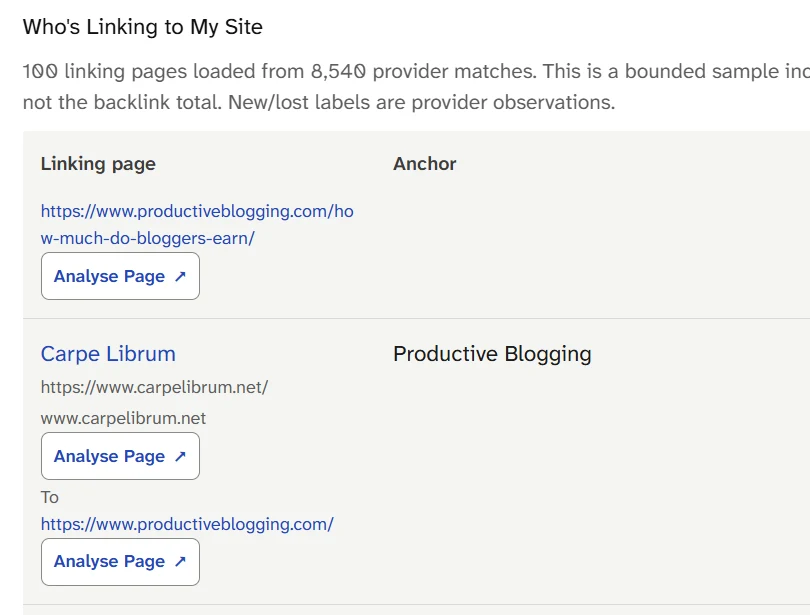
The Carpe Librum row names its homepage as the source and Productive Blogging as the anchor; the To field points to Productive Blogging’s homepage. Captured on October 7, 2026, this row identifies the link to investigate, while source-page reading establishes its placement.
Here are the useful details from that row, repeated in text:
Recorded field | Carpe Librum observation |
|---|---|
Linking page |
|
To |
|
Anchor | Productive Blogging |
First seen | September 19, 2025 |
Last seen | September 22, 2026 |
Change | No change supplied |
Those dates describe the recorded link observation. Keep your manual inspection date beside them, because opening a page today is a separate observation. Don’t turn “No change supplied” into a claim that you have monitored every version of the source.
At this point, the saved row identifies one homepage link. We still need to find where it appears and whether a shared component explains its repetition.
2. Compare Pages With Different Main Content
Open the Carpe Librum homepage and find Productive Blogging in the sidebar. It appears under My Favourite Blogs, a list of links to other blogs. The destination is Productive Blogging’s homepage, matching the recorded row.
Next, follow links from that homepage to two different reviews: the one-pot cookbook review and the Melbourne culinary-history review. Read enough of each main article to distinguish its text from the surrounding sidebar. Both contain different review content, but the same favorite blogs list appears beside them.
Page inspected | Main content | Where the Productive Blogging link appears |
|---|---|---|
Homepage | Recent book reviews | My Favourite Blogs sidebar |
One-pot cookbook review | Review of a cookbook | The same sidebar list, outside the review |
Melbourne culinary-history review | Review of a Melbourne history book | The same sidebar list, outside the review |
About | The blogger’s background | The same sidebar list, outside the page text |
All four pages showed the same destination and anchor in that component. The two review bodies contained no Productive Blogging link of their own. This establishes a repeated sidebar placement across the pages inspected; it does not establish that every URL on the website contains it.
Choose pages with different purposes when you repeat this check for your own site. A homepage and two article pages give you more useful comparison than opening the same article through several tag URLs. An About or contact page can show whether the component also appears outside the article layout.
3. Confirm the Shared Component
On each Carpe Librum review, the important question is whether Productive Blogging belongs to the review’s argument or the website’s surrounding list. Here, the heading, neighboring links and position repeat while the review changes. That is the visible clue to a shared block.
For a precise check, use your browser’s Inspect command on the link. You’re looking for its surrounding container, not trying to rewrite the source page. In the inspected Carpe Librum HTML, the link sits inside the sidebar container and a link-list widget named LinkList1, headed My Favourite Blogs; it is outside the article’s post-body container.
The entire list of linked destinations and labels also matched across the four pages. That combination is stronger than matching anchor text alone: different main content, the same surrounding component and the same link list all point to shared placement. Record those observations in ordinary language so you can explain the finding without depending on a screenshot.
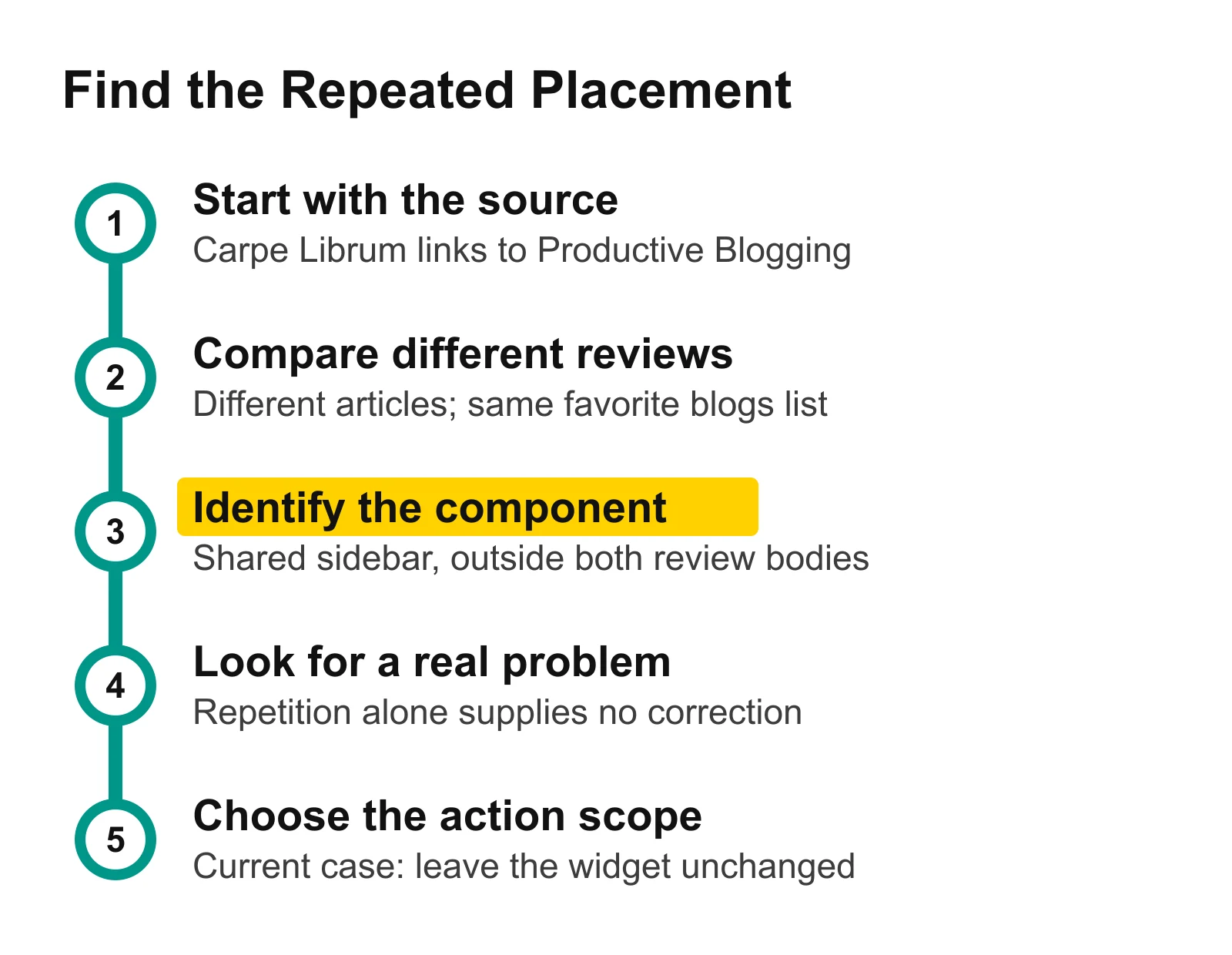
Compare the changing article text with the repeated sidebar before choosing an action. In this case, the shared favorite blogs widget explains the placement, and no correction is justified by repetition alone.
Watch for a different pattern in archive pages. Two inspected BeyondMyCV Holiday Blogging and Return To Blogging archives repeated the same article and its resource-list citation to Productive Blogging. That was article text displayed through two archives, rather than a link in a shared sidebar or footer. Identical wording led to a different placement finding once the pages were read.
4. Decide Whether a Real Correction Exists
A repeated link is not automatically a problem to fix. Carpe Librum visibly presents this one as part of a favorite blogs list, and the inspected pages supply no demonstrated destination or labeling error. For this placement check, the appropriate action is to leave the widget unchanged.
For the “are sitewide backlinks bad?” question, distinguish repetition from the reason a link exists. Google defines link spam around creating links primarily to manipulate rankings; its examples include certain links distributed through widgets, footers or templates across various sites. A repeated sidebar is a placement observation, not proof of that purpose. Google’s link-spam policy.
If you know a link is an advertisement or paid placement, Google recommends rel="sponsored", with nofollow also acceptable. Regular links need no special relationship attribute under that guidance. Apply those rules to a known arrangement rather than guessing the arrangement from the word “sitewide.” Google’s outbound-link guidance.
The public comparison does not establish a private agreement, Google’s treatment of this particular link or a ranking effect. It answers the narrower question you can act on: which page component carries the link, and whether your inspection reveals an actual correction.
What you establish | Sensible scope for the next action |
|---|---|
A shared list repeats, with no demonstrated defect | Record the placement and leave it alone, as in Carpe Librum |
An incorrect URL or label belongs to a shared widget | Ask the source owner to inspect that widget’s settings |
A mistake occurs inside one article’s explanation | Request a correction to that article |
The same article is displayed through archives | Inspect the original article before treating the archives as separate placements |
If a genuine widget error exists, send the owner the observed destination, the component heading and representative page URLs. Let them identify the editing screen that controls the component. After a correction, reopen the sampled page types and check the actual destination; editing one article would miss a link stored in the sidebar.
5. Keep a Short Placement Record
Download the filled placement notes. They contain the four inspected Carpe Librum URLs, their inspection times, the shared destination and anchor, and the observed sidebar component. Keep the recorded SearchCub source beside those manual observations so later changes remain easy to distinguish.
Your own note should answer three questions: where did you see the link, what repeated around it, and what problem—if any—did you establish? For Carpe Librum, the answer is a shared favorite blogs sidebar across the sampled pages, with no corrective action indicated by this placement finding. That is a useful completed decision even when it ends with leaving the link alone.
Open Backlinks for your domain and choose one recorded linking page to inspect next. Follow the source website to another article and compare the actual component before making a correction request.
Use the website SEO performance guide to place that decision alongside your other site checks. For the separate question of what link totals describe, read backlinks versus referring domains; for links between your own pages, use internal links for SEO.