- On-page SEO
- Tutorial
How to Check Your Website's SEO Performance
Editorial responsibility: SearchCub
To check your website's SEO performance, compare dated search estimates for the same country, read the pages behind them, and choose one specific question to investigate. You will finish a short scorecard and a next action. Use SearchCub's Domain overview for its estimates; if you own the site, keep your measured Google Search Console results alongside them.
Our worked example is productiveblogging.com in United States · English, retrieved on 3 and 4 October 2026. Its retained history covers April through September 2026. These are SearchCub estimates, rather than the blog's analytics or business results, and the example implies no affiliation. We have not changed the site or established why any estimate moved.
Start With the Same Domain and Country
Open Domain overview, choose Domain, enter the domain and choose Region. Click Research domain. After the result loads, use Overview, Search estimates, Pages and Backlinks for the separate questions below.
Write the domain, country and retrieval date at the top of your notes. Record the months you are comparing too: retrieving a report today does not turn every stored observation into today's performance. Keep the country fixed when you repeat the check. A country-wide report does not measure one town or your own visitors.
Begin with one decision you could make from the check, such as choosing an existing page to investigate. You do not need to set a traffic-growth target from someone else's report. For your own site, record any relevant publishing changes separately so that a later comparison has the context you actually know.
Read the Dated Trend Before the Latest Card
Open Search estimates and read the Organic search estimates table. Use completed, labeled months for a comparison. A value shown as Latest without an observation month cannot become another monthly column merely because it appears beside September.
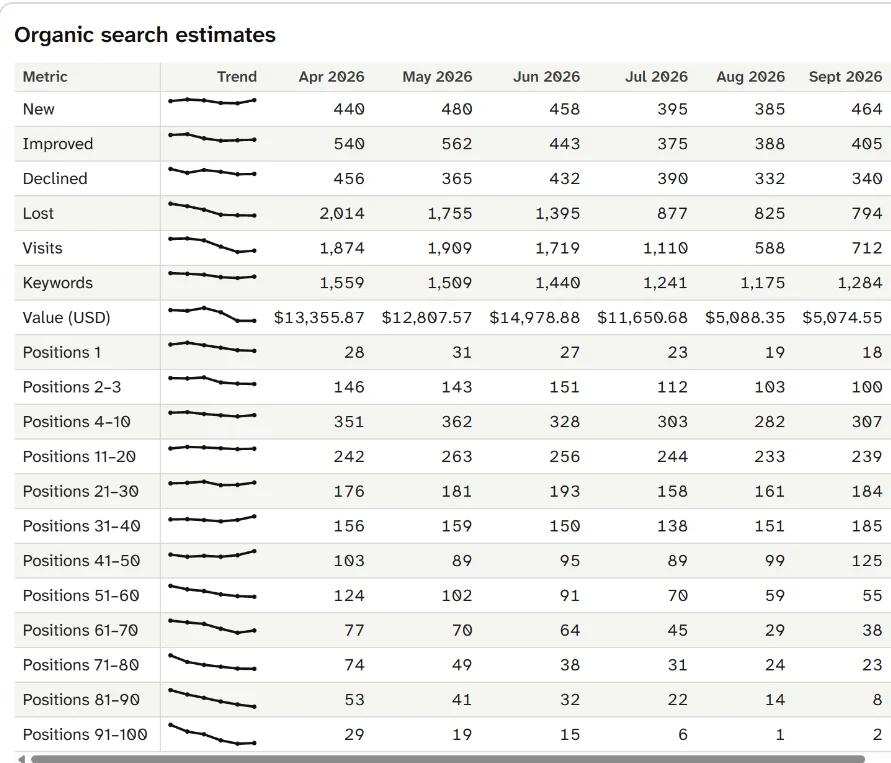
In this retained example, estimated visits are 1,874 in April and 712 in September. Position 1 falls from 28 to 18, while positions 2–3 fall from 146 to 100. Read the whole period before interpreting the last pair of columns.
The example's Visits row rises from 588 in August to 712 in September, while its April-to-September direction is down. Those statements can both be true. Choose and label the comparison period before writing “improving” or “falling.” A recent increase does not erase the longer decline, and the longer decline does not prove that the latest month declined.
The ranking-keyword count changes from 1,559 in April to 1,284 in September. To compare page one, add the supplied position buckets for each month: positions 1, 2–3 and 4–10. April gives 28 + 146 + 351 = 525; September gives 18 + 100 + 307 = 425. The top-three total is 174 in April and 118 in September.
These readings tell you which estimates changed together. They do not establish that a particular ranking change caused the visit estimate to fall, identify a Google update as the cause, or show lost sales. The useful next question is which relevant pages and queries to inspect, rather than which explanation sounds most convincing.
Keep the Overview's Scope Clear
Return to Overview. Latest estimates and Ranking distribution summarize available domain estimates; the keyword table is the set of rows loaded for the request. Keep those scopes separate.
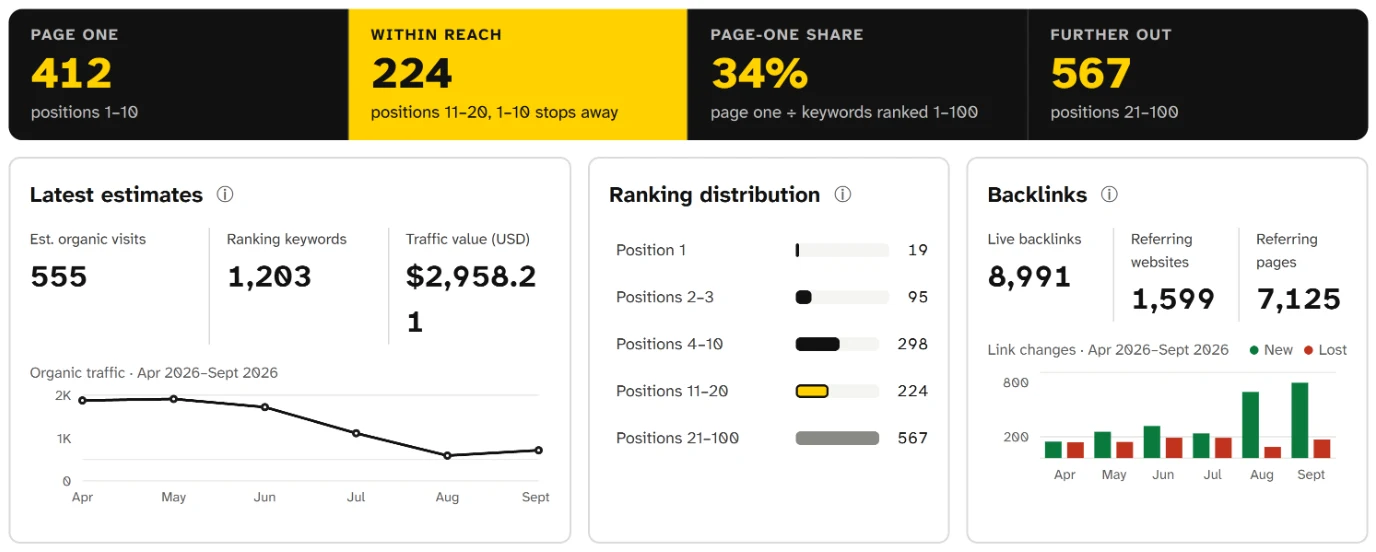
The saved 4 October summary shows 412 keywords on page one and 224 within reach. Its 1,203 ranking-keyword estimate is different from the September history count of 1,284; keep each figure attached to its own source and period.
In that saved summary, Page one covers positions 1–10 and Within reach covers 11–20. The supplied lower bands total 567 for positions 21–100. Adding the latter two groups gives 791 below page one, compared with 412 on page one. These are descriptions of the recorded distribution, not instructions to refresh every existing page or publish new pages whenever a threshold is crossed.
Likewise, the retained Latest visit estimate is 555, while September's history value is 712. Because the Latest observation month is not supplied, do not call the difference a drop since September. Use the labeled monthly table for the monthly scorecard and save the headline values separately if they are useful.
Check unavailable fields and any coverage message before continuing. A missing estimate stays unknown. An empty keyword list does not establish that a site has no rankings, no traffic or no indexed pages.
Choose a Page to Investigate From the Loaded Evidence
Open Pages and read the actual rows. The retained result lists /google-calendar-hacks/ with 21 ranking keywords, including 3 improved and 13 declined. That makes it a page worth inspecting in this example; it does not establish that rewriting it is the right remedy.
The Pages to update suggestions give another starting point. The result with 100 loaded keywords names the calendar page and lists 7 searches worth updating it for in that loaded set. One is google calendar tips, shown at position 2 with a displayed drop of 2 places and 140 estimated monthly searches. Keep the observation's dates where supplied, and leave an unknown comparison interval unknown.
A different retained result for the same domain has 290 loaded keywords and begins with another suggestion:
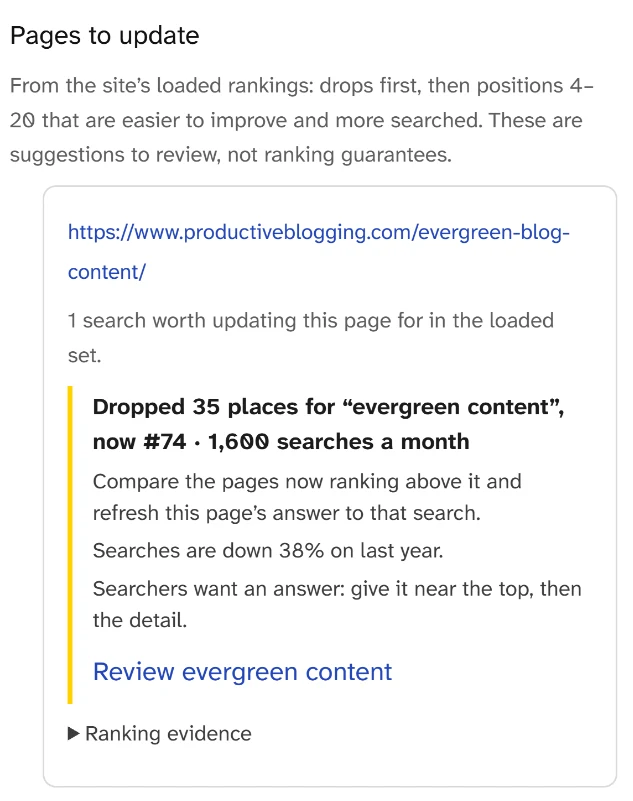
This saved card shows evergreen content at position 74 and a displayed drop of 35 places. It comes from the larger loaded set, so it is not a later measurement proving that the first result changed.
The suggestions differ because the evidence supplied to them differs. Do not present either list as an exhaustive audit of the website or combine the two as successive measurements. A high search estimate beside a suggestion also does not settle whether the query belongs to that page.
For the calendar page, the next action is to open the actual page and assess whether its answer still helps someone looking for calendar tips. Use the exact-page keyword workflow when investigating that URL further. Inspect relevant current results before proposing an edit. The page's usefulness, audience and available evidence determine the work; the displayed movement gives you a lead.
Put the Comparison in a Short Scorecard
Use one row per question, with the source and period preserved. The following example stays within the retained April-to-September history rather than mixing it with Latest.
Scorecard line | April 2026 | September 2026 | What to record next |
|---|---|---|---|
Estimated organic visits | 1,874 | 712 | Direction over this exact period |
Ranking keywords | 1,559 | 1,284 | Supplied counts and coverage |
Page one | 525 | 425 | Sum of positions 1–10 |
Top three | 174 | 118 | Sum of positions 1–3 |
Within reach | 242 | 239 | Positions 11–20 |
For this example, write: “Estimated visits and the top-three count are lower in September than April. Investigate the calendar page's relevant query evidence before deciding on an edit.” This conclusion names the observed direction and the next question. It makes no causal claim or promise about the result of an update.
Add your own page URL, the question to check and the evidence you need. Avoid a to-do list saying “fix SEO” or “improve all rankings.” A useful entry might ask whether a specific section supplies the instructions a query implies. If the page already answers the task well, keep that finding instead of manufacturing an edit to complete the sheet.
Use Links and Page Basics as Further Checks
Read Backlinks when there is a link question relevant to your investigation. The retained history reports 154 new and 151 lost links in April, then 704 new and 175 lost in September. These counts describe recorded link changes. A positive balance does not prove that the useful links remain intact, that new links are valuable, or that links explain the site's visibility trend.
Investigate a particular link when its source, destination or change matters to the page you chose. Keep link counts separate from a verdict about quality. There is no need to abandon the calendar-page investigation solely because one monthly link total is large.
Before comparing the totals, distinguish backlinks from referring domains.
When the same incoming link appears on several pages, check its sitewide placement before acting.
Next, read the page itself and check the promise and navigation a reader encounters. SEO titles and meta descriptions helps with its search-preview wording; internal links for SEO helps when a missing route prevents the next useful action. These checks complement the scorecard rather than supplying a universal SEO grade.
If a URL returns success but no longer supplies its promised content, follow the soft 404 response check before deciding on a repair.
If your report is empty, first check the target, country and report scope. For actual Google indexing questions, use the page-indexing investigation. An absent keyword row and an indexing diagnosis are different findings; leave the latter unresolved until you have the appropriate evidence.
Add Your Own Measured Results and Recheck Consistently
If you own the website, open Google Search Console separately. Its Performance report gives the clicks, impressions, click-through rate and average position recorded for your property. Compare equal periods with the same relevant filters. Google's Performance report documentation explains the fields and reporting limits.
Label those rows as Search Console observations, alongside the SearchCub estimates. SearchCub does not connect to your Search Console account. The worked example has no first-party export, so its measured rows remain unfilled. A disagreement between the sources is a question about periods, coverage and measurement, rather than permission to relabel an estimate as actual visits.
Save the scorecard and the selected page investigation before making changes. If you later edit a page, record what changed and use the page-refresh measurement guide to compare suitable evidence afterward. Keyword-ranking changes covers the narrower question of investigating a movement without assuming its cause.
Your next step is to open Domain overview, confirm your domain and Region, and write one comparison from its dated Search estimates table. Keep an unavailable period blank. Then name the one page or unresolved question you will investigate, so the check ends with work you can actually perform.
For a focused guide to Core Web Vitals, read Does Page Speed Affect SEO? Core Web Vitals for Bloggers.