- On-page SEO
- Tutorial
Soft 404: Fix a Success Response With Missing Content
Editorial responsibility: SearchCub
A soft 404 is a missing or error-like page that returns a response which does not correctly signal that state. To choose a repair, compare what the URL promises, what the visitor receives, and the server's response. Use Page checks for the response, then read the page yourself and write down whether its useful content should be restored, removed, or moved.
Our example is Bowdoin's old Spanish typing guide, checked on 7 October 2026 with the SearchCub region set to United States. The university still links to the guide, but the destination displays a retirement notice and returns HTTP 200, a success response. That combination makes the content decision visible without relying on a traffic chart.
Google describes its Soft 404 report as a missing-page message returned without the matching not-found response. A success response alone does not guarantee indexing. Google's Page indexing guidance explains that label; its HTTP-status documentation explains how responses are processed.
Start With the Task the Link Promises
Find an existing link to the URL before deciding that its content is missing. A brief page might answer its question perfectly; length is not the test. Write a sentence describing what someone following the link expects to accomplish.
For the Bowdoin example, the Spanish-language resources index links to instructions for writing Spanish accented characters on a Mac or PC. Its destination is https://learn.bowdoin.edu/spanish-grammar/newgr/accsp.htm. The university's Quick Spanish Grammar Summary also points its Typing Accents section to that file.
Those first-party links establish the intended task: learn how to type the characters. They are more useful than guessing from the filename accsp.htm. On your own site, use a navigation link, a reference in another article, or the original description of the resource to establish the same expectation.
Next, open the exact destination. Bowdoin's legacy typing page contains a bilingual retirement notice. Its English text says “This page is no longer available.” It offers a general grammar-book link, but the typing instructions are absent from the captured body.
Keep the exact URL in your notes. Switching to the site's homepage, another hostname, or a nearby article would answer a different question. The useful finding here is that the specific teaching link ends at a notice rather than the promised lesson.
What was checked | Observed result | What it establishes |
|---|---|---|
Resource index and summary links | Both point to the old typing guide | The task the destination is supposed to serve |
Exact typing-guide URL | HTTP 200, with a retirement notice | Success response and missing intended content coexist |
Quick Spanish Grammar Summary | HTTP 200, with genuine teaching material | A success response can also accompany useful content |
The summary is a helpful control. It prevents you from treating every old-looking page, or every page on this site, as the same problem. The decision depends on the returned content at the specific address.
Confirm the Response in Page Checks
Open Page checks, choose Page, paste the exact typing-guide URL, choose United States in Region, and click Research page. A fresh check uses research credit. When the page result opens, use the Page checks tab and read the response row before interpreting the other findings.
The retained result for this URL was retrieved on 7 October 2026. It shows Page responds normally, Passed, and HTTP 200. That is a precise response finding: the server supplied a success code for the page SearchCub requested.
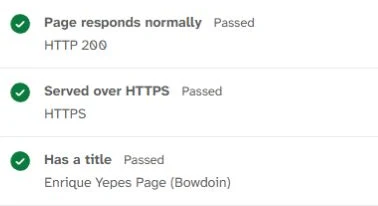
The response row passes because the exact Bowdoin guide returns HTTP 200. The HTML title is present too; neither row verifies that the typing instructions remain on the page.
The result also finds the title Enrique Yepes Page (Bowdoin). Has a meta description and Has a main heading (H1) each show Needs a fix. Canonical URL points to this page shows Review, with No canonical URL set; Links can be followed passes with Follow.
Keep those findings beside the content decision. Adding a description, a main heading, or a canonical URL would leave the retirement notice in place. First decide which resource should exist at this address, then improve the metadata for that resource.
SearchCub reads HTML only; JavaScript-added content, robots.txt, and Google's index status are outside this check. No verified Search Console result has been supplied for Bowdoin, so Google's classification of this URL remains unknown. The observed case is the response/content mismatch, rather than a claim that Google assigned this page a soft-404 label.
Choose the Repair From the Intended Outcome
On a site you control, establish what the page should do before changing its status. The same missing-content finding can lead to different repairs. For Bowdoin, the publisher's intended next state has not been established, so the following choices explain how to handle your own equivalent situation.
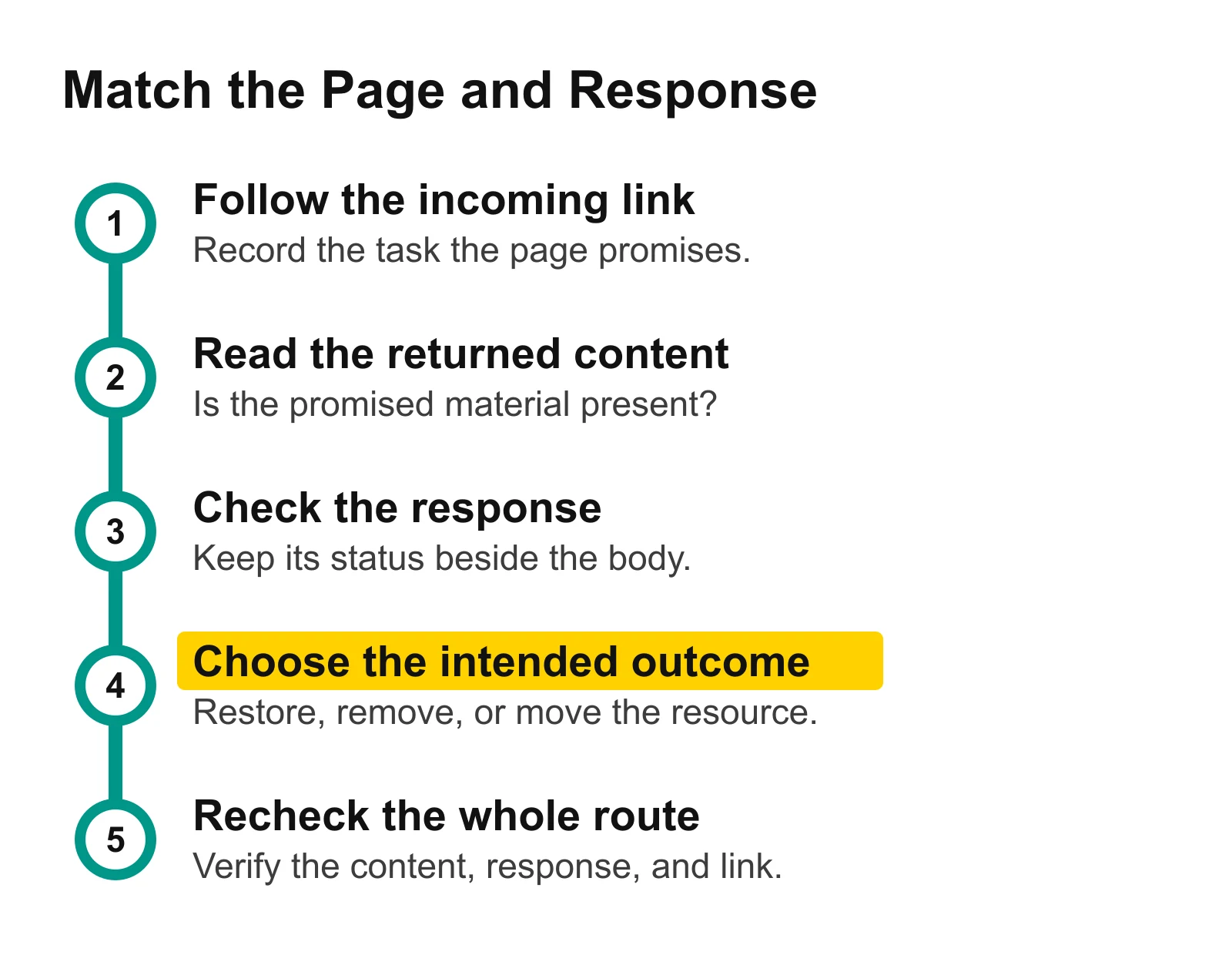
Read the promised task and returned content before choosing a response. The final check follows the incoming link again, so a repair covers the visitor's whole route.
Restore the Useful Content When the Page Should Stay
If the resource should remain at the existing URL, restore content that performs its original job. For this example, that would mean actual instructions for typing Spanish accents, rather than expanding the retirement notice with a longer apology.
Write the expected result in plain language: “A visitor following the typing-guide link can find and follow the relevant instructions.” Keep the success response for a page that actually supplies that resource. Review its title, description, and main heading after the body is useful again, using the actual Page checks findings to guide that work.
The acceptance check is practical. Follow the original link, read the resulting guide, and confirm that the promised instructions are present. A green response row becomes meaningful when it agrees with the content you intended to serve.
Use a Missing Response When the Resource Is Gone
If the resource has deliberately been removed and has no replacement, retain a helpful visitor notice while returning an appropriate missing response. Google recommends HTTP 404 for genuinely missing pages. Its HTTP documentation treats 404 and 410 as missing-content responses for Search processing; removal from search is a separate process rather than an immediate result. Google's missing-page guidance, HTTP-status reference.
For the typing-guide example, a helpful notice could still offer general grammar resources. The key difference would be agreement between the notice and the missing response. The incoming summary link would also need correction, so visitors are not repeatedly sent to a lesson that has been retired.
Ask whoever maintains your site to set the response at the server or application level. Changing the words in an error-page template is not enough to establish which status the server actually returns. Recheck the exact URL after the change.
Redirect Only After Verifying an Equivalent Replacement
If the resource moved, inspect the proposed destination before setting a redirect. It should let the visitor complete the same task. In this example, a broad grammar-book index is not evidence that the specific typing instructions have moved there.
Google's guidance recommends a permanent 301 redirect for a moved page. Google's Page indexing documentation. Record the verified replacement, configure the move, and update the incoming link to point directly to it.
Your check should end on the replacement lesson, with the useful instructions available. A redirect that lands on a working but unrelated page would still leave the original visitor's task unfinished.
Write a Repair That Someone Can Verify
Use the URL and content worksheet to keep the observations and intended change together. It contains the retired guide and the useful grammar summary as separate example rows, plus fields for the repair decision. Replace those example observations with your own URL and current findings when you use it.
For the Bowdoin case, the starting note is ready to copy:
The incoming links promise accent-typing instructions, but the exact guide URL returns HTTP 200 with a retirement notice. Confirm whether the guide should be restored here, deliberately removed, or moved to a verified equivalent before choosing the response and correcting those links.
For a URL you control, fill in this short contract:
Field | What to write |
|---|---|
Exact URL | The address reached by the existing link |
Promised task | What the visitor expects to accomplish |
Current response and body | The code and what the page actually delivers |
Chosen outcome | Useful page here, removed resource, or verified replacement |
Required change | Content, response, and incoming-link changes needed for that outcome |
Completion check | What someone must see after following the same link again |
This turns “fix the soft 404” into a request with an observable end. It also separates the server change from a metadata cleanup: a repaired title cannot stand in for a restored lesson, and a longer notice cannot stand in for a missing response.
Recheck the Same Route After the Change
Begin at the original incoming link and follow it again. Confirm that the final content matches the chosen outcome, then run Page checks for the exact old URL to record the response. If you chose a replacement, inspect that destination as well and confirm that the original link now leads directly to it.
Save the date and the new result beside your earlier observation. For a resource you restored, the success code and useful body should agree. For a deliberately removed resource, the missing response and helpful notice should agree. For a moved resource, the old address and incoming link should lead to the verified replacement.
If your own Search Console reports Soft 404, use its URL Inspection result to examine Google's view separately. Google's guidance points you to Test live URL and View tested page for the rendered result. Google's Soft 404 guidance. Record that finding with its date alongside your response and content observations.
For your next check, open Page checks and enter one URL whose useful content appears missing. Follow a real link to it, read the body, and choose the intended outcome before asking for a change.
For the wider site review, use Check Website SEO Performance. If the repaired page still does not appear in search, use Page Not Indexed to investigate that separate question. Use Internal Links for SEO to help readers reach the useful destination from related pages.