- Backlinks
- Tutorial
How to Create Linkable Assets People Can Use and Cite
Editorial responsibility: SearchCub
Create linkable assets around a useful output people can use and cite, then make that output easy to verify and keep current. You will finish with a filled resource worksheet, a readable reference card and a plan for preserving the edition behind a citation. Start with a real linking page in SearchCub's Backlinks, rather than choosing a format before you know its use.
A linkable asset is a resource someone can refer to when answering a question or doing a task: a study, a calculator, a template or a practical guide. Here the worked example is productiveblogging.com, checked in SearchCub for United States English on October 6, 2026. One linking row leads to an annual blogging survey and a concrete packaging decision.
Find a link with a visible purpose
Open Backlinks, choose Domain, enter productiveblogging.com, select United States under Region, and click Search. In the domain result, open the Backlinks tab and find Who's Linking to My Site. Read Linking page and Anchor, then note the destination shown beneath the linking page.
The example contains a Semrush page titled “46 Blogging Statistics to Know in 2025.” Its anchor, the clickable text of the source link, is “Productive Blogging, 2024,” and the destination is the survey at /how-much-do-bloggers-earn/.
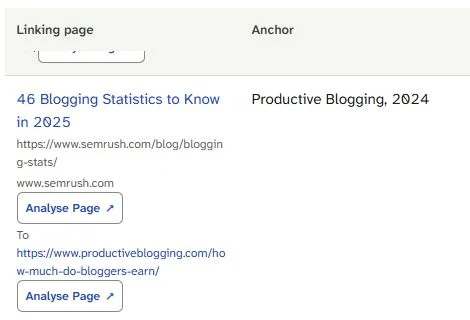
Read the source page and anchor together: this row points to material credited by a statistics article. Open the public page to see what that credit supports.
Choose this row because it gives you something specific to investigate. A link total tells you how often a resource appears in the data; the linking page shows how someone uses it. If you are comparing totals elsewhere, backlinks versus referring domains explains what the different counts mean.
Open the linking page's ordinary external address, then follow its source link to the destination. You are reading the publishers' pages, so this step uses their public content rather than another SearchCub analysis.
Let the use determine the format
In Semrush's statistics article, the source credit accompanies a comparison between blogging niches. The link therefore functions as a reference behind a claim. The current Productive Blogging destination presents its 2026 survey, while the citing anchor says 2024; the earlier edition was not obtained for this example.
That gives you a design requirement: someone referring to annual research needs to identify which edition they mean. It does not establish why the author chose the link. Write the observed use as “reference for a stated comparison,” then design the output around that use.
Contrast it with a procedural link. Reliablesoft's linkable-assets guide links to Backlinko's SEO checklist as a checklist example. Backlinko's current page offers a Google Doc template, so the visible promise is a procedure the reader can reuse; the linked document itself was not inspected.
Someone needs to… | Deliver something they can… |
|---|---|
Refer to a research finding | Identify by edition, trace to its source and read with its method |
Work through a procedure | Follow in order, record progress and return to later |
Make a calculation | Supply inputs, understand the result and check the assumptions |
Use the first row for the survey example. A decorative chart or a longer introduction would not, by itself, solve the edition problem. Choose a reference card and a downloadable record that keep the source, method and edition together.
Useful formats and sound sourcing are already covered in the inspected guides: Reliablesoft discusses tools, research and checklists, while Editorial.link connects resource design to audience problems and original sources. The practical work here is turning the real citation into a filled output you can use and test.
Specify what your resource delivers
Name the resource Annual Research Reference Kit. Its job is to help you package annual research so another writer can identify the edition and follow a concise reference back to its methods. The original material in this example is the worksheet and card design; the survey belongs to its publisher.
Keep the promise small enough to fulfill. The kit delivers a readable method-reference card, a downloadable metadata record and an edition plan. It starts with stated public methods, so there is no respondent dataset to copy or new income result to calculate.
Fill the worksheet before writing the surrounding guide:
Design field | Filled choice for this resource |
|---|---|
Reader's task | Refer to one identifiable annual survey |
Required inputs | Edition, source address, collection dates, response count, recruitment, update date and relevant missing fields |
Visible output | A short reference card with its source link and method context |
Download | The same fields in CSV, plus an edition manifest in JSON |
Update behavior | Keep identifiable edition records; update a separate current-edition entry |
Completion test | Card, download and source agree; an unavailable edition remains marked unknown |
This table is a product specification for your resource. It describes what someone receives and how it behaves. For the surrounding article's questions, structure and supporting material, use the separate keyword-led article brief.
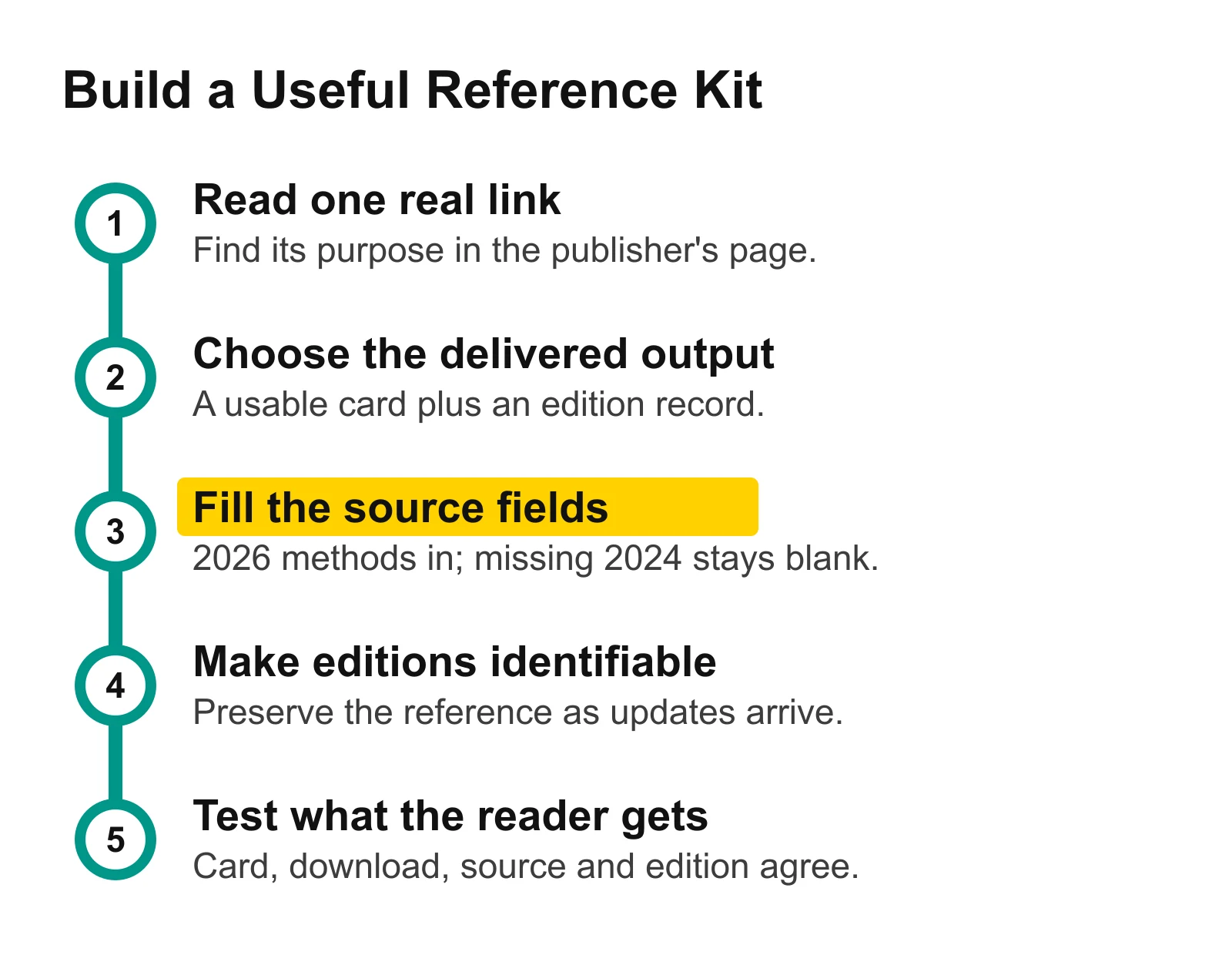
The downloadable record and readable card come from the same fields. Keep the edition attached as the resource changes, then test the output a reader will receive.
Fill the fields and produce the card
The current survey's methods give you a usable demonstration record. Attribute every transcribed field to Productive Blogging's original page and add the date you inspected it. For your own study, the same fields would come from your actual collection records.
Field | Stated value in the current source |
|---|---|
Edition and source update | 2026; May 28, 2026 |
Collection dates | January 2–April 29, 2026 |
Responses and questionnaire | 129 individual-blogger responses; 16-question survey; anonymous responses |
Recruitment | Self-selected respondents from the author's audiences and communities |
Reported currency and conversion | USD; conversion dated May 4, 2026 |
Missing inputs for this kit | Earlier 2024 source edition; response counts for individual niche groups |
Generate a reference card from that record:
Productive Blogging survey, 2026 edition. Collection: January 2–April 29, 2026. Responses: 129 individual bloggers recruited through the author's audiences and communities. Read the original methods before extending the findings beyond that sample. Source updated May 28, 2026; inspected October 6, 2026.
Attach the original source link to the card. The card now supplies something concrete: another writer can identify the study and follow its methods without guessing which year is meant.
Download the filled reference-kit CSV. It has a current-edition row and a separate row for the older citation request, with unknown values kept visible. The JSON edition manifest expresses missing values as null, meaning unavailable rather than zero.
The shared structure matters more than the file format. source_edition identifies the actual material inspected, while requested_edition records what the citation asks for. output_state tells you whether to produce a current method card or leave an older request unresolved. Keep those fields separate: replacing a missing edition with the latest one would erase the very distinction the resource promises to preserve.
Use the CSV to fill another resource's record. Use the JSON if you later build a page or tool that reads the same fields. This example generates the card manually; SearchCub supplies the link lead, and you supply the resource design.
Give each edition a clear identity
For an annual resource you publish, decide how people will refer to an edition before the next update arrives. An edition-specific page or maintained record can hold its methods and outputs; a separate current-edition entry can point to the newest release. These are design choices for your resource, not addresses already provided by either publisher.
Keep the edition name in the page heading, downloadable filename and record. Give corrections a short change note explaining the affected fields. When collection scope or methodology changes, record that alongside the new edition so a reader can distinguish a corrected value from a different study.
The current demonstration supports its 2026 method card. The 2024 request stays unresolved until the corresponding source is available; a live link to a newer edition does not establish the older claim's support.
If you already published annual research without edition records, start by listing the materials you actually retained. Preserve only what you have rights and records to maintain. Making an edition easy to identify is more useful than assigning an old year to reconstructed material.
Test the delivered resource
Open the kit as a reader would: read the card, open its source and download the record. Run these checks before treating it as finished.
Test | Result in this demonstration | What to do |
|---|---|---|
Does the card identify the inspected edition and method? | Yes: the current record produces the shown method reference. | Keep those fields together in the visible output. |
Does the download preserve the same inputs? | Yes: the CSV and manifest carry the current record. | Update card and record together when a field changes. |
Can the older citation request resolve to its source edition? | Unknown: that earlier source is unavailable here. | Keep the requested year and missing source visible. |
Can this record produce a niche-income ranking? | No: the kit contains method metadata rather than ranking inputs. | Keep that output outside the kit's promise. |
For a checklist, the equivalent test would be completing a task and saving progress. For a calculator, it would be checking a known input against an expected result. In every case, test the promised use instead of calling a file useful because it exists.
This kit demonstrates a resource interface and its outputs. Whether a resource later earns links needs observation after publication; it is not a result established by this example.
Your next action
Open Backlinks, choose Domain, and type your site or one relevant site. On Who's Linking to My Site, choose a linking page you can inspect and write down the use you see. Fill the downloadable worksheet, produce its visible output, and test that one reader task before expanding the resource.
Where to go next
Competitor keyword research: choose relevant sites and searches to investigate next.
A keyword-led article brief: plan the guide that explains your resource.
Backlinks versus referring domains: interpret the link counts without confusing repeated links with different websites.