- Backlinks
- Tutorial
What Is a Backlink in SEO? A Real Link, Part by Part
Editorial responsibility: SearchCub
A backlink is a link on another website that points to a page on your site. Search engines follow these links to find pages, and Google uses them as one of many clues about what a page is about and how useful it is. By the end of this post you will be able to read one real backlink part by part in SearchCub's Backlinks tool, and you will know which questions the backlink totals answer and which they leave open.
People also call backlinks inbound or incoming links. To the site that publishes it, the same link is an outbound link. A link from one page of your own site to another is an internal link, not a backlink; internal links for SEO covers those.
Why backlinks matter in SEO
Backlinks do two jobs for search engines:
They lead Google to your pages. Google says following links from pages it has already crawled is its main way of finding pages, and in many cases those pages belong to other websites that link to yours (Google SEO Starter Guide).
They help Google understand pages. Google uses "various systems that understand how pages link to each other" to work out what a page covers and which pages may best serve a search. One of them, PageRank, "continues to be part of our core ranking systems" (Google's ranking systems guide).
So, do backlinks help SEO? Yes, as one input among many. The same starter guide says: "We have many ranking signals, and PageRank is just one of those."
What Google does not want is links made to game its rankings. Its spam policies describe link spam as "creating links to or from a site primarily for the purpose of manipulating search rankings", and the first example they list is "Buying or selling links for ranking purposes" (Google spam policies).
The example: one blog's backlinks
The example is productiveblogging.com, a blog about blogging. In Backlinks, choose Domain, type productiveblogging.com, choose United States as the Region and click Search; the result opens on its Backlinks tab. The figures below come from a saved result retrieved on 3 October 2026 and read again on 4 October. They are SearchCub estimates from third-party link data, not the blog's own records.
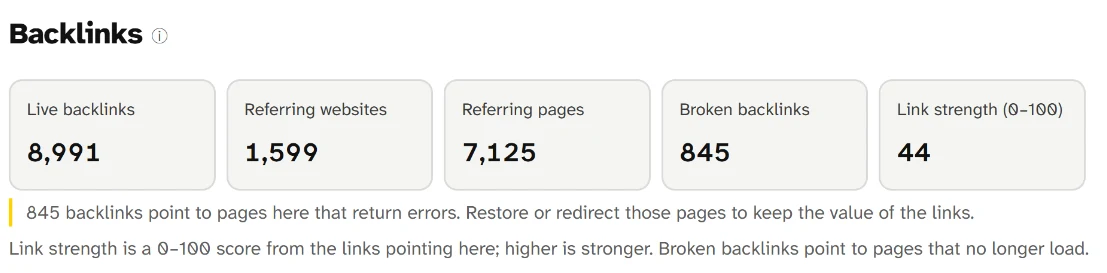
The five cards are totals for every link the data found: 8,991 live backlinks from 1,599 referring websites, held on 7,125 referring pages. The yellow note flags 845 links that point to pages returning errors, and Link strength scores the blog 44 out of 100.
Live backlinks counts the links and Referring websites counts the different sites they come from; backlinks vs referring domains explains why those two numbers differ and which one to compare. Broken backlinks are links that point to pages on the blog that no longer load, and the product's advice for them is to "Restore or redirect those pages to keep the value of the links." Link strength (0–100) is SearchCub's score from the links pointing at the site, where higher is stronger.
None of these totals shows you an actual backlink. For that, scroll down the same tab.
One backlink, part by part
The Who's Linking to My Site table lists the pages that link to the site. In the example it loaded 100 linking pages out of 8,236 matches, with live and lost links together, and the product notes that "row count is not the backlink total". Each row has seven columns. Here is one row, read from left to right:
Linking page. In this row: A page titled Easy Peasy Foodie, with its address and domain. What it tells you: Where the link lives. On a domain result, a line starting "To" names the page on your site that the link points to.
Anchor. In this row: Productive Blogging. What it tells you: The clickable words of the link.
Link. In this row: Follow. What it tells you: Whether the link carries a marking that asks search engines not to follow it.
Strength. In this row: 30. What it tells you: A 0–100 score of the linking page; higher is stronger.
First seen. In this row: 27 November 2021. What it tells you: When the link data first found the link.
Last seen. In this row: 18 September 2026. What it tells you: When the link data last found it.
Change. In this row: No change supplied. What it tells you: Shows New or Lost when the data saw the link appear or disappear.
Read together, the row says: a page titled Easy Peasy Foodie links to the blog using the blog's own name, nothing asks search engines to ignore the link, and the link data has found it for nearly five years. Each part is worth a closer look.
The linking page
The linking page matters most, because it is the reason the link exists. Open its address and find your link in the text: the paragraph around it tells you whether someone recommended your page, cited it as a source or listed it among others. The Analyse Page button under the address opens SearchCub's Page analysis for that linking page.
The anchor
Google defines anchor text as "the visible text of a link", which "tells people and Google something about the page you're linking to" (Google's link best practices). Here the anchor is simply the blog's name. When the table shows Not supplied, the data has no anchor for that row, and the linking page itself will show you the words.
Follow or Nofollow
A site can add a rel value to a link to tell Google how it relates to the page it points to. Google asks sites to mark paid links with sponsored and links in comments and forum posts with ugc, and to use nofollow when neither applies and they would rather Google not associate their site with the linked page. Links with these markings "will generally not be followed" (Google: qualify outbound links).
SearchCub's Link column shows Follow or Nofollow, or Not supplied when the data has no value. It does not say which rel value a link carries, so open the linking page's code if you need to know. A Nofollow link is still a link that readers can click.
Strength
Strength scores the linking page, not the whole site. In the same sample, a page on the Semrush blog that links to the blog scores 19, lower than the Easy Peasy Foodie page's 30. The score comes from SearchCub's third-party link data, not from Google, which says third-party tools "don't have access to our internal ranking data" (Google on third-party SEO tools).
Dates and change
First seen and Last seen are the dates the link data first and most recently found the link. Change shows Lost when a link the data found before is no longer there, and New when one has just appeared. These are observations from the link data, not a record kept by the linking site.
Four backlinks, four different stories
The same sample holds very different links. All four of these rows say Follow:
Easy Peasy Foodie. Anchor: Productive Blogging. Strength: 30. First and last seen: 27 November 2021 to 18 September 2026. What it shows: another site linking by name, for years.
Semrush blog, "46 Blogging Statistics to Know in 2025". Anchor: Productive Blogging, 2024. Strength: 19. First and last seen: 11 May 2024 to 10 August 2026. What it shows: a citation, because another publisher used the blog as a source.
Mitch Teemley, The Power of Story. Anchor: Not supplied. Strength: 50. First and last seen: 27 January 2026 to 8 February 2026. What it shows: marked Lost, found for under two weeks.
Productive Blogging Courses, on a Teachable subdomain. Anchor: productiveblogging.com. Strength: 26. First and last seen: 12 March 2022 to 18 April 2026. What it shows: the blog's own course pages linking back to it.
Three lessons come out of these rows:
The links that say most about your content exist because the linking page needed yours. The statistics article links to the blog as a source. Google encourages publishers to link out this way, saying outbound links, such as citations of your sources, can help show a page is trustworthy (Google's link best practices). To make pages that earn links like that, read linkable assets.
A high strength does not make a link last. The highest Strength in these four rows, 50, belongs to the link that was found for under two weeks.
Not every backlink comes from someone else. Links from your own other sites count in the totals, so leave them out when you judge how other sites see your content.
Backlinks come and go
A backlink is a current fact, not a permanent one. The New and lost links table on the same tab counts, month by month, the links and websites that appeared and disappeared:
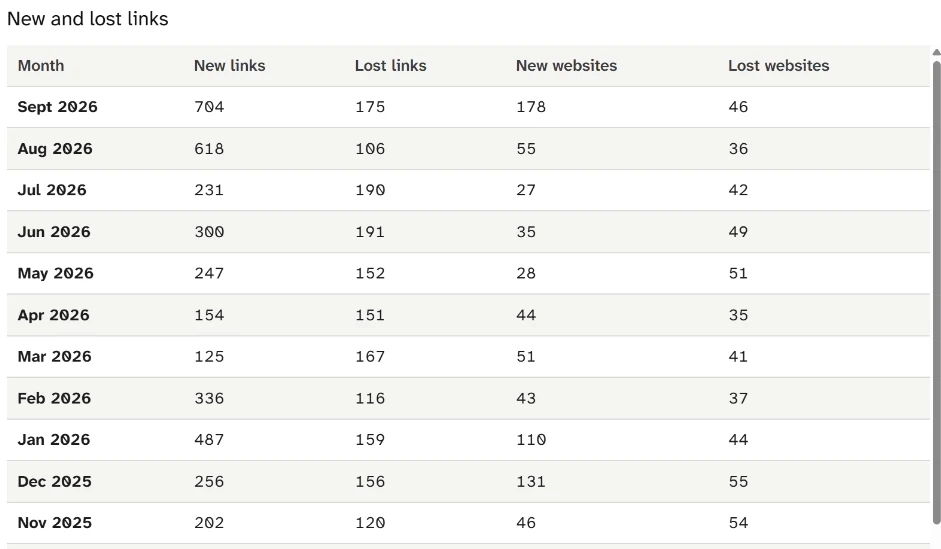
Read one row across: in September 2026 the blog gained 704 links and lost 175, while 178 websites linked for the first time and 46 stopped. Every month shown has losses as well as gains.
The table's footer calls these "Completed months of observed changes, not total backlink counts", so compare months instead of adding them up. April 2026 came closest to even, with 154 links gained and 151 lost. The October 2025 row, below the part shown, swung hardest: 1,253 new links and 1,034 lost in one month. Pages get edited, moved and deleted, and the links on them go too.
What backlink counts show, and what they leave out
The counts are useful for three things:
Size and direction. How many links and linking websites the data found, and whether new websites keep arriving month by month.
Repairs. Broken backlinks point at pages you can restore or redirect.
Leads. The linking-pages sample shows real links you can open and read.
They also leave three things out. A count cannot tell you whether a link is relevant or deserved; only the linking page can. The numbers describe what one third-party index found, so treat them as a sample of the links to your site rather than Google's own list. And the linking-pages table is itself a sample: 100 rows out of 8,236 matches in the example.
Read a backlink on your own site
You can repeat the example in a few minutes:
Open Backlinks, choose Domain, type your domain, choose your readers' Region and click Search.
On the Backlinks tab, write down Live backlinks, Referring websites and Broken backlinks with the date.
Scroll to Who's Linking to My Site and pick a row you don't recognize.
Read it from left to right, as in the list above: linking page, anchor, Follow or Nofollow, strength, dates and change.
Open the linking page and find your link in its text.
Then decide what the row means for you:
What you find | What it means | What to do |
|---|---|---|
A Follow link from a relevant page that names or cites you | Someone chose to send readers to your page | Note which of your pages earned it: it shows what others find worth linking to |
A Nofollow link | The linking site marked the link | Nothing to fix: readers can still use it |
A row marked Lost | The link data no longer finds the link | Open the linking page to see whether the page was removed or only your link was |
A link from your own other site | It counts in your totals | Leave it out when you compare your site with others |
Broken backlinks above zero | Links point at pages that no longer load | Restore those pages, or redirect their old addresses to the closest live page |
Your next step
Open Backlinks, search your own domain and read one row from Who's Linking to My Site, part by part. If your site is new and the table is short, that is normal: Google describes other sites linking to you as "something that happens naturally over time" (Google SEO Starter Guide). For how backlinks fit into SEO as a whole, start with what is SEO, and for the two headline counts, read backlinks vs referring domains.