- On-page SEO
- Tutorial
What Is SEO? A Plain Answer, Shown on a Real Blog
Editorial responsibility: SearchCub
SEO (search engine optimization) is the work of making your pages easy for search engines to understand and worth choosing for the people searching, so your pages appear when someone looks for what you wrote. By the end of this post you will know the four kinds of work SEO covers, what it cannot promise, and how to recognize basic SEO labels in a real example. You will see those labels in SearchCub's Domain overview, which shows what a whole site ranks for.
Google's own guide connects two jobs: helping search engines understand your content, and helping people find your site and decide whether to visit it from search (Google SEO Starter Guide). Notice the two halves. The first is about the search engine: can it find and understand your page? The second is about the reader: when your page shows up, is it the one they want to click?
How search works, in three steps
Google describes Search as three stages (How Google Search works):
Crawling. Automated programs called crawlers download the text, images and video on pages Google has found, for example through a link from a page it already knows or through a sitemap you submit.
Indexing. Google analyzes what it downloaded and stores it in its index, a very large database of pages.
Serving search results. When someone searches, Google returns the pages from the index it judges most relevant to that search.
Each stage gives SEO a job. Pages that no crawler can reach cannot have their content indexed. Pages that are indexed but unclear about their topic rarely get served for the searches you hoped for. And pages that are served but do not answer the question get skipped by readers. SEO is the work that keeps a page moving through all three.
What people mean when they search "what is SEO"
The search itself shows what a good answer has to cover. In SearchCub, clicking a keyword in a Keyword ideas set opens its Keyword analysis. We opened what is seo that way on 7 October 2026, from a keyword set already loaded for a different starting keyword, seo friendly url:
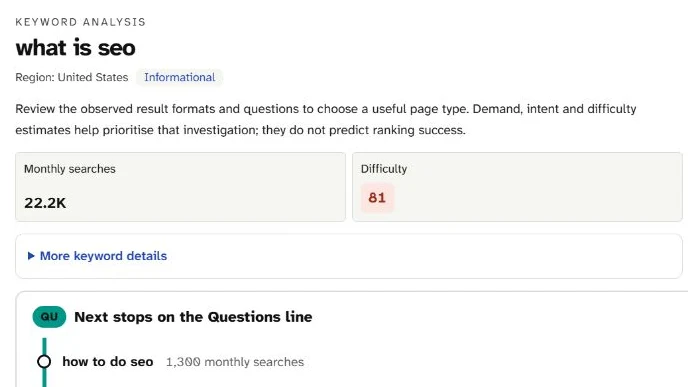
The panel shows 22.2K monthly searches in the United States, difficulty 81 and the Informational tag: many people ask this, and they want an explanation rather than a product. The loaded set's Questions line also shows how to do seo at 1,300 a month, a natural next question for a beginner.
Read the three labels this way:
Monthly searches (22.2K) is SearchCub's estimate of an average month in the United States, about 22,200 searches. It is a stored estimate, last updated on 16 September 2026.
Difficulty (81 out of 100) estimates how hard the search is to rank for. The panel adds its own caution: these estimates "do not predict ranking success."
Informational is the intent tag: people want to learn something, not buy something.
The panel's SERP overview shows what Google returned. Checked for United States desktop results at 06:57 UTC on 7 October 2026, it listed nine organic results. Six were titled as definitions or guides, with Google's own SEO Starter Guide in first place. The other three were a Reddit thread asking for a simple explanation, a YouTube tutorial and the Wikipedia entry. The page also showed an AI overview, a People also ask box and related searches. That mix suggests what searchers expect: a plain definition first, then how it works.
For a guide to the different parts of a results page, see what is a SERP.
People also asked four questions, and this post answers three of them:
Question people also asked | Where this post answers it |
|---|---|
What is SEO and how does it work? | The opening definition and how search works |
How to do SEO for beginners? | The four kinds of SEO work below |
Can you do SEO by yourself? | The next paragraph |
Is SEO a good career? | Not covered: it is a career question, not how SEO works |
Can you do SEO by yourself? For a blog or small site, the basics in this post are work an owner can do: choosing searches, writing pages that answer them and checking the page basics. Google's own guide treats outside help as an option, not a requirement: "Short on time or not feeling adventurous? You might consider hiring a professional." (Google SEO Starter Guide).
The example: two sites, two very different results
Two real sites make the idea concrete. Both were looked up in Domain overview for the United States on 4 October 2026.
productiveblogging.com, a blog about blogging.
searchcub.com, the site of this product.
Every number below is a SearchCub estimate from third-party United States search data, rather than either site's analytics or Search Console data; zero ranking keywords means none were found in that data, not that a site ranks for nothing. Here is the blog:
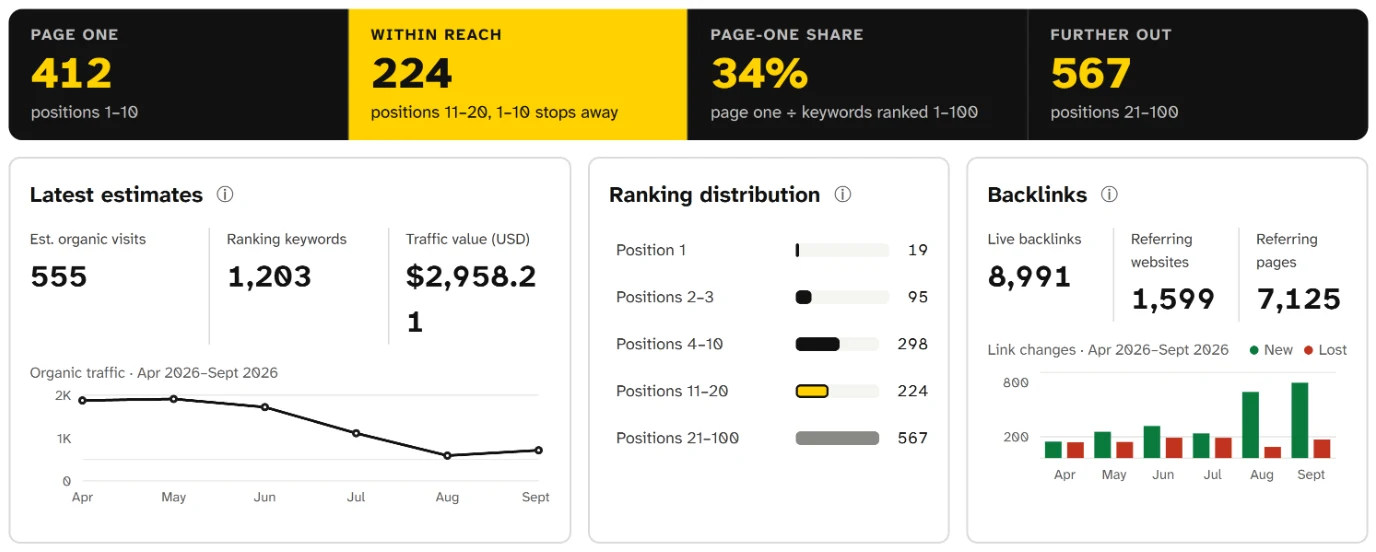
Read the black band first: 412 searches show this blog on page one and 224 more sit just behind it, within reach. Together with 567 further out they add up to 1,203 ranking keywords, about 555 estimated monthly visits and 8,991 links from 1,599 websites.
Four terms on that screen come up in every SEO conversation, so here is what each one means:
Ranking keywords are the searches a site appears for anywhere in the top 100 results. This blog has 1,203.
Page one means positions 1 to 10, the first page of results. 412 of the blog's searches land there.
Within reach means positions 11 to 20, just off page one. These 224 searches are close to the first page; SearchCub's own update suggestions treat rankings like these as "easier to improve".
Est. organic visits estimates how many visits a month the site gets from unpaid search results. Here it is 555, for the United States.
Now searchcub.com. The same tool showed it with Est. organic visits 0 and Ranking keywords 0, and 11 live backlinks from 11 websites.
What SEO work looks like, using the example
SEO is usually split into four kinds of work. Each one shows up somewhere on the screens above.
1. Choose searches people actually make
Keyword research means finding the words your readers type and checking how many people search them. The blog shows what that can look like. It ranks first for blogging tools (320 searches a month, difficulty 12) and first for blog content calendar (170 a month). It is third for how to make money blogging, a much bigger search at 2,400 a month. Difficulty is a 0 to 100 estimate of how hard a search is to rank for; lower is easier.
For a closer look at the estimate and its limits, read keyword difficulty.
Each of those rankings lands on a page about that one subject: /best-blogging-tools/ for the tools search and /blog-content-plan/ for the calendar search. If you want to choose searches like that for your own blog, keyword research for bloggers walks through choosing your next post.
2. Make each page answer its search clearly
On-page SEO is the page itself: a title that says what the page is about, a main heading, a short description, readable text that answers the question, and images that are described. SearchCub's Page checks read nine of these basics from a page's HTML. Here is the home page of searchcub.com:
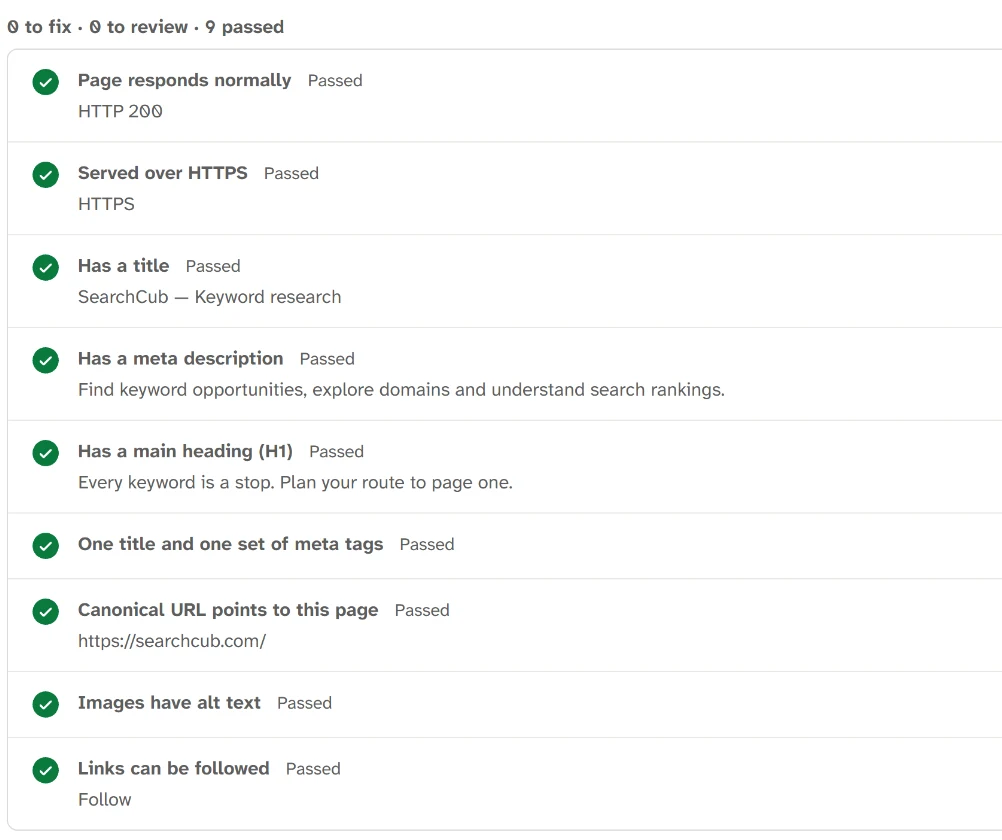
All nine checks pass: the page responds, uses HTTPS, has a title, a description and one main heading, and its canonical URL points to itself.
Technical basics are necessary, and they are quick to fix when one fails. Treat them as the floor, not the goal. For the details of titles and descriptions, read how to write SEO titles and meta descriptions.
3. Earn links from other sites
Off-page SEO is mostly about links from other websites, called backlinks. Google says some of its systems look at how pages link to each other to work out what pages are about and which might be most helpful for a search (Google's ranking systems guide). The blog has 8,991 live backlinks from 1,599 websites; searchcub.com has 11 from 11. Passing Page checks is not a ranking result, and backlink counts alone do not explain why a site ranks. Backlinks vs referring domains explains how to read those two counts.
To read the link-based scores SEO tools give sites, see what is domain authority.
4. Keep checking and updating
SEO is not finished when a post is published. The traffic chart on the Domain overview screenshot runs from April to September 2026: the blog's estimated visits sit around 2K in April and May, then fall to their lowest point in August. Rankings move as competitors publish, as searches change and as Google updates its systems. Deciding which pages to review, and in what order, is a separate task covered in how to update an existing blog post.
What SEO is not
Three misunderstandings cost beginners the most time.
It is not something you can buy from Google. Google states that it "doesn't accept payment to crawl a site more frequently, or rank it higher" (How Google Search works). Paid ads are a separate product with a separate label.
It has no guaranteed result. Google's own guide says: "There are no secrets here that'll automatically rank your site first in Google." Any service promising a ranking position is promising something nobody controls.
It is not fast. Google says some changes "might take effect in a few hours, others could take several months", and suggests waiting a few weeks before judging whether a change helped (Google SEO Starter Guide).
Two related terms appear alongside SEO. SEM (search engine marketing) usually means paid search ads. AI search optimization is about appearing in AI-generated answers. For its own AI features, Google says SEO best practices still apply, because those features are rooted in its core Search ranking and quality systems (Google: optimizing for generative AI features). SEO vs AI search optimization covers what changes and what stays the same.
Practice reading the labels on your own site
You can practice the same reading on your own site in a few minutes. The aim is to recognize each label, not to judge the result.
Open Domain overview. Choose Domain, type your domain without
https://, choose the Region where most of your readers live, and click Search.Find the black band: Page one, Within reach, Page-one share and Further out. Page-one share is the share of the ranking searches that are on page one.
Find Latest estimates: estimated organic visits, ranking keywords and traffic value, with the date and region they describe.
Find Ranking distribution, which shows whether the rankings sit near the top or mostly far down.
Find the Backlinks card, which counts the links and linking websites the data found.
For each label, say in one sentence what it counts, the way the example did. For productiveblogging.com on 4 October 2026, Ranking keywords was 1,203, the searches the blog appeared for anywhere in the top 100, and Page one was 412, the ones in positions 1 to 10.
What to do with those numbers belongs to other guides. Choosing which existing pages to work on first is covered in how to update an existing blog post, and the searches one page ranks for in find the keywords a page ranks for.
Your next step
Open Domain overview for your own site and find each label from this post: ranking keywords, page one, within reach, estimated organic visits and backlinks. When you want to act on what you see, go to the guide for the job: how to update an existing blog post for pages that already rank, keyword research for bloggers for choosing searches to write for, and why a page is not indexed if a page does not show in Google at all. If you are still choosing a name for a new blog, does your domain name affect SEO shows what a name can and cannot do for you.