- Backlinks
- Tutorial
What Is Domain Authority? How to Read Authority Scores
Editorial responsibility: SearchCub
Domain authority is a score out of 100 that an SEO tool calculates, mainly from the links it has found pointing to a website. It is that tool's estimate of how strong a site's links are compared with other sites, and it is not a number from Google. By the end of this post you will know what SearchCub's three authority scores (Domain rank, Page rank and Link strength) measure, and how to read them next to the pages that actually rank before you commit to a keyword. You will do it in SearchCub's Keyword overview.
One idea, several tools
"Domain Authority" is the name Moz gives its own score. Moz describes it as "a search engine ranking score developed by Moz" that predicts how likely a site is to rank, and states that it "is not a Google ranking factor and has no effect on the SERPs" (Moz: Domain Authority). Other tools publish their own versions:
Moz. Its score: Domain Authority. Scale: 1 to 100. What its maker says the score is: a prediction of how likely a site is to rank, calculated mainly from backlink data in Moz's own link index.
Ahrefs. Its score: Domain Rating. Scale: 100-point scale. What its maker says the score is: "the strength of a website's backlink profile compared to the others in our database" (Ahrefs help).
Semrush. Its score: Authority Score. Scale: 1 to 100. What its maker says the score is: eight weighted factors: link power, organic traffic and six checks for signs of manipulated links (Semrush knowledge base).
SearchCub. Its score: Domain rank. Scale: 0 to 100. What its maker says the score is: "Relative authority of the result's overall domain, based on its links".
Each company calculates its score from its own data with its own method, so a 44 in one tool is not a 44 in another. Compare sites with one tool's numbers, never a mix.
What Google says
Google's documentation explains ranking in its own terms. Three points from it matter here:
Google ranks pages. "Our ranking systems are designed to work on the page level", although site-wide signals also contribute. Google adds that good site-wide signals do not mean everything on a site "will always rank highly" (Google's ranking systems guide).
Links are one signal among many. Google uses link analysis, including PageRank, to understand pages, but its starter guide says: "We have many ranking signals, and PageRank is just one of those" (Google SEO Starter Guide).
Tools don't see Google's data. "Third-party tools don't have access to our internal ranking data", and Google warns that some people misread tool data "as somehow being from Google" (Google on third-party SEO tools).
So treat any authority score as an outside estimate, built mainly from one kind of signal. SearchCub's Page rank column shares a name with Google's PageRank but is not it: it is SearchCub's 0–100 score for one page, read from third-party link data.
SearchCub's three authority scores
The three scores this post uses appear in two places. Their definitions, quoted from the product:
Domain rank, in the SERP overview's table of top search results: "Relative authority of the result's overall domain, based on its links." It runs from 0 to 100.
Page rank, in the same table: "Relative authority of this specific page, based on its links." Same 0–100 scale.
Link strength (0–100), on a domain's Backlinks tab: "a 0–100 score from the links pointing here; higher is stronger."
In the results table, Domain rank and Page rank are colored: 0–39 green (lower), 40–69 amber (moderate) and 70–100 red (high). SearchCub's own note on the colors is blunt: "These are display bands, not validated difficulty thresholds." A missing score shows as a dash, which means unavailable, not zero. The same table's Ref. domains and Backlinks columns count the links to each page; backlinks vs referring domains explains those two counts.
Keyword overview can also show a Top 10 link benchmarks panel with Page strength and Domain strength averages for the top ten pages. Those use a different scale, 0–1000, so keep them apart from the 0–100 columns.
The example: a blog with a score of 44
The example is productiveblogging.com, a blog about blogging, looked up in SearchCub for the United States. Its beginner's guide to keyword research ranks fifth for keyword research for bloggers, so SearchCub's results table for that search shows the blog's scores next to the scores of the pages around it. Here are the first five results for United States desktop searches, retrieved on 4 October 2026:
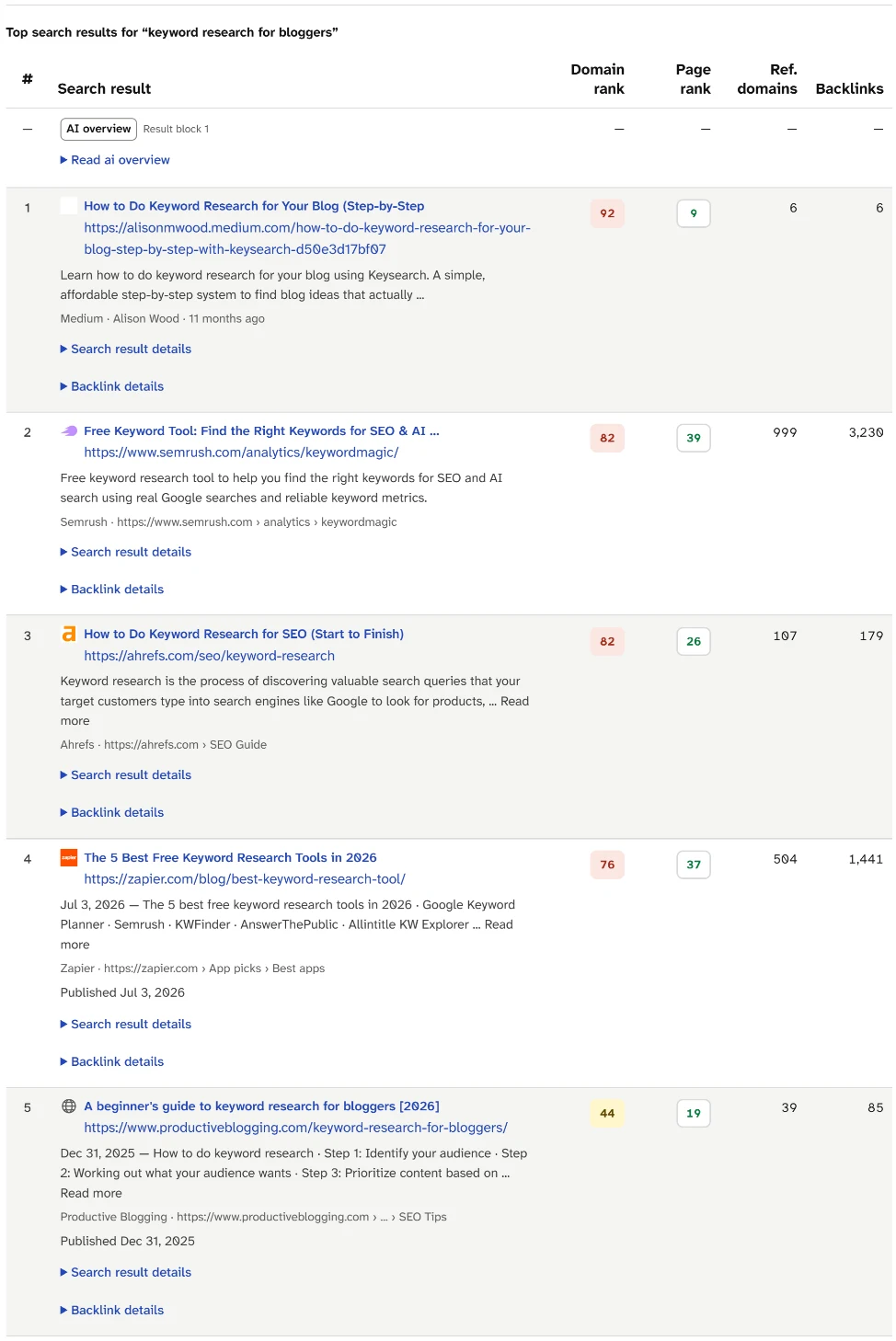
Compare the first and fifth rows. The first result is a page on Medium, a domain ranked 92, but the page itself has a Page rank of 9 and 6 referring domains. Fifth is productiveblogging.com's guide: Domain rank 44, Page rank 19 and 39 referring domains.
The blog's own result in Backlinks, saved on 3 October 2026, gives the whole site the same number as its Domain rank in that table, a Link strength of 44:
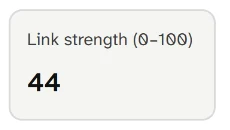
Link strength is one number for the whole site, here 44 out of 100. Find this number for your own site first, because every results page below is read against it.
So the question for each keyword is simple: how does a 44 compare with page one?
Step 1: Open the results page for a keyword
Open Keyword overview, choose Keyword, type the keyword you are considering, choose your readers' Region and click Search.
Scroll to SERP overview and find Top search results for your keyword.
Each organic result has its position in the # column, then Domain rank, Page rank, Ref. domains and Backlinks. Click a column heading to read SearchCub's definition of it.
Step 2: Read each score against its position
Go back to the table for keyword research for bloggers. Its first row shows why a domain score can mislead: 92 describes Medium as a whole, not one writer's page on it. The four results below the blog's guide, outside the screenshot, make a second point:
Position 5: productiveblogging.com guide. Domain rank: 44. Page rank: 19. Ref. domains: 39.
Position 6: Mangools, KWFinder tool page. Domain rank: 57. Page rank: 52. Ref. domains: 6,112.
Position 7: WordStream, free keyword tool page. Domain rank: 67. Page rank: 60. Ref. domains: 2,154.
Position 8: Moz, free keyword research tool page. Domain rank: 75. Page rank: 49. Ref. domains: 5,656.
Position 9: ryrob.com, free keyword research tool page. Domain rank: 57. Page rank: 31. Ref. domains: 321.
All four have a higher Domain rank and a higher Page rank than the blog's guide, and all four rank below it. So SearchCub's link data gives the guide no edge over them. Google says its systems look at "many factors and signals" to present "the most relevant, useful results" (Google's ranking systems guide), and a link score measures only one of them.
Step 3: Hold your score up to page one
Now hold the same 44 up to page one for three more searches, set beside keyword research for bloggers. All four results pages were checked in SearchCub's SERP overview for United States desktop results, and the monthly searches and difficulty are SearchCub estimates for the United States.
what is seo(7 October 2026). Monthly searches: 22,200. Difficulty: 81. Domain rank on page one: 64 to 100. Page rank on page one: 4 to 71. Ref. domains per page: 2 to 17,099. Domain ranks of 44 or lower: none.keyword research for bloggers(4 October 2026). Monthly searches: 320. Difficulty: 54. Domain rank on page one: 44 to 92. Page rank on page one: 9 to 60. Ref. domains per page: 6 to 6,112. Domain ranks of 44 or lower: one, the blog's own guide.seo vs ppc(7 October 2026). Monthly searches: 390. Difficulty: 15. Domain rank on page one: 29 to 99. Page rank on page one: 0 on eight results, 4 on one. Ref. domains per page: 0 to 4. Domain ranks of 44 or lower: one.does domain name affect seo(7 October 2026). Monthly searches: 30. Difficulty: 8. Domain rank on page one: 15 to 99. Page rank on page one: 0 on eight results, 5 on one. Ref. domains per page: 0 on seven results, 2 and 8 on the others. Domain ranks of 44 or lower: five.
Read the searches from the top:
what is seois a different league for a 44. Every domain on page one scores 64 or more, 20 points above the blog, and seven of the nine pages have hundreds or thousands of referring domains of their own. First is Google's own SEO Starter Guide, with Domain rank 100, Page rank 71 and 16,605 referring domains.keyword research for bloggersis mixed, and the blog already holds fifth place with its 44.seo vs ppchas large platforms on page one, such as Reddit at 95 and LinkedIn at 99, but their pages score 0, and no page in the nine has more than four referring domains.does domain name affect seois held by pages with almost no links found: eight of the nine have a Page rank of 0. The first two results come from domains scored 40, and the fourth from a domain scored 15.
Step 4: Decide whether the keyword is worth a post now
Use what page one shows, not the color of the badges:
Domain and Page ranks well above yours, and pages with hundreds or thousands of referring domains. What it suggests: the ranking pages themselves have strong links. Decide: a long shot for now. Choose a narrower search, or cover the topic as a section of a broader post.
High Domain rank but a Page rank near 0, often on forums, Q&A sites or social platforms. What it suggests: the score belongs to the platform, not the page. Decide: judge the page itself. A clear, complete answer can compete with it.
Mostly Page rank 0 and few or no referring domains, whatever the Domain rank. What it suggests: in SearchCub's link data, the ranking pages themselves have few or no links. Decide: realistic. Write the best answer, then check difficulty and the types of pages ranking.
A page from a domain scored at or below yours already ranks. What it suggests: sites like yours can rank for this search. Decide: realistic, if your page answers the search better.
Then read Difficulty beside the scores. SearchCub's own note on these columns says "Authority alone does not determine keyword difficulty", and search volume vs keyword difficulty shows how to weigh difficulty against demand.
What authority scores leave out
Three limits change how you use them. Each score is one tool's estimate from its own link data, so another tool can give the same site a different number. None of them measures whether a page answers the search, how current it is or how well it is written. And the green, amber and red bands are display bands: a red 95 on page one is not a wall, and a green score is not an opening.
Your next step
Open Keyword overview, search a keyword you are weighing, and copy the Domain rank and Page rank of each page-one result next to your own Link strength from Backlinks. If most of page one has a Page rank near 0, the search deserves a closer look: SearchCub SERP analysis shows how to turn those results into a page brief. For where links fit in SEO as a whole, start with what is SEO.