- Content Planning
- Tutorial
Evergreen Content: How to Test a Topic Before You Write
Editorial responsibility: SearchCub
Evergreen content is a post that keeps finding readers for years because people search for its topic in every month and its answer stays true, so call a topic evergreen only after its 12-month search trend has held steady. By the end of this post you will have a quick test for that, run in SearchCub's Keyword overview and worked on two real searches: one whose demand barely moves all year, and one that sounds evergreen but more than doubles between winter and June. Then you will see a real evergreen post that slipped 35 places, and what keeps a page like that earning its place.
What makes a topic evergreen
The name comes from evergreen trees, which keep their leaves through every season. The opposite is content tied to a moment: news, a product launch, a holiday or this year's trend. Those posts can bring a burst of visits and then fade, while an evergreen post keeps meeting new readers long after you publish it.
A topic has to pass two checks:
Check | The question | Where to look |
|---|---|---|
Demand | Do people search for it in every month, at a similar level? | The 12-month search trend for the topic's main search |
Answer | Will the answer still be right next year without a rewrite? | Your own answer: the prices, versions, rules and dates in it |
A topic needs both. A guide to "this year's best cold brew makers" fails the answer check whatever its searches do, because the answer changes with every new model. This post is about the demand check, the half you cannot judge from your own knowledge of the subject.
The example: a topic that sounds evergreen
The worked example is cold brew coffee ratio, looked up in Keyword overview for the United States on 4 October 2026. It passes the answer check easily: a ratio of coffee to water does not go out of date. Its demand is the open question.
For comparison, the post also uses seo meaning, a row from a keyword set looked up in SearchCub's Keyword ideas for the United States on 7 October 2026. Both searches ask for an answer that lasts, so any difference between them is in the demand. The monthly figures for both run from September 2025 to August 2026.
Step 1: Look up the topic's main search
Open Keyword overview, choose Keyword, type the search your post answers, choose your readers' Region and click Search. The Keyword analysis panel opens with two cards:
Monthly searches: 9,900 for the example. SearchCub defines it as an estimated average month in the region you chose, and adds: "This is not the current month's count."
Difficulty: 2, on a scale from 0 to 100.
Click More keyword details. Two of the cards that open matter for the demand check. Past 12 months searches reads 112.1K for the example. Search volume change reads 0% over one month (1m), −18% over three months (3m) and −18% over twelve (12m).
So far that reads like a large audience that shrank a little. The chart under those cards shows how the searches are spread across the year, and that changes the verdict.
Step 2: Read the shape of the year
Under the cards sits a chart headed Search trend (monthly searches), with one point for each of the last twelve months. Hover over or tap a point to see that month's estimate. Until you do, the label under the chart shows the newest month: August 2026, at 12,100.
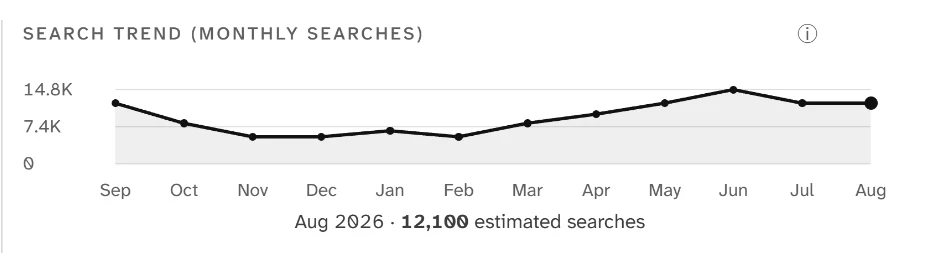
The top gridline is the busiest month of the year, 14.8K in June, and the middle line is exactly half of it, 7.4K. From November to February the line stays under the middle line, so each of those months drew less than half of June's searches.
That is year-round demand with a strong season. The line never falls near zero, but it more than doubles between winter and June. A ratio post still deserves a permanent page, because people look for it in every month. The season decides when you work on it: have the page ready, or freshly updated, before the climb that starts after February. Seasonal keywords covers that timing in detail.
Step 3: Compare it with a steady line
A keyword set gives you a faster read across many searches at once. In Keyword ideas, the Trend column draws each search's last twelve months as a small line; the rows below come from the set that holds seo meaning. SearchCub starts each line's scale at zero, so a small wobble in a large number stays small, and a flat line means steady demand.
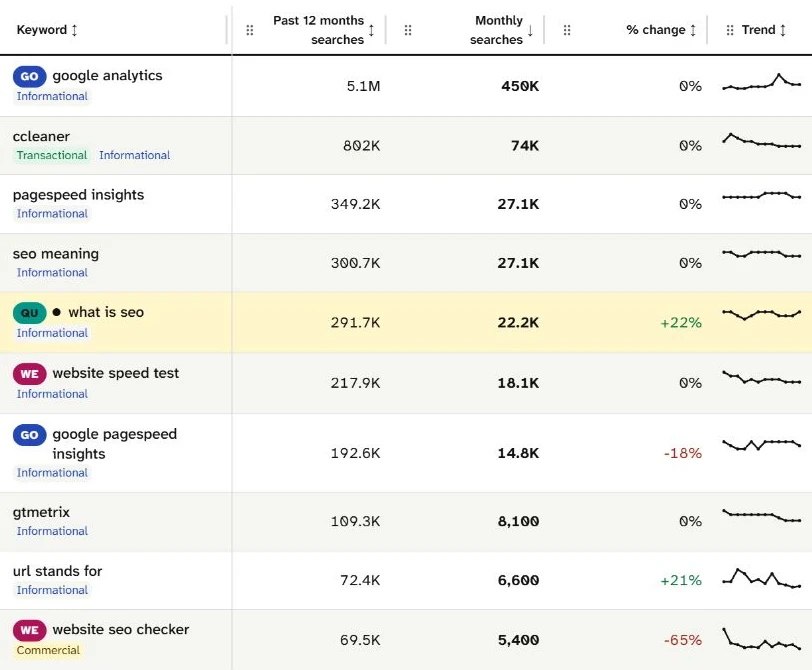
Read the Trend column next to Monthly searches. seo meaning, with 300.7K searches over 12 months, draws an almost flat line; url stands for jumps up and down, and website seo checker starts high and slides. Of those three, only seo meaning has the flat line of evergreen demand.
The % change column beside it compares the latest month with the month before, so it tells you nothing about the rest of the year. Read the line instead.
seo meaning shows what steady looks like in numbers. In SearchCub's data, every one of its twelve months sits at one of two values:
Searches in the month | Months, September 2025 to August 2026 |
|---|---|
27,100 | September, October, January, February, March, April, May |
22,200 | November, December, June, July, August |
Even its quietest months bring 82% of the searches of its busiest. That is the shape to look for before you call a topic evergreen.
The quick test: quietest month against busiest month
Divide the quietest month by the busiest month:
seo meaning: 22,200 ÷ 27,100 is about 82%. Demand barely moves.cold brew coffee ratio: four months, November to February, sit under half of June.
The closer the answer is to 100%, the steadier the demand. Use it with the shape of the line to sort a topic into one of four groups:
What the twelve months show | What it means | What to do |
|---|---|---|
Every month close to the busiest, like | Evergreen demand | Write one thorough page and review it when something changes |
Searches in every month, but quiet months under half the peak, like | Evergreen answer, seasonal demand | Keep one permanent page and update it before the busy months |
Near zero most of the year, then one spike | Seasonal or event-driven | Plan it on a calendar, as a seasonal post |
A line that keeps sliding or climbing, like | A trend, not yet evergreen | Look again in a few months before you write a long post |
One label can mislead here. SearchCub counts a search as Rising when its searches are up 10% or more on a year earlier. A rising search can be the start of a short-lived trend, so read its line before you build a long post around it.
Why the 12-month change is not enough
Both searches carry the same 12-month change: −18%. For cold brew coffee ratio it is on the More keyword details card. For seo meaning it is in SearchCub's data for that row, retrieved on 7 October 2026. Yet one search barely moved all year, and the other more than doubled between winter and June. A single percentage cannot show the shape of a year, so read the line before you trust the figure.
Evergreen topics still lose rankings
Choosing an evergreen topic does not keep a page in place. On 4 October 2026, SearchCub's result for the blog productiveblogging.com, with one competitor added for comparison, listed the blog's own post about evergreen content first under Pages to update:
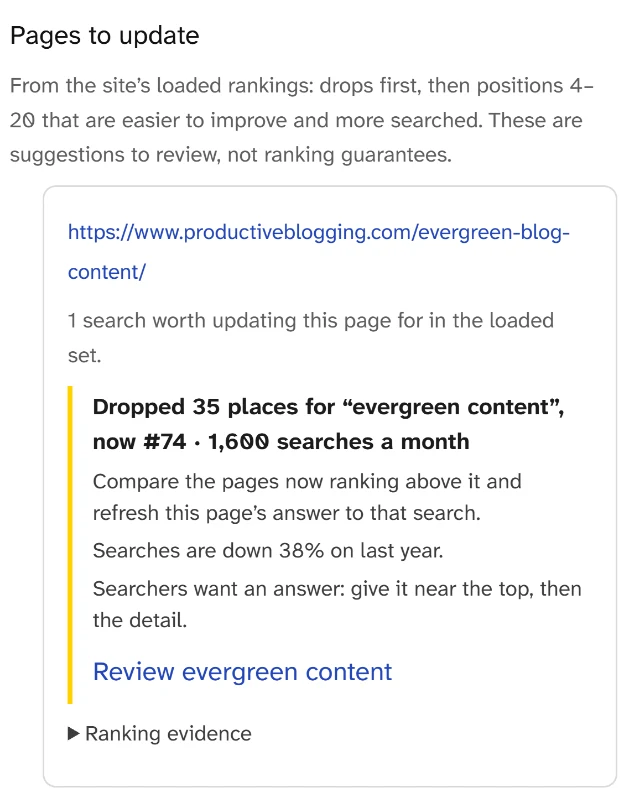
Read the bold line first: the page dropped 35 places for evergreen content and now sits at #74, on a search made 1,600 times a month. The lines under it say searches are down 38% on last year and suggest comparing the pages now ranking above it.
Two lessons sit on that card. First, the page fell from #39 to #74 for its own topic, a topic that has not gone out of date. Second, demand for an evergreen search moves too: evergreen content itself was down 38% on the year before. The card does not say why the page dropped, so its advice is a next step, not a diagnosis: "Compare the pages now ranking above it and refresh this page's answer to that search." These positions and searches are SearchCub estimates for the United States, not the blog's own analytics.
Keep an evergreen page earning its place
An evergreen page needs a review when something changes, not a rewrite on a timetable. Watch for four triggers:
The page slips. When you review your posts, run your site through Domain overview and read Pages to update under Suggested next actions. SearchCub does not rerun this for you, so the review starts when you run it.
The demand changes shape. Look the main search up again in Keyword overview. If a steady line has turned into a slide, put new effort into steadier topics.
The answer drifts. Prices, tool names, steps, screenshots and links age even when the topic does not. Fix them where they are.
A season is coming. If the line has a busy season, update the page before the climb, not during the peak.
When a trigger fires, work through the page in this order:
Compare it with the pages ranking above it. Open the SERP overview for the search in Keyword overview and note what those pages answer that yours does not.
Put the answer near the top. The card's own advice is "Searchers want an answer: give it near the top, then the detail."
Keep the URL, and change the visible date only when the content really changed. Google's guidance on helpful content asks: "Are you changing the date of pages to make them seem fresh when the content has not substantially changed?" (Google: creating helpful content).
How to update an existing blog post helps you choose between a refresh and a rewrite once you know what changed.
Limits worth knowing
Twelve months is one cycle, so a single year of data cannot confirm that a season will repeat; compare the same months again when you next look. Every figure here is a SearchCub estimate from third-party search data for one country, not Search Console data for any site. And no keyword tool knows whether your answer will still be right next year: that half of the test is yours.
Your next step
Pick the post on your blog you think of as evergreen. Look up its main search in Keyword overview, click More keyword details and read the Search trend (monthly searches) chart. Divide the quietest month by the busiest. If the line holds steady, keep the page and review it when one of the triggers above fires. If it has a season, schedule the update before the climb; if it slides, put your next post elsewhere. To choose that next topic, start with keyword research for bloggers.