- Content Planning
- Checklist
Refresh or Rewrite? How to Update an Existing Blog Post
Editorial responsibility: SearchCub
Refresh a post when its answer still works but some details are stale; rewrite it when the reader's task, main answer or structure needs to change. Start with the problem you need to solve, then preserve the parts that already help readers.
An old publication date alone is a weak reason to overhaul a page. Outdated instructions, missing evidence and a title that promises the wrong answer are much stronger reasons.
1. Identify what needs fixing
Read the post as someone trying to complete its task. Follow the instructions, open its links and check any claims that could have changed. Write down the specific failure: an obsolete product, an unexplained step, a broken download or a conclusion the evidence no longer supports.
If traffic prompted the review, inspect the affected page and queries in Search Console before editing. A decline can reflect seasonal demand, technical trouble or changes in results. Google recommends diagnosing the traffic drop and avoiding radical changes to a page that is already performing well after a small fluctuation.
Separate content problems from other work. Rewriting paragraphs will not repair a page that search engines cannot access.
2. Choose the size of the update
What you find | Appropriate response |
|---|---|
The answer is useful, but links, screenshots or product details are outdated | Refresh those details and verify the steps. |
Readers need a missing explanation or example | Expand or replace the relevant section. |
The title promises a comparison, but the article barely compares anything | Rewrite the structure around a real decision. |
The recommended approach no longer works | Recheck the evidence and rewrite the answer. |
The page is accurate and serves its reader well | Keep it; record when to review it again. |
A refresh can still be substantial. Replacing an unreliable test or demonstrating a confusing step may improve the post more than rewriting every sentence.
When does a new post make sense?
A new phrase alone does not require a new URL. Compare the reader's outcome with the current post and private drafts. If the same task belongs on the existing page, refresh or rewrite that owner. If a genuinely different task needs different evidence and would confuse the current answer, consider a separate post.
For a hypothetical home-office blog, better “cable management without drilling” instructions might improve an existing installation guide. A cable-tray comparison for standing desks asks readers to choose equipment; it could justify its own page if you can supply real comparison criteria and evidence. Neither phrase has measured demand in this example.
Record refresh, rewrite, new candidate or hold, the owning URL and a one-sentence reason before assigning a writer. Confirm that a proposed new post does more than reword the introduction of the old one.
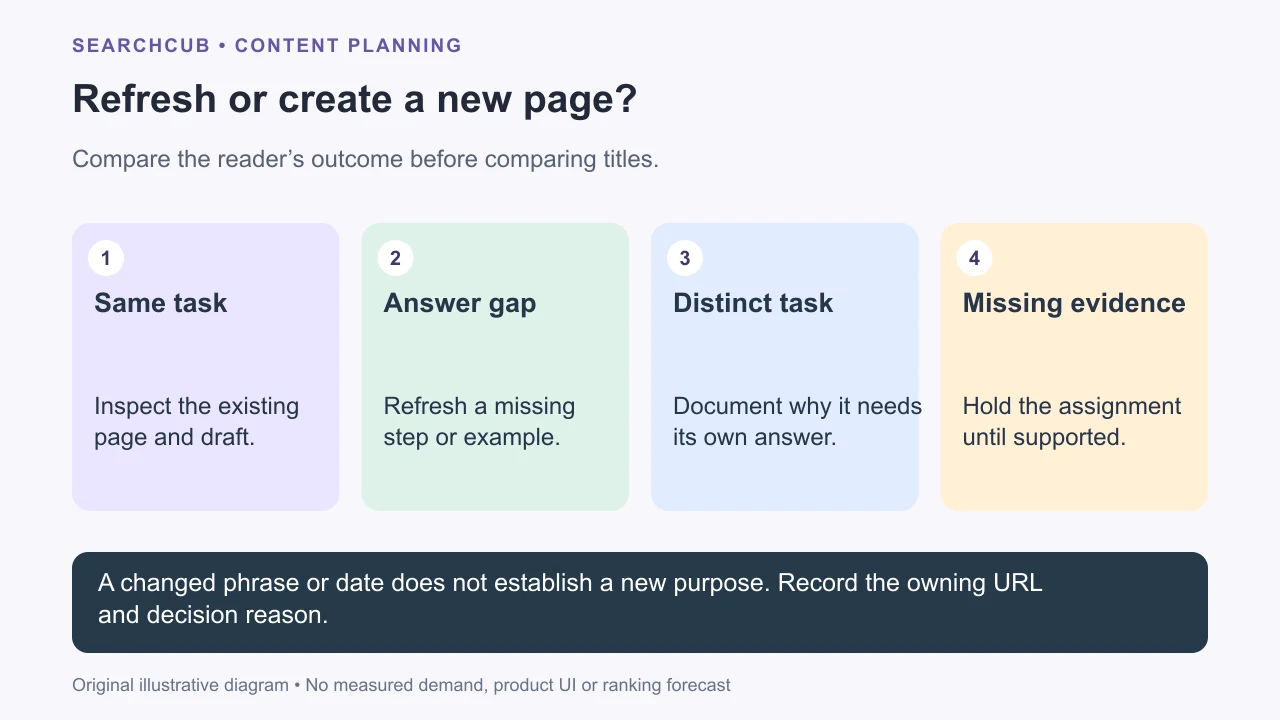
This is an editorial decision flow, not an automatic SEO diagnosis.
3. Check whether the page still answers the query
In SearchCub, choose Keyword, enter the post's main topic, select your audience's Region, and submit the request. Review any account and usage prompts first. Open a relevant keyword and inspect SERP overview. Read returned pages to check the task and format they serve.
Compare that task with your article. Does the reader need instructions, a comparison, a short definition or a working tool? Our search-intent guide explains this decision without turning every result into a template to copy.
For a keyword-research tutorial, changed button labels and screenshots might call for a refresh. If the article promises to help readers choose a keyword but spends most of its space defining SEO, the structure needs a rewrite. This is an illustrative editorial example, not a measured performance diagnosis.
4. Make a short revision brief
Before editing, record:
Keep: useful explanations, original evidence and working examples.
Change: the specific answer, section or instruction that fails.
Add: evidence or detail needed to make the answer usable.
Remove: repetition, unsupported claims and material outside the reader's task.
Verify: the steps, figures, links and screenshots affected by the changes.
For the tutorial example, the brief might be: keep the metric definitions, open with the selection rule, add a worked comparison, replace old screenshots and remove the long SEO introduction.
Draft the new first sentence before expanding the body. It should give the answer the title promises. Google's helpful-content guidance emphasizes useful, original value and explicitly challenges date changes made merely to appear fresh.
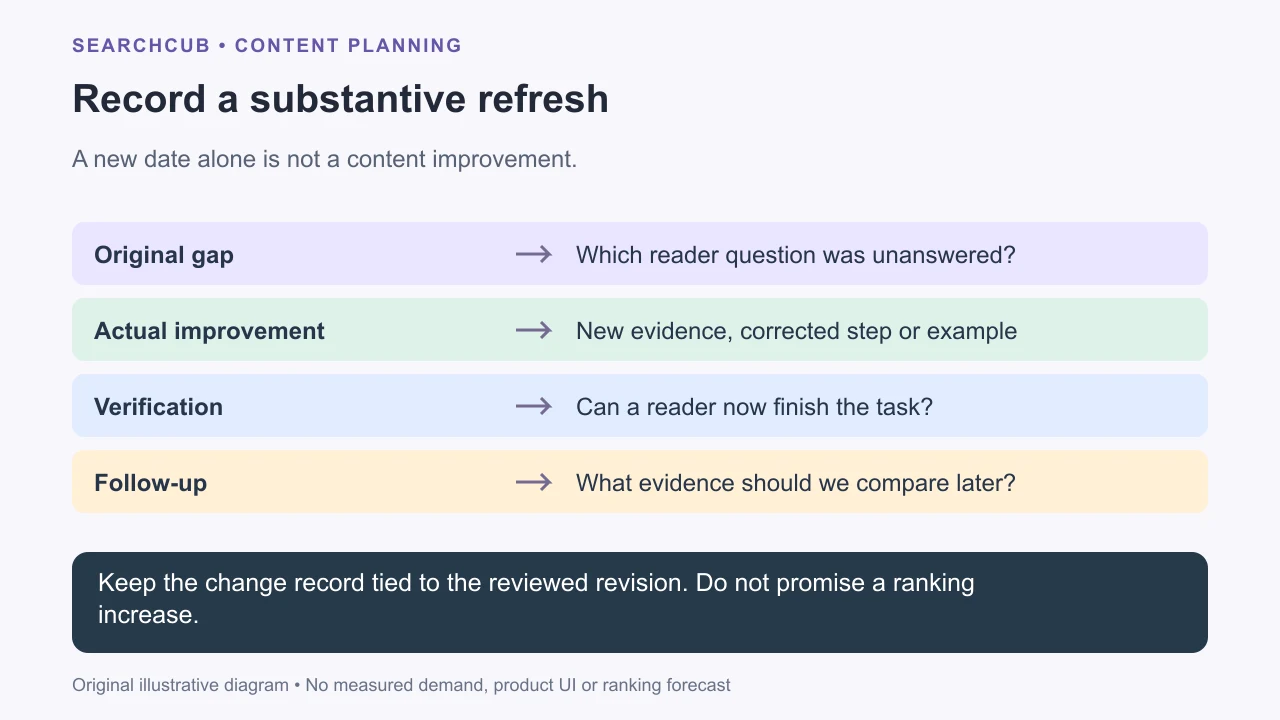
Useful maintenance has a stated change and verification evidence.
5. Publish and review the actual change
For an update serving the same purpose, keep the existing URL unless there is a separate reason to move it. Check the finished page on desktop and mobile. Make sure tables, images, downloads and links still work.
If you display an updated date, make it reflect the work actually published. Keep the visible date and any matching structured date consistent, following Google's byline-date guidance. A year in the title is a claim the contents need to support.
Record the publication date, material changes and what improvement you expect. Compare later performance using consistent page, query, country and time-period filters. Also check whether readers can complete the intended task. A change in clicks alone cannot prove which edit caused it.
Finish when the identified problem is solved and the revised instructions work. Save the next review trigger, such as a product release, a changed recommendation or new evidence, instead of rewriting again on an arbitrary schedule.