- Keyword Research
- Tutorial
Keyword Research for Bloggers: Choose Your Next Post
Editorial responsibility: SearchCub
Choose your next blog post by matching a reader problem to an answer you can produce, then checking demand, search results and existing coverage. These six steps turn that research into one topic and a short writing brief.
Follow these six steps in SearchCub. The worked example and screenshots use U.S. results inspected on 13 September 2026. These are historical observations, not current metrics or a current ranking check; your results and interface may differ. Download the shortlist worksheet to keep your decisions.
1. Search a topic your reader needs help with
First complete this sentence: “This post helps [reader] do [task] under [constraint].” For a hypothetical home-office blog, “help renters tidy desk cables without drilling” is more usable than “desk setup.” It identifies an answer you could demonstrate rather than a broad phrase to repeat.
Open SearchCub, choose Keyword research, enter your topic, select your audience's Region, and click Search keywords.
Start with a specific task. For an SEO blog, keyword research is a starting point; keyword research for bloggers names a clearer audience. For a cooking blog, you might start with a meal or technique you can demonstrate.
When adapting an existing answer for another country, use the content localization worksheet to separate shared facts, local wording and details that still need checking.
Keep the region unchanged while comparing candidates. Then pick up to three relevant phrases from the returned Keyword set. Ignore attractive numbers beside topics you cannot usefully cover.
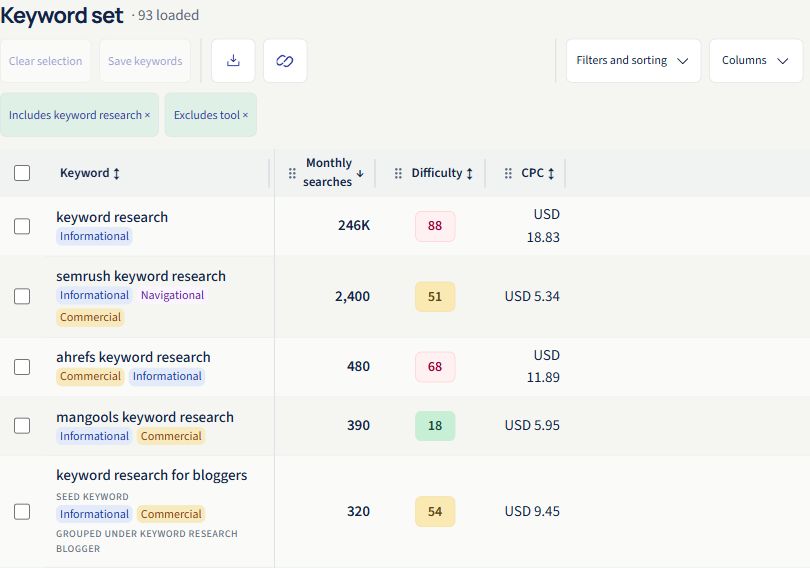
Read the keyword alongside its numbers. A popular topic still needs to fit your reader.
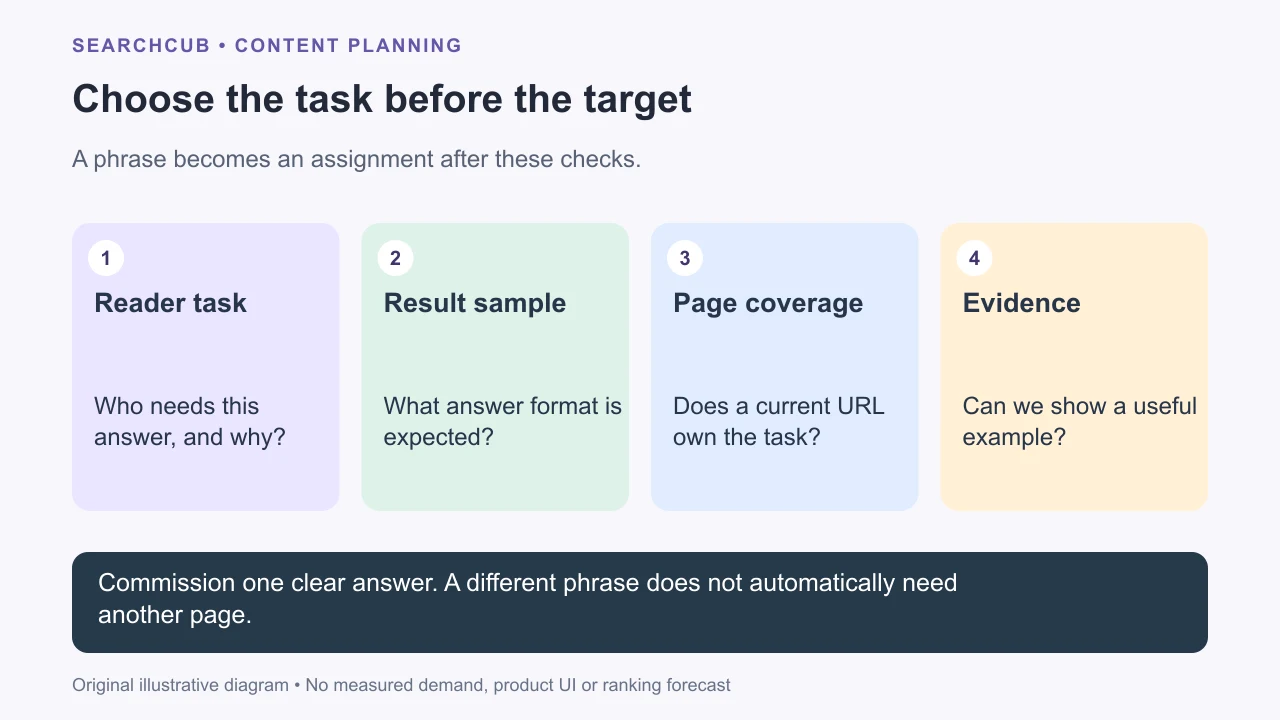
Illustrative workflow: each check answers a different commissioning question.
2. Check monthly search volume
Search volume estimates how often a keyword is searched in a month. It gives you a clue about demand in your chosen region, not the number of visitors your post will receive.
Look at Monthly searches in the table. In our U.S. results, keyword research for bloggers showed 320. That is a smaller audience than a broad SEO topic, but a clearer match for a tutorial helping bloggers choose a post.
Do not discard it just because it falls below 5,000 searches. A useful, focused article can be worth writing for a smaller audience. Compare relevance first, then demand.
Click the keyword to inspect its monthly history too. The blogger example's latest displayed month, July 2026, showed 140 searches. That prompts a closer look at demand over time. Monthly averages can hide changes and seasonality; Google's historical-metrics guidance explains this limitation.
3. Compare keyword difficulty
Keyword difficulty estimates how hard it may be to rank in organic search. SearchCub displays it on a 0–100 scale; lower values indicate lower estimated difficulty.
Look at Difficulty beside your shortlisted phrases. Prefer a lower-difficulty option when it serves the same reader and you can produce an equally useful page. A high score needs a stronger reason to pursue it, such as substantial demand or valuable firsthand experience.
Our blogger phrase scored 54. Keep it for further review, rather than treating it as an easy win. A score is not your personal probability of ranking.
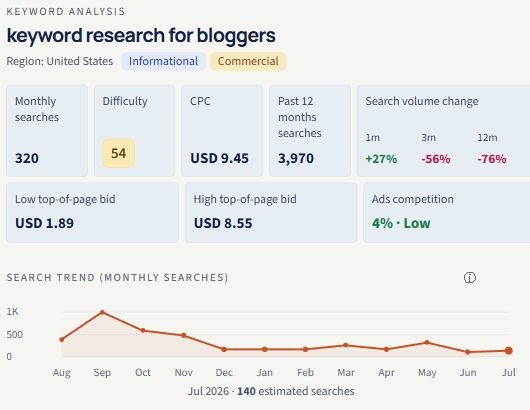
The example combines 320 estimated monthly searches with difficulty 54. Read both before choosing.
Use this order when reviewing a candidate:
Check | What it means | What to do |
|---|---|---|
Monthly searches | Estimated monthly demand | Compare relevant phrases in the same region. |
Difficulty | Estimated organic ranking difficulty | Look for a more manageable alternative serving the same reader. |
Monthly history | How estimated demand changed | Check for spikes, declines or recurring peaks. |
Search results | The pages currently returned | Confirm what kind of answer readers are being shown. |
If a value says Not supplied, leave it unknown. For a fuller tradeoff, read search volume vs keyword difficulty.
To decide whether a keyword needs a post, an ad, both or neither, compare SEO vs PPC.
4. Open the results and check the article's job
In the keyword analysis, inspect the SERP overview. SERP means search engine results page. Open several relevant result links and ask:
What format appears? Tutorials, product pages, comparisons or discussions?
What can the reader do afterwards? Complete a task, choose a product or understand a concept?
What can you contribute? A real example, test, photograph, worksheet or clearer explanation?
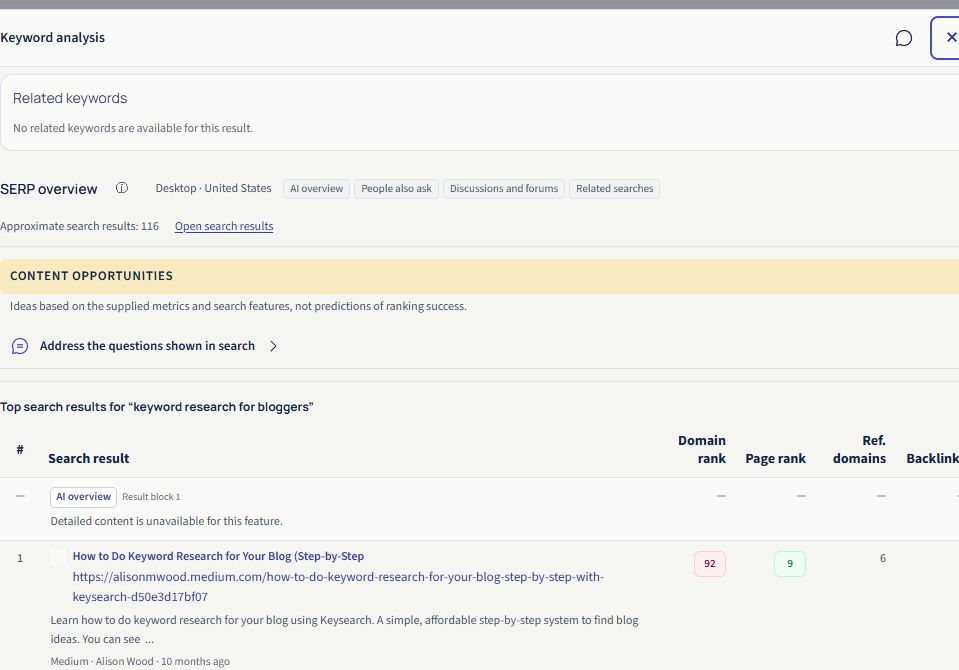
Open relevant result links to check their content, rather than judging from titles alone.
The blogger query returned a mix of guides, tools and discussion. Productive Blogging and HostPapa offered tutorials; Semrush supplied a tool page. A practical tutorial fits part of that demand, but a generic definition would do little for someone trying to choose a post.
Choose a contribution you can deliver. Google’s helpful-content guidance encourages original value and an answer that helps readers accomplish their goal.
5. Choose one page and group overlapping phrases
Ask whether two phrases need the same steps, examples and outcome. If they do, start with one article.
For this example:
Candidate topic | Decision | Reason |
|---|---|---|
Keyword research for bloggers | Choose a practical tutorial | Clear audience and visible instructional results. |
Keyword research for blog posts | Include as supporting wording | The proposed process and outcome overlap. |
Keyword research worksheet | Include a download | The worksheet helps readers complete the tutorial. |
Search volume vs keyword difficulty | Keep as a separate guide | It answers a narrower question about choosing between candidates. |
The returned blog-post phrase showed 70 monthly searches and difficulty 43. Grouping it with the blogger tutorial is an editorial choice based on the proposed task; we did not inspect its separate SERP. The worksheet phrase is an unmeasured content idea. See the filled shortlist.
Check whether the answer already has an owner
Read your published articles and private drafts before commissioning another URL. Choose refresh when the same reader task already has a useful page but lacks an example or current instruction; create when the task is distinct and you can provide the required evidence; hold when coverage duplicates another assignment or key evidence is missing.
For the hypothetical cable topic, better reversible-attachment instructions could belong in an existing cable-management guide. A tested standing-desk cable-tray comparison may justify a separate page because it helps readers choose equipment. Those are planning examples, not measured demand or product-test results.
Use the refresh-or-rewrite checklist to name the gap. For a page you already manage, the page-keyword workflow helps collect dated query evidence. Keep unavailable demand unknown rather than substituting zero.
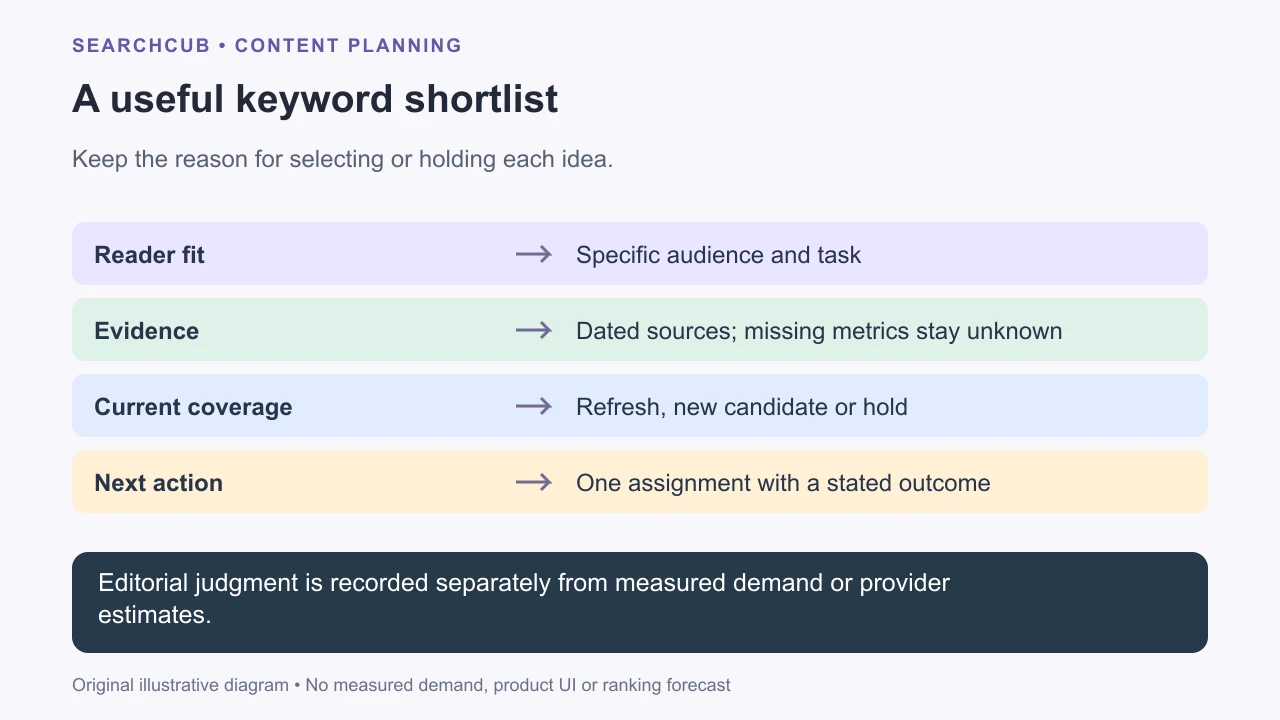
The checklist is an editorial aid, not a prediction of ranking difficulty.
6. Save your choice and write a short brief
Use the row checkboxes, then Save keywords to keep your shortlist. If creating a list, click Create list, then add the selected keywords to that list. To download it, choose Download → Selected rows · CSV.
Next, fill the page brief:
Field | Example |
|---|---|
Reader | A blogger choosing the next post. |
Topic | Keyword research for bloggers. |
Format | A numbered tutorial with screenshots and a worksheet. |
Outcome | One chosen topic, with a reason for choosing it. |
Evidence to include | Actual keyword metrics and inspected result pages. |
Next action | Research a topic and save a shortlist in SearchCub. |
Finish with one sentence explaining why you chose this topic over the runner-up. That gives your draft a direction before you write the opening.
Turn that brief into a finished article with how to write a blog post.
Open SearchCub, shortlist three relevant keywords, and choose the post you can make most useful.
Turn the choice into an assignment
Group related queries and map page owners before creating another URL. If volume is unavailable, record why the work is worth testing. Then write a usable article brief and plan the cluster's research and review work.
Before grouping overlapping lists into pages, use the duplicate keyword cleanup case to keep one planning entry per literal query while preserving its source observations.
Once an article has a clear answer, use the content repurposing recording plan to translate its useful answers into scenes and identify the checks needed before filming.
When an article includes compensated recommendations, use the affiliate disclosure wording and placement worksheet to explain the known relationship and record the checks needed on the published page.
For the links inside a finished article, use the blog link browsing-context guide to decide when a new tab serves a concrete reader task.
For format decisions, compare HTML and optional PDF companions to keep the answer usable on the page.
For a clear distinction between sets, sequences and priorities, compare numbered lists and bullets.
To place complete answers beside the choices they explain, use the answer-placement map and decide whether a separate Q&A serves a distinct task.
To make a link describe what readers will open, compare link purpose in its words and context and choose wording that accurately names the destination.
When a post uses color to communicate a status, see color cues with visible words and shapes for completed examples that preserve the meaning without color.
For a preview that stands alone, use a blog excerpt built from a complete source paragraph and check that each claim preserves the supplied details.
When displaying a rounded value, compare raw and rounded numbers in a filled record and keep the quantity, unit and rounding rule visible.
For unfamiliar short forms, use a filled abbreviation style card to decide when to write the term out and when a declared short form is useful.
For a completed worked example, see Active or Passive Voice? Keep the Right Actor.
For a completed worked example, see Make Blog List Items Parallel Without Losing Meaning.
For a completed worked example, see Write Ranges That Give Boundary Values One Answer.
For a completed worked example, see Say Whether a Blog List Is Complete or Gives Examples.
For a completed worked example, see And or Or? State What Your Blog Instructions Require.
For a completed worked example, see Keep One Name for Each Thing in Your Blog Post.
For a completed worked example, see Image Captions and Alt Text Do Different Jobs.
For a completed worked example, see Not All or None? Match the Claim to the Items.
For a completed worked example, see Say Whether a Quantity Is Per Item or Per Set.
For a completed worked example, see Keep Missing Source Dates Missing.
For a completed worked example, see Mean or Median? Name the Average You Report.
For a completed worked example, see Explain What to Replace in a Blog Template.
For a completed worked example, see Count or Rate? Keep the Time Basis in Your Claim.
For a completed worked example, see Give a Blog Deadline an Explicit UTC Offset.
For a completed worked example, see After Is Not Because: Write the Change You Know.
For a completed worked example, see Cut Repeated Answers Without Losing the Details.
For a completed worked example, see Compare Sources Without Hiding Their Disagreement.
For a completed worked example, see Q&A or Narrative? Keep the Interview's Meaning.
For a completed worked example, see Give a Blog Series a Clear Reading Path.
For a completed worked example, see Reverse Outline a Blog Draft Before Reordering It.
For a completed worked example, see Repeated Reports Are Not Independent Evidence.
For a completed worked example, see Treat Blog Feedback as a Request, Not a New Fact.
For a completed worked example, see Turn a Visual Blog Passage Into a Spoken Script.
For a completed decision trace, see how to explain a worked blog example. To choose between options for a particular reader, use recommendations tied to reader needs.
When handing unfinished work to another writer, preserve the exact manuscript and gaps in a complete draft handoff. For a factual scene, compare notes and proposed wording with writing from notes without inventing details.
For a short version of an article, summarize its answer without dropping its conditions. When versions change, write a change note from the actual before-and-after passages.
Keep planned work distinct from recorded check results. For an explanation built around a comparison, bound the analogy with declared rules and a clear stopping point.
Before publishing instructions, check the draft for contradictions. When responding to another position, describe the opposing view fairly before giving your response.
For unfamiliar terms, write definitions that do not loop. To propose an article, build a pitch with a reporting plan and keep unanswered questions visible.
Before assigning dates, plan a writing week around its actual constraints. When explaining a procedure, build troubleshooting branches from known facts and give a practice exercise a usable answer key.
Use personal experience to offer conditional advice, then audit headline promises against the whole article before finalizing the title.