- On-page SEO
- Tutorial
Keyword Stuffing: Repair a Page Without Losing Its Answers
Editorial responsibility: SearchCub
Keyword stuffing forces repeated search phrases into a page to manipulate rankings; remove the forced wording while keeping its useful answers. You will finish with a passage repair sheet and a page you have read through after editing. Use Keyword overview to identify useful questions, then make the wording changes yourself.
Start with the real search keyword stuffing. SearchCub returned 590 monthly searches in the United States and Difficulty 20 on 6 October 2026, Singapore time. Monthly searches estimates how often the query is searched in the selected market; Difficulty is the product's estimate of ranking difficulty on a scale from 0 to 100.

The Monthly searches card shows 590 estimated searches a month for keyword stuffing in the United States. Use that demand to justify answering the question, then inspect what the answer needs.
That research will help us protect the useful parts of a page about stuffing. For the passage editing exercise, we will use Google's own public teaching example: an ad-like passage repeating a claim about app credit. This gives you a real text to inspect without diagnosing another publisher's site.
1. Keep a List of Answers Before You Cut Words
Open Keyword overview, choose Keyword, enter keyword stuffing, choose Region: United States, and click Search. Open the keyword's Keyword analysis and look at Questions people search and SERP overview. Write the reader's question beside the part of your page that answers it.
The result contained the following questions. The numbers are SearchCub's estimates from the same market and retrieval date.
Question in the result | Monthly searches | What to preserve in a page about stuffing |
|---|---|---|
| 320 | A direct definition and a recognizable example |
| 140 | An explanation of what counting repeated terms tells you |
| 90 | An editing method the reader can actually follow |
| 170 | Include only a short clarification if your page raises the term |
| 70 | A brief distinction and a link to the separate page-comparison task |
The last rows are a useful trap to catch. A question appearing in the result is a reason to consider it, not an instruction to fit its exact phrase into your opening. Cannibalization asks about competing pages; stuffing asks about wording within a page. Use the keyword cannibalization guide if your problem concerns which URL should answer a search.
In the same SERP overview, the first organic result was the Market Brew explanation of optimization and manipulation; the next had the SEOmator definition-and-avoidance title, followed by the seoplus glossary. Those observed result titles call for a definition and a practical way to change the text. Preserve those answers before removing repeated phrases.
For our page, keep the definition, the editing method, and the explanation of counting. Repeating keyword stuffing in every heading would add words without adding another answer. Replacing every occurrence with a related phrase would leave the same problem if the sentences still say the same thing.
If you have yet to choose what your page should answer, choose its primary keyword first. Here, the topic is already chosen. You are deciding what individual passages contribute.
2. Mark Repetition by Its Job
Read the page aloud and underline the phrase that feels forced. Beside each occurrence, write its job: identifies the topic, defines a term, labels a step, gives a specific fact, or repeats an earlier claim. Your first edit should target occurrences in that last group.
A repeated technical term can be useful. In this article, naming stuffing again when the editing steps begin keeps the subject clear. Changing it to a vague word such as “issue” would make that step harder to follow when read on its own.
Use a deletion test: cover the phrase and reread the sentence. If the sentence keeps its meaning and reads more easily, delete it. If the subject becomes unclear, keep the necessary noun and shorten the rest of the sentence instead.
Next, cover the whole sentence. If the neighboring sentences already answer the same question, combine them. If the sentence contains a condition, exception, warning, or instruction that appears nowhere else, save that information before you change its wording.
Google describes stuffing in terms of attempts to manipulate rankings, including unnatural repetition and out-of-context lists. See the keyword-stuffing policy, checked on 6 October 2026. That description gives you a reason to inspect the text; your editing decision still needs a passage and a reader consequence.
3. Fill the Passage Repair Sheet
Google's sample opens “Unlimited app store credit.” It repeats the offer in several forms, criticizes other sites, and closes with another invitation. We will replace that promotion with guidance for evaluating an offer, because the sample supplies no evidence supporting the promise.
Part of Google's teaching passage | Proposed editorial repair | What the reader keeps |
|---|---|---|
Opening promise | Replace the promotional lead with an assessment task | The subject: an app-credit offer |
Repeated offer and criticism of other sites | Remove both; require evidence before adding factual terms | A clear question to investigate |
Closing invitation | Replace with a specific check before proceeding | A next action |
Proposed editorial rewrite of Google's teaching passage: “Before accepting an app-credit offer, read its eligibility terms, identify who supplies it, and check what you must pay or provide.” This is an editing proposal, not a verified offer or a tested website.
Download the filled passage repair worksheet. It includes these passages, the editing decisions, the preserved reader task, and the checks still needed. Add your page's passages underneath them.
The useful column is the verification column. A smoother sentence can still make an unsupported promise. When an edit changes a factual claim, look for the source that supports the new wording; when you have no source, remove the claim or replace it with a question the reader can investigate.
For your own page, keep the smallest passage that lets you make a decision. A whole chapter in a spreadsheet hides which sentence needs work. Copy the affected sentence and enough neighboring text to understand it, then write the repair beside it.
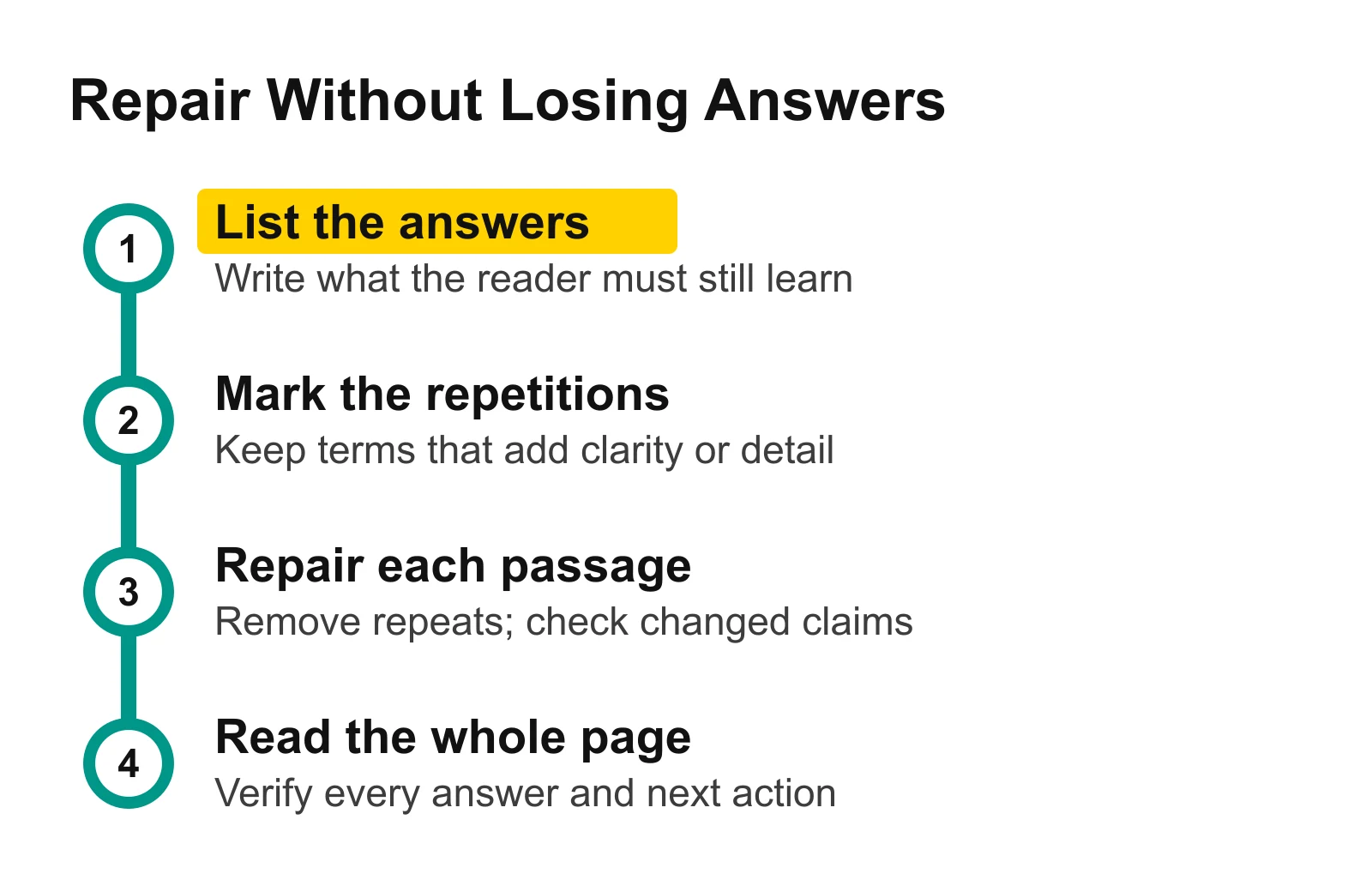
List the answers before editing, then check each repaired passage against that list. The final read catches a definition or instruction that disappeared during a local rewrite.
4. Avoid Repairs That Create a New Problem
Do not edit toward a density score. Keyword density describes how frequently a term occurs in text, often as a proportion of the words. A count helps you locate repetition; it does not tell you whether an occurrence explains something useful. In our research, what is keyword density deserves an answer, but that answer should not become a target percentage for the page.
Do not swap in synonyms mechanically. Google's SEO Starter Guide, checked on 6 October 2026, says its systems can relate a page to queries without every exact variation appearing. Use the term that makes the instruction clear. In our sample repair, changing one promise to several differently worded promises would still leave the reader without evidence.
Keep useful repeated headings when they locate different answers. A definition, a repair method, and a verification step do different jobs. Cut the extra phrase within a heading when it crowds out that distinction. If the title needs a separate edit, use the guide to SEO titles and meta descriptions.
Read the other places where the phrase appears. Check captions, link text, image descriptions, and reusable page blocks. Describe what an image shows rather than appending the query to its description. If the same promotional sentence appears in a shared block across your site, fix the block where it is maintained and check the pages that use it.
5. Verify the Complete Answer After Editing
Put the repaired passage back into the page and read from the opening to the next action. Check that pronouns still have a clear subject, instructions still appear in a usable order, and links still lead to the answer their text promises. A sentence can work in the worksheet and fail beside the paragraphs around it.
Now reopen your answer list. For our keyword stuffing page, can you still find the definition, the density explanation, and the practical avoidance method? Can you distinguish the separate cannibalization problem without turning this page into a guide to choosing URLs?
Ask those questions in your own words rather than searching only for the exact query. If the answer is present but uses a clearer phrase, keep it. If the exact phrase remains but the explanation has disappeared, restore the explanation.
Keep the original passage and your proposed wording in the sheet until you finish this check. Mark a row complete only when its preserved task still works and any factual claim has a source. In Google's sample repair, the promotional claim has been removed; the proposed advice asks the reader to verify the terms rather than accepting them.
SearchCub supplies search estimates and result context; it does not detect stuffing, set a safe density target, or diagnose a Google penalty. Perform this wording check manually, and record search-performance changes separately from the edit itself.
Repair One Passage on Your Page
Open Keyword overview and enter the main query for the page you want to edit. Use its questions and results to list the answers worth preserving, then fill one repair row and reread the complete page.
If you need to establish which searches an existing URL already answers, the guide to finding a page's keywords gives you that starting list. Return here once you have a passage to repair: keep its useful information, remove the forced repetition, and verify what the reader can still do.