- Keyword Research
- Tutorial
Seed Keywords: Choose Better Research Inputs
Editorial responsibility: SearchCub
Choose seed keywords by naming your reader's problem, trying a broad input, then adding a more specific input when the returned wording leaves part of that problem unexplored. You will finish with a small set of research inputs and a reason for each one. SearchCub's Keyword ideas is where you inspect the broad sample and decide what to type next.
What Are Seed Keywords?
Seed keywords are the starting phrases you give a keyword tool to explore a subject. A broad seed such as cold brew coffee names the subject; a more specific research input such as cold brew coffee ratio adds the task you want to investigate.
The input and the eventual keyword for a page do different jobs. An input helps you discover wording and questions. You can keep it as a useful research starting point even when you would never write a page targeting that phrase alone.
For this example, the subject is already fixed: preparing cold brew at home. The immediate reader problem is understanding preparation and measurement, including proportions and dilution. We are choosing inputs for that problem. The keyword-research guide for bloggers handles the later decision about which post to write.
The real comparison uses two saved United States samples from October 4, 2026: cold brew coffee in Keyword ideas and a cold brew coffee ratio keyword set loaded with Keyword overview. The broad table was reopened on October 6. These are estimates from different lookup paths and saved samples, so compare their observed wording rather than treating them as a controlled test or adding overlapping search volumes.
1. Build Inputs From the Same Problem
Write the problem in everyday language before opening the tool. Here it is: “Help someone making cold brew at home understand what to measure and how to prepare the drink.” Keep that sentence beside your results so a large unrelated row has less chance of redirecting your research.
Then separate the subject from the condition you want to examine:
Input scope | Starting phrase in this case | What you want to inspect |
|---|---|---|
Broad subject |
| Preparation wording and nearby tasks |
Particular task |
| Proportion, unit and dilution wording |
Particular product | The exact brewer plus the task | Whether instructions for that setup need investigation |
The product option applies only when the reader's problem includes that brewer. Adding a brand because it appears in a result would change the scope without explaining why.
Use words from the problem itself. Google's SEO Starter Guide explains that newcomers and experienced readers may use different search terms. That is a reason to try relevant wording from both, while keeping the underlying problem constant.
Decide: keep the broad subject and measurement task as inputs; leave a model-specific input conditional on the reader's actual setup.
2. Inspect the Broad Input Before Narrowing It
Open Keyword ideas, keep Keyword selected, enter cold brew coffee, choose United States under Region, and click Search. Read the Keyword set and the wording in its rows.
Monthly searches estimates how often the phrase is searched in the chosen country. Difficulty estimates how hard it is to rank for that phrase. For input selection, start with what the words ask for; the biggest number can belong to a different problem.
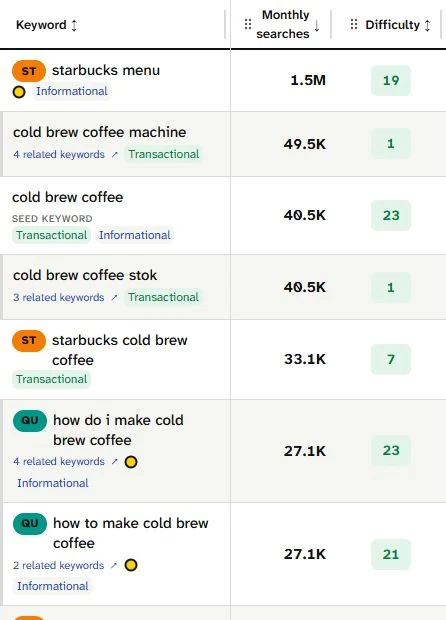
The saved table viewed on October 6 puts a menu row at 1.5M and a machine row at 49.5K above preparation rows at 27.1K each. Read their tasks first: a broad input brings useful preparation wording and distractions into the same view.
The broad sample includes how to make cold brew coffee at home, cold brew coffee ratio and cold brew coffee in french press. Those rows suggest a method, a measurement task and a method conditioned by equipment. Keep them as observed coverage of the fixed problem.
It also includes Starbucks menus, ready-made brands and coffee and whiskey bath and body works. Record these as unwanted wording for this research task. Their presence tells you to inspect the sample carefully; it gives you no reason to expand a home-preparation question into menu or retail research.
Decide: retain the broad input for orientation, then check whether it gives enough detail about measurement.
3. Separate Filtering From Trying Another Input
Before changing the seed, use Filters and sorting to inspect the loaded set. The saved Informational view still includes starbucks menu alongside preparation rows. An intent tag is a useful starting clue, but the wording still has to match your problem.
Lines offers another route through loaded ideas. Its Questions group is useful when you want question wording. A shared-word group can help you find related terms quickly, but it describes the ideas already returned.
Ask a concrete question of this sample: where are the cup, gram and dilution wordings? The exact rows used in the next step were not observed in the inspected broad sample; that omission leaves demand unknown, and filtering the loaded set alone cannot establish what another input would return.
That is the reason to try a task input. You have named the part of the problem you want to inspect, instead of narrowing merely to get smaller numbers or fewer rows.
Decide: investigate cold brew coffee ratio for measurement wording, while keeping the broad set as context.
4. Compare the Actual Task Sample
Read the saved ratio set for concrete measurement wording:
Actually observed wording | Where it appears in this comparison | Monthly searches, United States | What it adds to the research |
|---|---|---|---|
| Broad and ratio samples | 9,900 | The general proportion task |
| Ratio sample | 390 | Measurement in household units |
| Ratio sample | 320 | Measurement by weight |
| Ratio sample | 90 | Diluting prepared concentrate |
| Ratio sample | 320 | A request that may involve a tool |
These extra wordings change your research notes. “Ratio” now involves a measurement unit, a preparation stage and possibly a calculator. You can examine those differences before deciding how to answer any of them.
The narrower input still has distractions. The ratio sample contains cold brew coffee maker at 49.5K monthly searches, along with specific makers and pour-over coffee ratio calculator. Narrowing the input helps you investigate a task; it still leaves you responsible for checking whether each row belongs to cold-brew preparation.
Keep the two inputs for different reasons. The broad input shows surrounding preparation language. The ratio input supplies useful measurement wording in this saved sample.
Decide: keep this complementary pair for preparation and measurement research, with unwanted rows recorded beside each.
5. Add a Product Input Only When the Setup Matters
The broad result groups cold brew coffee oxo with related maker wordings. Opening that group reveals a product-oriented selection inside the existing result. This is not a separately searched OXO seed set, so it provides no observed comparison of what a new product input would load.
The ratio sample separately includes oxo cold brew instructions. That is a useful lead when your reader already has that brewer. It asks for a different kind of research from comparing makers to buy.
Check the task wording against an appropriate source. OXO's own instructions, checked on October 6, describe preparing concentrate and then making a serving from it. Those are concrete stages you can use to distinguish a brewing question from a dilution question, without copying a product name into every input.
For the fixed general measurement problem here, keep a model-specific search as an optional next input. Use it when the setup changes what you need to investigate. Otherwise, the broad and ratio inputs already have clear reasons to remain in your research list.
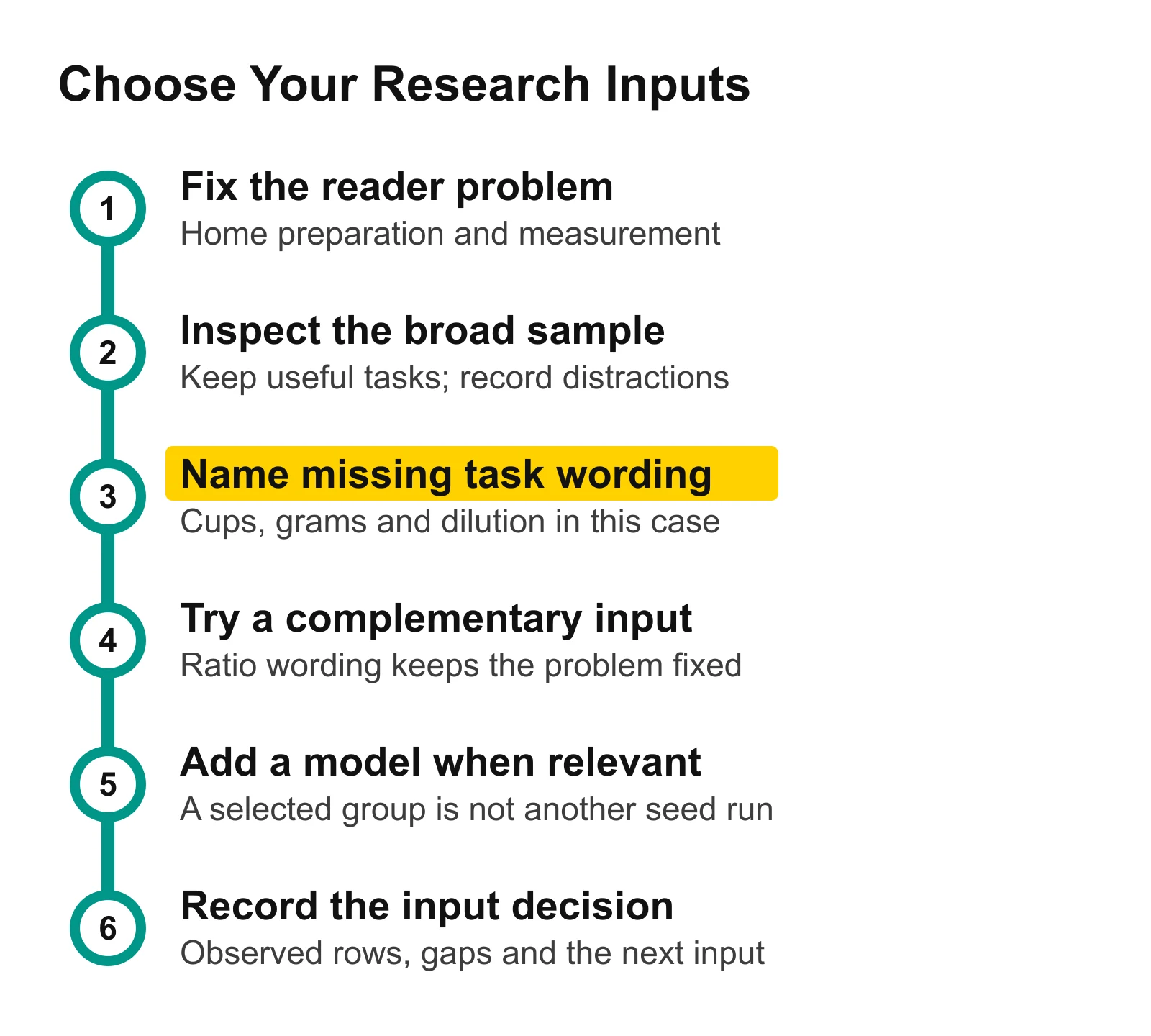
Read the missing-task station as the trigger for another input. Add a model only when the reader's setup calls for it, then record what was actually observed before planning an answer.
6. Save the Input Decision in a Worksheet
Download the filled seed-input worksheet. It contains the broad input, ratio input and observed OXO selection, with columns for scope, actually observed tasks, unwanted rows, wording not observed and the next input.
Keep those columns separate. “Observed” contains wording you saw. “Not observed” names a gap in the inspected sample. “Next input” contains the phrase you propose to search and its purpose. Run that next input, then record the returned wording before comparing it with your other samples.
The completed decision here is a complementary broad-and-ratio pair. You now have an input list that explains both coverage and the purpose of the next search.
Stop adding inputs when another one repeats the same useful wording without helping you examine a missing part of the fixed problem. If a new sample mainly brings an unwanted subject, return to the reader sentence and change the task wording deliberately.
Your Next Action
Open Keyword ideas and enter your broad subject. Choose your Region, click Search, and fill the worksheet's observed and unwanted columns before deciding whether a more specific task input would help.
When your inputs have useful coverage, group keywords and map them to pages to plan answers. Use the long-tail keyword guide when deciding how to handle the smaller searches in those results.