- Guide
Keyword Research Guide
Editorial responsibility: SearchCub
To research keywords in SearchCub, choose your market, compare search volume and difficulty, inspect the ranking pages, then save a shortlist for one useful page. This guide walks through that process with the topic keyword research.
The screenshots use U.S. results captured on 14–15 September 2026. Follow along with your own topic; the numbers and results can change.
1. Search a topic in the right region
Open SearchCub, choose Keyword, enter keyword research, select United States under Region, and click Search.
Choose the country where your readers live. Keep it unchanged while comparing keywords. Use a country rather than Worldwide when you need organic keyword difficulty; that metric is unavailable for Worldwide research.

Start with a topic and the country where your readers search.
Start with a topic you can cover well. A cooking site might enter meal prep; a photographer might enter product photography. The first search gives you candidates to investigate, not an instruction to write about every result.
2. Read monthly searches before choosing a candidate
In Keyword set, look at Monthly searches. This estimates monthly search demand in the selected region. It is different from the Past 12 months searches total and from the visits your page might receive. Google's historical-metrics guidance explains why averages, close variants and changing demand need care.
Our broad seed, keyword research, showed 246K monthly searches. That large audience is interesting, but it does not tell us whether a new article can compete or satisfy the query.
Use this order as you review each phrase:
Check | What it means | Your decision |
|---|---|---|
Monthly searches | Estimated monthly demand | Is there an audience for a page you can usefully create? |
Difficulty | Estimated organic ranking difficulty, from 0 to 100 | Is there a more manageable phrase serving the same reader? |
Trend | How monthly estimates changed | Is demand steady, seasonal or recently falling? |
Intent and results | What the searcher appears to need | Should you create a tutorial, comparison, product page or another format? |
3. Compare difficulty and related wording
Click a keyword to open Keyword analysis. Difficulty estimates how hard it is to rank organically; higher scores mean greater difficulty. SearchCub's provider defines the scale as 0–100.
The broad seed scored 88. Check Related keywords for alternative wording and compare the displayed scores. In this example, the five related variants also scored 88, so changing the wording alone did not produce an easier option.
Similar phrases can share estimates. Treat them as wording to investigate, and avoid adding their volumes together as though each represented a separate audience.
4. Narrow the results to your audience
Open Filters and sorting. Enter blog in Include words, set Difficulty: Maximum to 60, then click Apply filters.
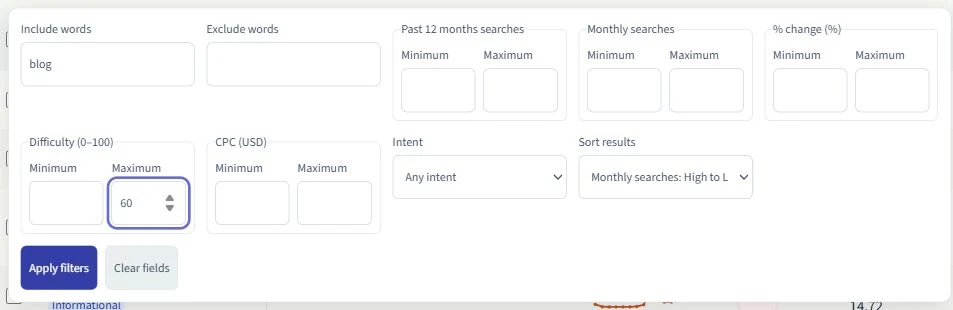
An example filter: keep phrases containing blog and difficulty scores at or below 60.
Here, 60 is an example filter to find alternatives below the seed's 88, not a universal target. Leave the minimum monthly searches blank initially so smaller, relevant opportunities remain visible. If too few rows remain, loosen the filters or use Load more keywords to explore more results.
This left keyword research blogger in the loaded rows: 320 monthly searches and difficulty 54. It has less estimated demand than the broad seed, but names a clearer audience and a lower difficulty score. Keep it for a closer look.
You do not need a 5,000-search minimum. The useful question is whether the topic is worth answering for your readers. Our search volume vs keyword difficulty article explains that tradeoff.
5. Check the trend and the actual ranking pages
Click the candidate. Read its monthly chart alongside the average. Our example averaged 320 searches, while the latest displayed month, July 2026, showed 140. The average alone would hide that difference.
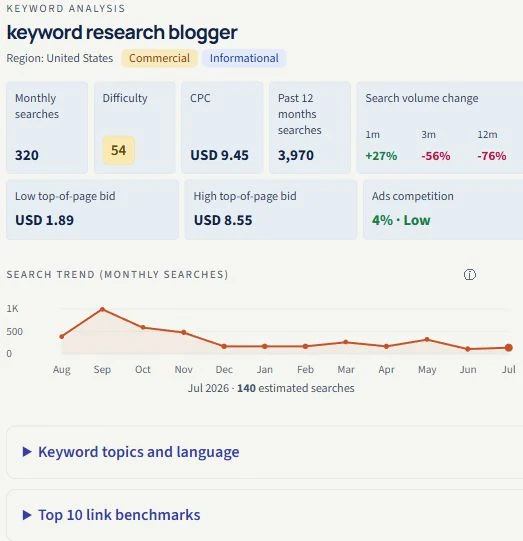
The monthly average and the latest recorded month answer different questions.
CPC estimates the price of a paid-ad click. It can add advertising context, but a low CPC does not establish easy organic rankings. Use Difficulty and SERP overview for the organic research decision.
SERP means search engine results page. In SERP overview, open a few relevant result links and check:
Page format: are readers being shown tutorials, tools, comparisons or product pages?
Required answer: what task does each page help someone complete?
Your contribution: can you add a tested example, useful screenshot, original data or clearer instructions?
The blogger query returned both tools and instructional pages. A practical tutorial is a plausible direction; the mixed results are a reason to inspect the pages before committing. Intent badges provide a starting point, while the pages show what you would actually compete with.
6. Save a small shortlist and export it
Tick the checkbox beside each phrase you want to keep, then click Save keywords. In the list panel, choose an existing list, or enter a New list name and click Create list. Click Add selected keywords to put your selection into that list; the button includes the number selected.
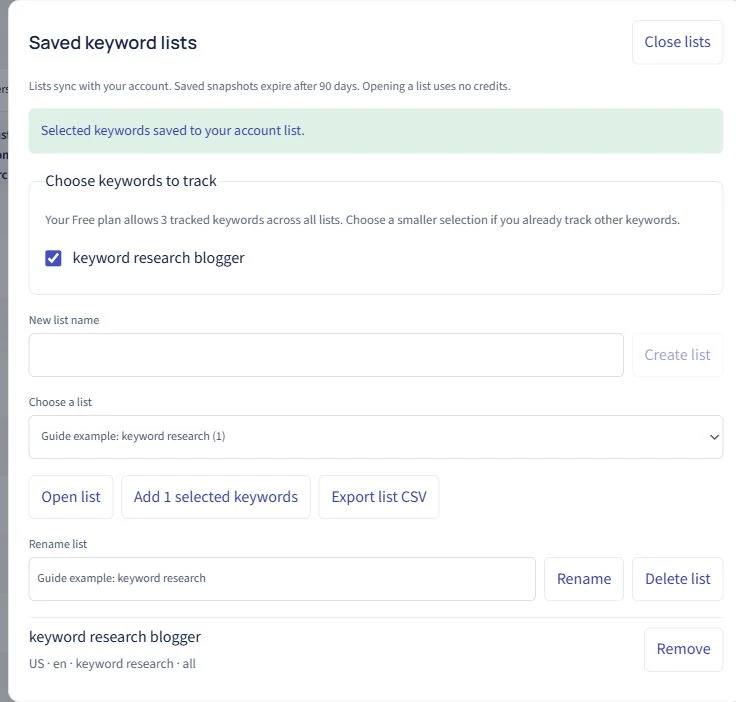
The keyword is saved in the example list. Export list CSV downloads that list.
To download your current selection, open Download and choose Selected rows · CSV. Loaded rows · CSV exports the loaded results instead. Saved lists also offer Export list CSV. Sign in when prompted to keep a shortlist with your account.
Finish with a short brief outside the results table:
Field | Our example |
|---|---|
Reader | A blogger choosing the next post |
Topic | Keyword research for bloggers |
Format | A worked tutorial with screenshots |
Why this topic | Clearer audience and lower difficulty than the broad seed |
Evidence to add | Current keyword comparison and inspected search results |
Reader's next step | Choose a topic and save a shortlist |
Group phrases that need the same answer into this page. Keep genuinely different tasks for separate pages. You now have a reason to write one article, rather than a spreadsheet of disconnected keywords.