- Content Planning
- Comparison
Bar Chart or Line Chart? Start With the Reader's Question
Editorial responsibility: SearchCub
Use bars to compare distinct categories and consider a line when the reader needs to follow change through ordered time. Start with the question and what each value means, rather than choosing a shape because it looks more polished.
The Office for National Statistics chart-choice guidance connects the choice to the relationship being shown. For a blog, that means deciding whether readers need to compare sizes, follow a trend, or inspect individual values before drawing the chart.
Make the comparison before plotting
Decision | Category comparison | Change through time |
|---|---|---|
Reader's question | Which category has more? | How did the value change? |
Meaning of order | Categories may be sorted by value or another declared rule | Keep the actual chronological order |
Useful starting choice | Horizontal bars | A line for a meaningful time trend |
What to check | Comparable units and a zero bar baseline | Point-in-time or interval values, spacing and missing observations |
Alternative worth considering | A table when exact lookup is the task | Columns for interval totals or a small number of time points |
A line between unrelated category names adds a sequence that the data does not supply. Conversely, sorting a time series from largest to smallest removes the chronology the reader needs.
Choose bars for the resource counts
Studio Notes is a fictional blog. Its invented resource list contains 12 Workbooks, 7 Checklists and 4 Logs, all measured as numbers of files. The question is: which type has the most files?
Resource type | Files, count |
|---|---|
Workbooks | 12 |
Checklists | 7 |
Logs | 4 |
These categories have no inherent time order. The chart uses descending values, with Workbooks first, to match the comparison. Workbooks exceed Checklists by 5 files: 12 minus 7.
ONS bar-chart guidance recommends bars for comparing category values and a zero starting point on the value axis. Here, every bar starts at zero and the horizontal axis is labeled Files (count); connecting the categories with a line would imply an unnecessary progression.
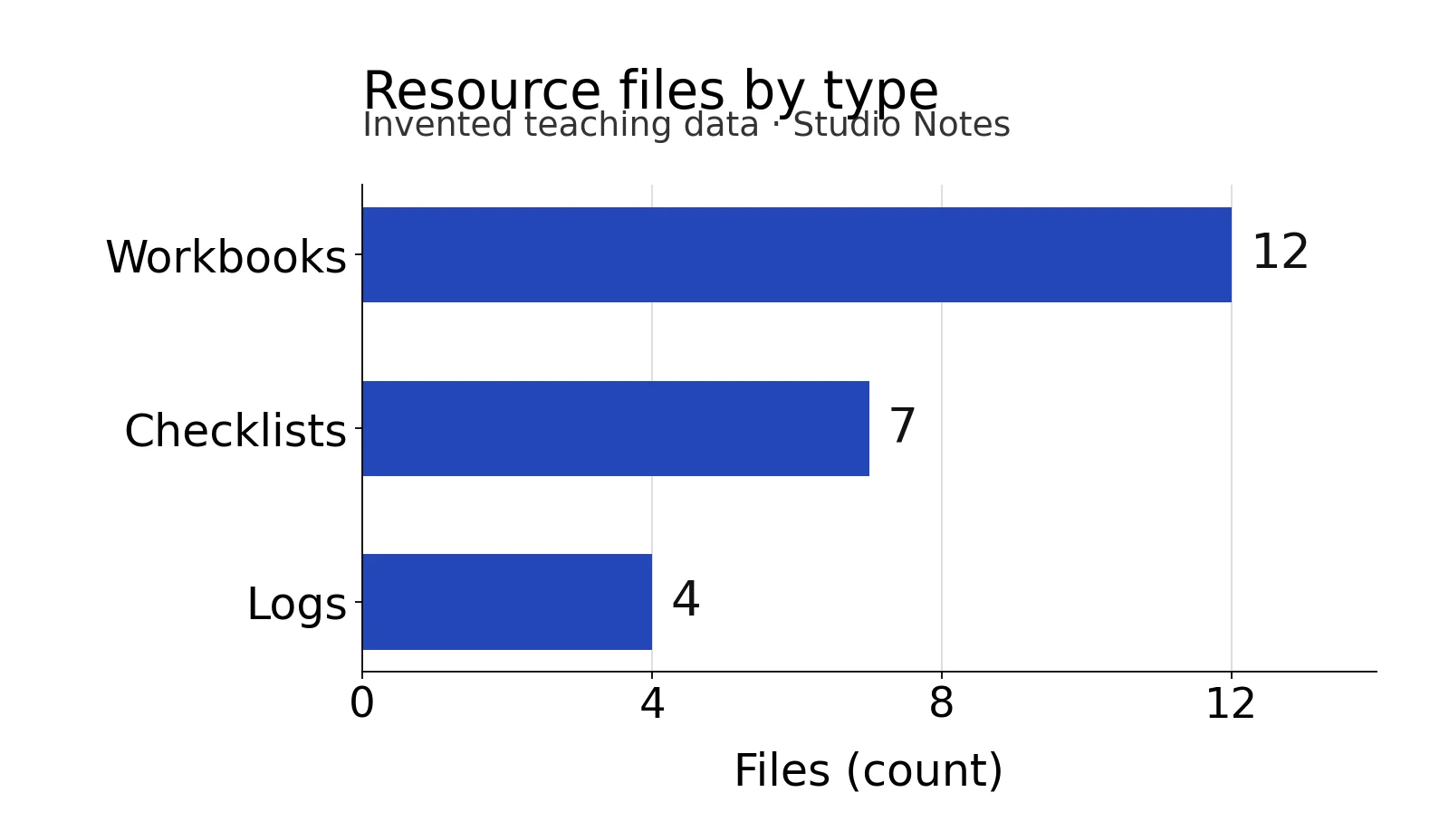
Workbooks have the longest bar at 12 files; the descending order compares three resource types in the fictional list.
Choose a line for six hourly values
The second dataset is also invented. It assigns a temperature in degrees Celsius to six equally spaced times on one imaginary day. Each value represents that point in time, rather than a total accumulated during the previous hour.
Time on the teaching day | Temperature, °C |
|---|---|
10:00 | 19 |
11:00 | 20 |
12:00 | 22 |
13:00 | 21 |
14:00 | 23 |
15:00 | 22 |
The question is how the value changes across those times. Keep the six points in chronological order: the sequence rises, falls, rises again and ends at 22°C, 3°C above the first value. The highest supplied value is 23°C at 14:00.
ONS line-chart guidance recommends lines for time trends and allows markers when there are few points. This figure marks all six supplied values, uses equal one-hour spacing, and labels the vertical axis Temperature (°C).
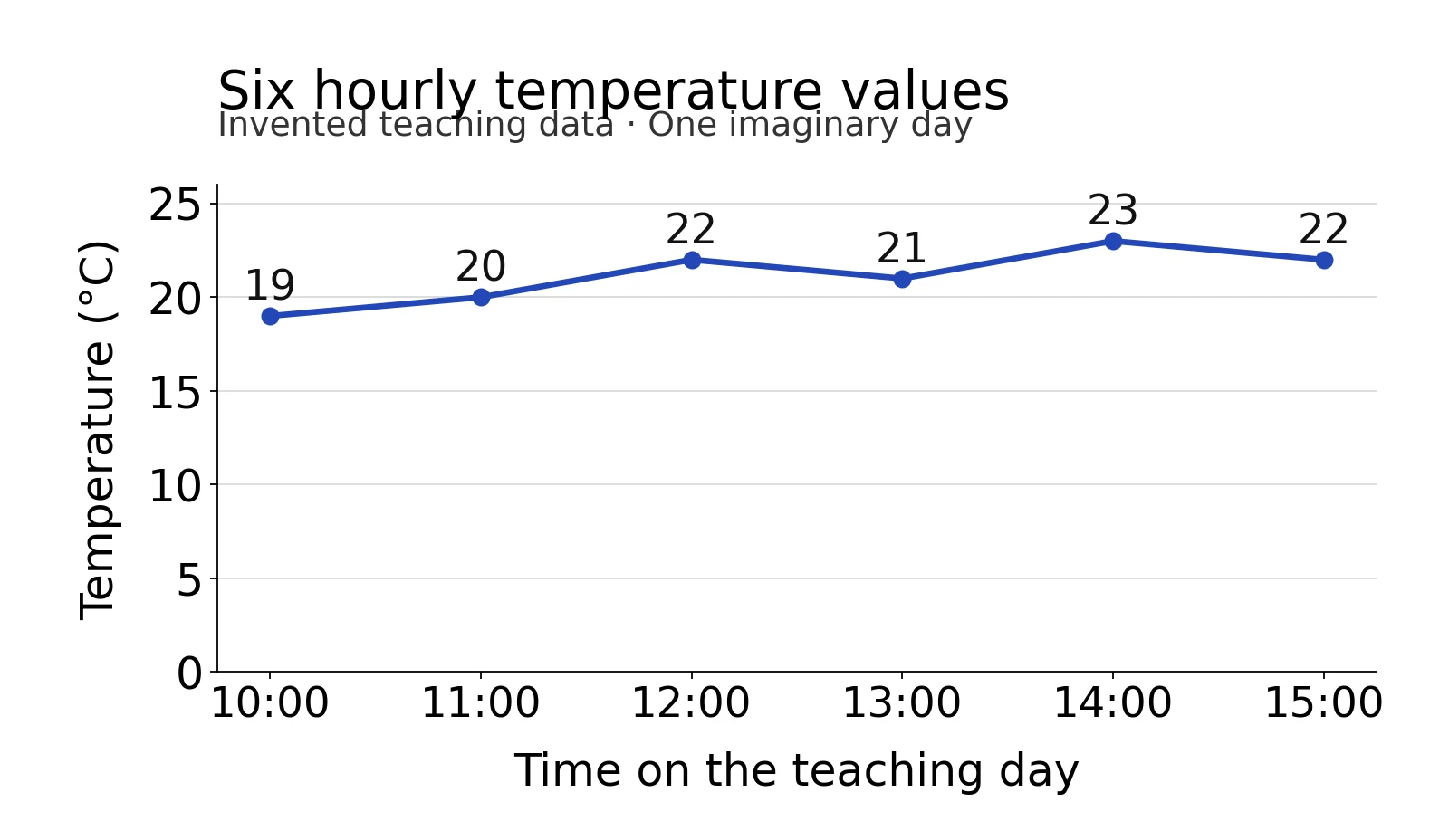
The marked values preserve the 13:00 dip and 14:00 peak; the connecting segments do not establish readings between the supplied times.
The vertical scale starts at 0°C in this figure. That is a declared scale choice for this example, not a rule that every line chart must start at zero. Neither dataset establishes a cause, prediction or real measurement.
Time does not automatically mean a line
Ask whether the number is a value at a moment or an amount over an interval. ONS distinguishes these meanings in its stock and flow discussion: interval totals often suit columns, while point-in-time series often suit lines. Monthly numbers of newly published articles, for instance, are interval totals; a column for each month can make that meaning explicit.
The line-chart guidance also suggests considering columns for five or fewer time points. If you only need exact values or a start/end comparison, reconsider whether a line adds useful information.
For otherwise regular observations with a missing value, leave a gap in the line as ONS advises. A missing temperature is unknown, not0°C, and an invented replacement would change what the chart claims.
Reuse the completed choice
Download the original teaching CSV and the filled chart-choice card. The CSV contains every label, value, unit and teaching-data identifier used in both figures; the card records the reader's question, chosen chart, ordering, baseline, alternative and limits for each example.
Copy the reusable card entry for your own data. Fill the question and value meaning before plotting, then compare the plotted marks with the final data file. Keep the complete values beside the chart so the article's answer remains available in text.
For the surrounding article, use the blogger's keyword research guide to choose a useful question, plan the writing around its answer, and record the reader outcome in an article brief.