- Content Planning
- Tutorial
How to Write a Blog Post From What Searchers Ask
Editorial responsibility: SearchCub
To write a blog post people find, collect what your readers search for first, then give each finding its own section: a title in the search's words, an opening that gives the answer, the steps, a short section for each question people ask, and one next step. Below you can download the outline and watch it get filled in from one real search. You will use SearchCub's Keyword ideas to find what goes in each section.
Most advice on writing a blog post gives you a shape: an introduction, a few body sections and a conclusion. That shape says nothing about what goes in each part. The method here works the other way round: you collect what searchers ask first, then each finding becomes a section, and anything searchers do not ask for is left out. The result reads like an answer instead of an essay.
What people searching "how to write a blog" expect
The search itself shows what a useful answer needs. how to write a blog has about 1,300 searches a month in the United States, difficulty 52 and an Informational tag in SearchCub, an estimate last updated on 13 September 2026. Its SERP overview, checked for United States desktop results on 7 October 2026, listed nine organic results below an AI overview.
Six of the nine were how-to guides, several with numbered steps, such as Shopify's "How to Write a Blog Post: 10-Step Guide" and Dorik's "13 Steps to Write an Awesome Blog Post". The other three were one writer's own process, ideas for when you feel stuck, and a post about writing introductions. That mix suggests readers expect steps in order. This post adds one thing to a list of steps: a way to fill each step from what people searching your own topic ask, shown on a real search.
People also asked four questions:
Question people also asked | Where this post answers it |
|---|---|
How to write a blog as a beginner? | The whole method below: it starts from a search, not from writing experience |
Can I use ChatGPT to write a blog? | The next paragraph |
What is the 80/20 rule for blogging? | Not covered: it is not about how to write the post |
Do bloggers make money? | Not covered: it is about earning, not writing |
Can you use ChatGPT to write a blog? Google's guidance says generative AI can help you research a topic and add structure to original content, while producing many pages without adding value for users may violate its spam policy on scaled content abuse (Google: using generative AI content). The same page calls a manual fact-check of AI-generated content critical before you publish. Whoever drafts the words, the sections below come from what searchers ask, and the facts in them have to be yours.
The outline
This version is for how-to posts. Each line is a section of the finished post.
Section | What goes in it | Where it comes from |
|---|---|---|
Title | The search's words in natural order, 60 characters or fewer | The search you chose |
Opening | One sentence with the answer or the result, then what the reader will have at the end | What the top results promise |
What you need | Equipment, ingredients, files or accounts, with amounts | Your own method |
Steps | One heading per step: what to do, what right looks like, what to decide | Your own method, checked against the top results |
Question sections | One short section per question that changes what the reader does | People also ask and question searches |
Mistakes or fixes | Only if searchers ask about them | People also ask |
Visual | A photo, short video or diagram where a step is hard to describe | The result types that rank |
Next step | One related post or action | Your own site |
The downloadable outline has the same sections as two tables, a research table to fill first and the post outline, each with a column for your notes and a column showing the worked example below.
The example: how to make cold brew coffee
The example is a real search looked up in SearchCub for the United States on 4 October 2026: how to make cold brew coffee. Imagine you run a coffee or recipe blog and want to write this post. Every finding below comes from that one lookup.
Open that search and its Keyword analysis lists the next stops on its Questions line, the other ways people ask the same thing:
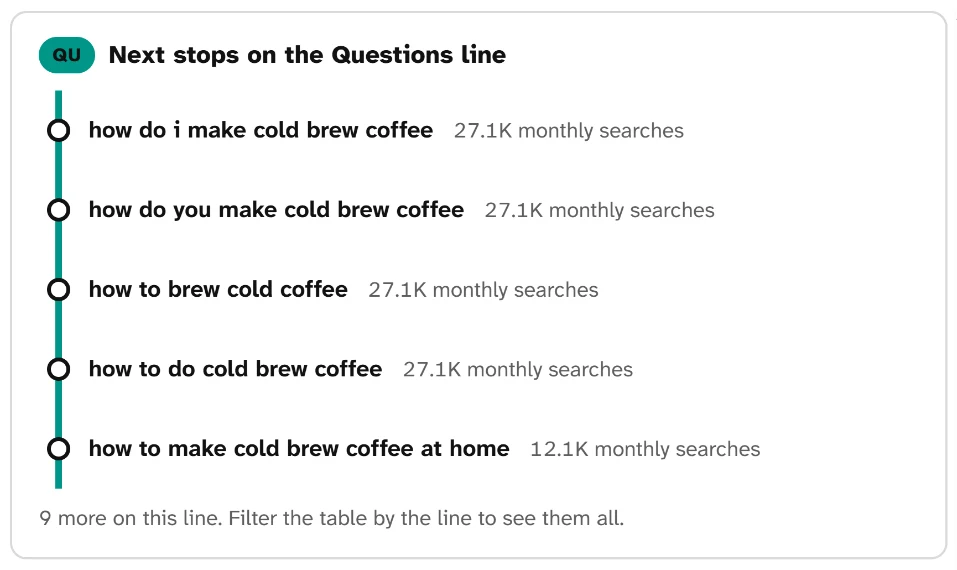
Five phrasings of one question: four show 27.1K monthly searches and "how to make cold brew coffee at home" shows 12.1K. They feed one post, its title and opening, not five separate headings; the note says 9 more questions sit on this line.
This panel belongs to the worked example, a cold brew how-to, not to how to write a blog, the search this guide answers. The sections below show which findings become which parts of the outline.
Step 1: Find the search and its questions in Keyword ideas
Open Keyword ideas, choose Keyword, type your topic in a word or two (here cold brew coffee), choose your readers' Region, and click Search. You get a keyword set of up to 100 related searches.
Click Lines and choose the Questions line to keep only the searches phrased as questions:
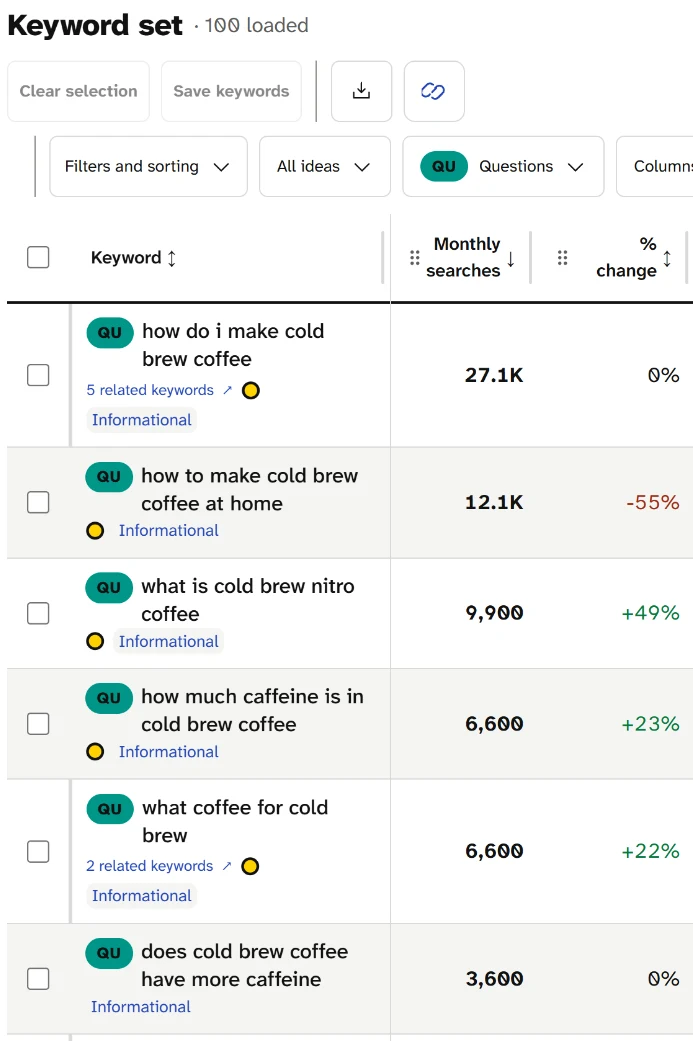
Each row is a question people type, with its monthly searches. The first two ask how to make it, the third asks what nitro cold brew is, and the rest ask about caffeine and coffee choice. The caffeine and coffee rows become the question sections of the outline.
For this topic the Questions line held 15 searches. The ones that matter for a how-to post:
how much caffeine is in cold brew coffee: 6,600 searches a monthwhat coffee for cold brew: 6,600does cold brew coffee have more caffeine: 3,600is cold brew stronger than espresso: 1,900
Write them down. They are your candidate question sections.
Step 2: Open the search you are writing for
Click the search itself, here how to make cold brew coffee, to open its Keyword analysis:
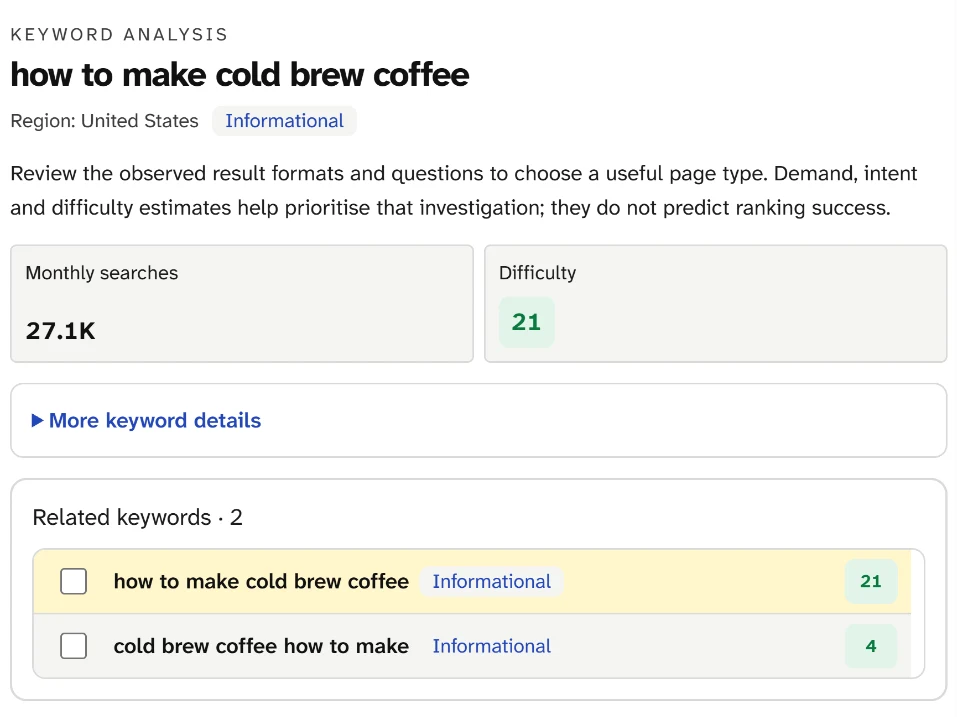
The tag says Informational, so readers want to learn how, not buy something. 27.1K searches a month, at difficulty 21, which SearchCub counts as Easy (under 30). The two related keywords are the same question in other words, so they belong in one post.
Three things go into the outline from this panel:
Title. The search's own words: "How to Make Cold Brew Coffee". Keep the wording people use.
Format. Informational means a tutorial, not a product page.
Scope. Same-meaning wordings such as
how do i make cold brew coffeego into the same post, not separate posts.
Difficulty is a 0 to 100 estimate of how hard a search is to rank for. It helps you choose between topics, but it does not change the outline.
Step 3: Read what ranks and what people also ask
Scroll to the SERP overview. It shows the features on the results page and the top results:
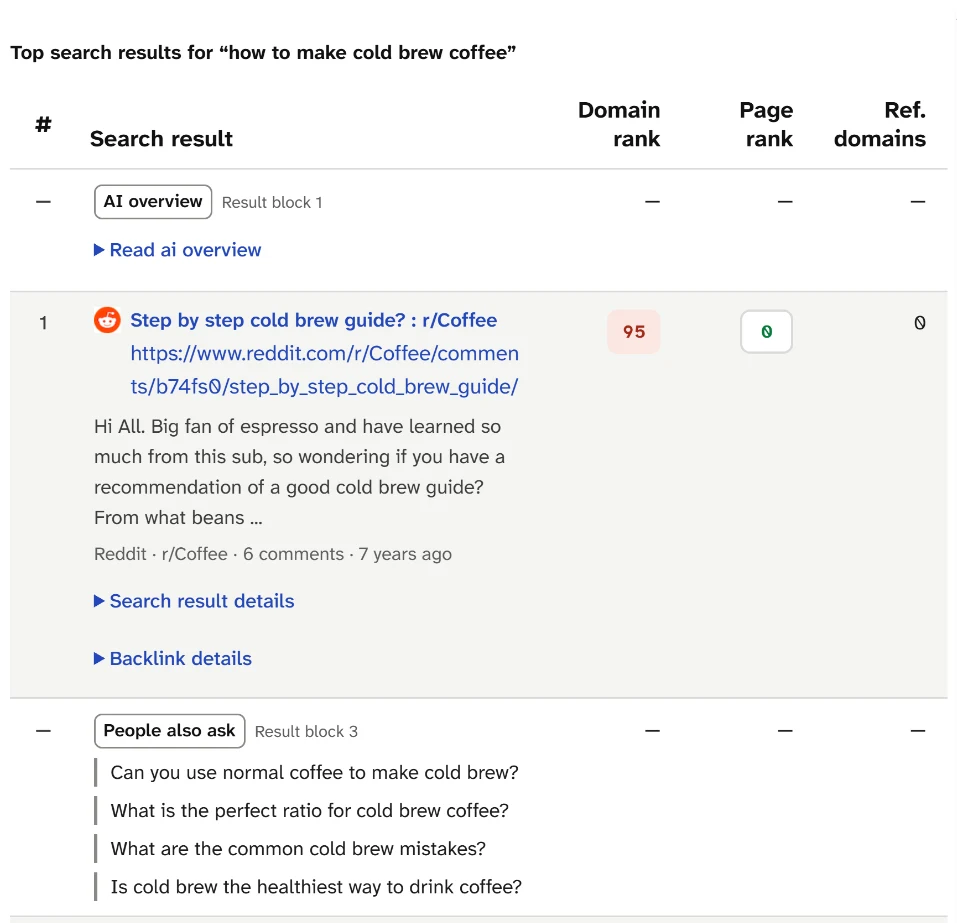
An AI overview sits above everything, a Reddit thread asking for a step-by-step guide ranks first, and the People also ask block lists four questions. The questions are ready-made sections; the Reddit thread shows readers want clear steps.
Here is what this results page tells you to put in the outline:
Finding | Outline section it fills |
|---|---|
A Reddit thread titled "Step by step cold brew guide?" ranks first | Steps: number them, one action each |
An Instagram reel and a Pinterest pin rank second and third; the page shows short videos and video | Visual: show the coffee, the jar and the strain step |
"Can you use normal coffee to make cold brew?" | Question section, near What you need |
"What is the perfect ratio for cold brew coffee?" | A line in the steps with your ratio; the ratio is a 9,900-a-month search of its own, so a separate post can go deeper |
"What are the common cold brew mistakes?" | Mistakes section |
"Is cold brew the healthiest way to drink coffee?" | Leave out unless you can answer it with sources: it is a health question, not a how-to |
The Content opportunities box on the same screen suggested "Address the questions shown in search" and "Consider a visual explanation". Both fit the outline.
Step 4: Fill the outline
Here is the filled outline for the example. Every section traces back to one of the findings above; the method lines inside them (what to grind, mix and strain) are the writer's own, as they will be yours.
Title: How to Make Cold Brew Coffee at Home
Opening: one sentence with the method and the waiting time, then what the reader will have: a jar of cold brew and a ratio they can repeat.
What you need: coarse ground coffee, a jar, water, a filter. Answer "Can you use normal coffee?" here in one paragraph.
Steps: grind, mix, steep, strain, dilute. One heading each, with a photo for the strain step.
Question sections: "How much caffeine is in cold brew?" and "Does cold brew have more caffeine?" combine into one section, since both searches ask the same thing. "What coffee for cold brew?" gets its own short section.
Mistakes: the mistakes your method guards against, answering "What are the common cold brew mistakes?", each with the fix.
Visual: a short video or photo sequence for the whole method, since videos rank on this results page.
Next step: link to your post on cold brew ratios, or to a recipe that uses the cold brew.
Notice what is not there. No history of coffee, because none of the recorded questions asks for it. No definition section: the "what is" question in the screenshot, what is cold brew nitro coffee (9,900 a month), asks about a different drink and suits a post of its own. And no health claims: the People also ask question "Is cold brew the healthiest way to drink coffee?" is left out on purpose, as the table above says, unless you can answer it with sources.
Other post formats
The same method works for other formats; only the sections change.
If the top results are | Use this structure |
|---|---|
Numbered how-to guides, videos | The how-to outline above |
"Best" or "top" lists of products | A list post: criteria first, then one section per item, each with the same facts |
Comparisons ("cold brew vs iced coffee") | A comparison: the difference in one sentence, a table, then when to choose each |
Definitions ("what is cold brew nitro coffee") | An explainer: the definition first, then how it works, then examples |
The search's intent tag and the result types tell you which row you are in. Search intent explains how to read them.
Where this fits
An outline is the last step before writing. If you have not chosen the search yet, start with keyword research for bloggers. If you are planning several posts or handing the work to someone else, a content brief records why you chose the topic and what the post must include.
What the lookup cannot tell you
The numbers are estimates for one country and the results page is a snapshot from one day; check them again when you plan the post. The method itself is yours to supply: the outline tells you which sections readers expect, not how to make good coffee.
Your next step
Download the outline, then run your next post's topic through Keyword ideas. Filter to the Questions line, open the search you are writing for, and fill the research block before you write a word.