- Keyword Research
- Explainer
What Is Keyword Difficulty? How to Read the Score
Editorial responsibility: SearchCub
Keyword difficulty is an SEO tool's score out of 100 for how hard it would be to get a page into Google's top 10 organic results for one search in one country, worked out from the pages that rank there now, chiefly their links. Each tool builds its own version, and each country has its own top 10. That is why one search, cold brew coffee ratio, scores 2 in the United States, 5 in the United Kingdom and 15 in Australia in SearchCub's Keyword overview. This explainer covers what the score rests on, how to read it, and what it can't tell you.
Where you see the score
Open Keyword overview, choose Keyword, type the search, choose a Region and click Search.
The Keyword analysis panel shows Monthly searches and Difficulty side by side, for that one region.
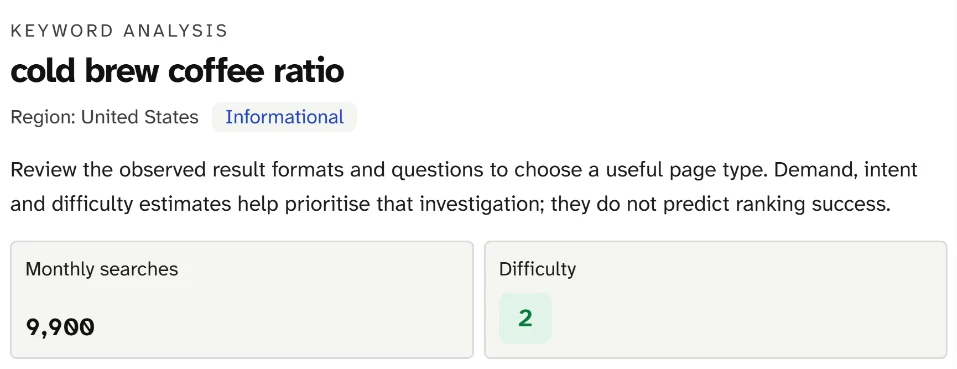
Difficulty sits beside Monthly searches for one search and one region: 2 here, in a green box. The sentence above the cards is the product's own reminder that these estimates help you decide what to investigate.
SearchCub's help text calls the score "Estimated organic ranking difficulty, from 0 to 100" and adds that "zero is a real score": a 0 is the bottom of the scale, not a gap in the data. The box is green for 0 to 29, amber for 30 to 54 and red for 55 and above, and SearchCub's summary of a keyword set counts anything under 30 as Easy.
What the score rests on
SearchCub does not publish its own formula. Its keyword data comes from DataForSEO, a search-data company that SearchCub's privacy policy names as a source of its search data. DataForSEO's documentation says its difficulty indicates "the chance of getting in top-10 organic results for a keyword on a logarithmic scale from 0 to 100". It adds that the calculation looks at the link profiles of the 10 pages ranking first in the results, along with other factors (DataForSEO: keyword overview).
Other tools describe their own recipes, and they differ:
SearchCub, using DataForSEO data. Scale: 0 to 100, logarithmic. What its maker says the score is built from: link profiles of the top 10 pages, among other parameters.
Moz. Scale: 1 to 100. What its maker says the score is built from: Page Authority and Domain Authority of the page-one results, weighted toward the higher positions (Moz Help).
Ahrefs. Scale: 0 to 100. What its maker says the score is built from: "the number of referring domains (RDs) the Top 10 ranking pages" have (Ahrefs Help).
Semrush. Scale: 0 to 100%. What its maker says the score is built from: referring domains and the dofollow/nofollow ratio of the ranking pages, the authority of the ranking domains, plus the results page itself (Semrush Knowledge Base).
Three practical rules follow. Compare scores only within one tool, because each one weighs different data. Don't carry a threshold across tools: Moz says keywords get "significantly tougher to rank for at a Difficulty score of around 40", which describes Moz's scale, not SearchCub's. And read the numbers as an order, not as amounts: on a logarithmic scale, 15 is harder than 2, but that does not make it seven times as hard.
Why one search scores 2, 5 and 15
Each country has its own search results, so each has its own top 10, and the score is worked out for one market at a time. DataForSEO's difficulty request requires a location, and SearchCub shows no score for Worldwide research: "Organic keyword difficulty is unavailable for Worldwide research." Here is the same search in three markets, each looked up in Keyword overview on 4 October 2026:
United States. Monthly searches: 9,900. Difficulty: 2.
United Kingdom. Monthly searches: 590. Difficulty: 5.
Australia. Monthly searches: 590. Difficulty: 15.
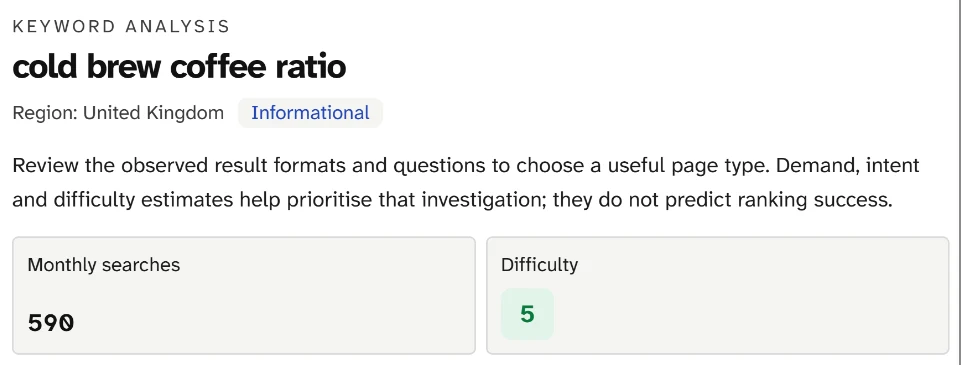
Same search, same panel, Region set to United Kingdom: fewer searches and a slightly higher difficulty. The score belongs to the region named under the keyword.
Two lessons sit in those figures. Difficulty is not demand in disguise: the United Kingdom and Australia have the same 590 searches a month but different scores, and the market with by far the most searches has the lowest. And the right score is the one for your readers' country. A blogger writing for Australian readers should plan with 15, not 2.
What sits under a low score
Keyword overview can also show a Top 10 link benchmarks panel, which SearchCub describes as "Averages across the top 10 organic ranking pages." It shows the kind of evidence DataForSEO says its score analyses: the links pointing to the pages that rank.
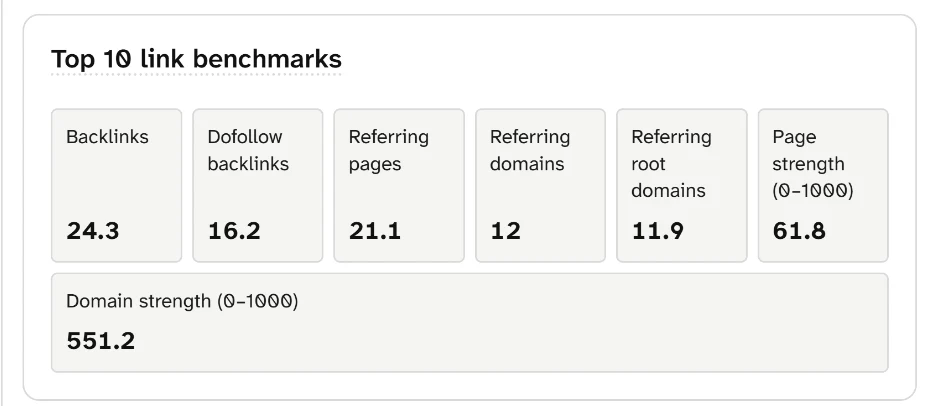
For the United States, the top 10 pages average 12 referring domains and a Page strength of 61.8 on a 0 to 1000 scale. These are the pages the score of 2 describes.
The panel's own note says these averages "describe the search competition; they are not backlink targets or requirements." To read the link scores of each ranking page one at a time, see what domain authority is and how to read authority scores.
What the score can't tell you
Your own chances. The score describes the competition, not your site. Moz describes its score as "a predictor for the level of challenge" an average website would face, and warns that a site straying outside its usual subject may struggle even when the Difficulty scores suggest the keyword is attainable. Moz adds that a brand-new site may find even scores in the 20s or 30s tough, while a very powerful site, with many links and other strong signals, will probably find higher ones easier to rank for.
Whether the top 10 answers the search well. None of the four descriptions above says the score judges how good the ranking pages are. Open the results page and look: what is a SERP explains what you will find there.
A promise. SearchCub's help text says the score "is not a ranking guarantee", and the panel says estimates "do not predict ranking success."
Use it to choose what to check first
Treat difficulty as a way to sort your list: compare searches in one tool and one region, then open the results pages for the most promising ones. Search volume vs keyword difficulty shows how to weigh the score against demand when you choose your next page.
Your next step
Open Keyword overview and search the keyword you are weighing, with the Region set to where most of your readers live. Note Difficulty, look at the Top 10 link benchmarks if the panel appears, then open the results page before you decide. If you are new to how search works, start with what is SEO.