- Keyword Research
- Tutorial
What Is a SERP? The Parts of a Search Results Page
Editorial responsibility: SearchCub
A SERP (search engine results page) is the page a search engine shows after you search: a list of ordinary web results plus extra blocks, such as an AI overview, People also ask questions, videos and related searches, that change from one search to the next. In this post you will take one real results page apart in SearchCub's Keyword overview, name each part, and see which parts a small blog can realistically appear in.
Google calls these parts visual elements: "the building blocks of the Google Search results page that a user can perceive or interact with" (Google: Visual Elements gallery). Which ones you get depends on the search. In Google's own example, a search for bicycle repair shops will probably bring up local results and no images, while a search for a modern bicycle leans toward images rather than local results (How Google Search works).
The example: one real results page
The example is the results page for does domain name affect seo, a question new bloggers ask before buying a domain. SearchCub retrieved it for United States desktop results on 7 October 2026. To open the same view for any search:
Open Keyword overview, choose Keyword, type the search, choose a Region and click Search.
Below the search's own numbers, find SERP overview, then scroll down to Top search results for "does domain name affect seo".
Here is the top of that table:
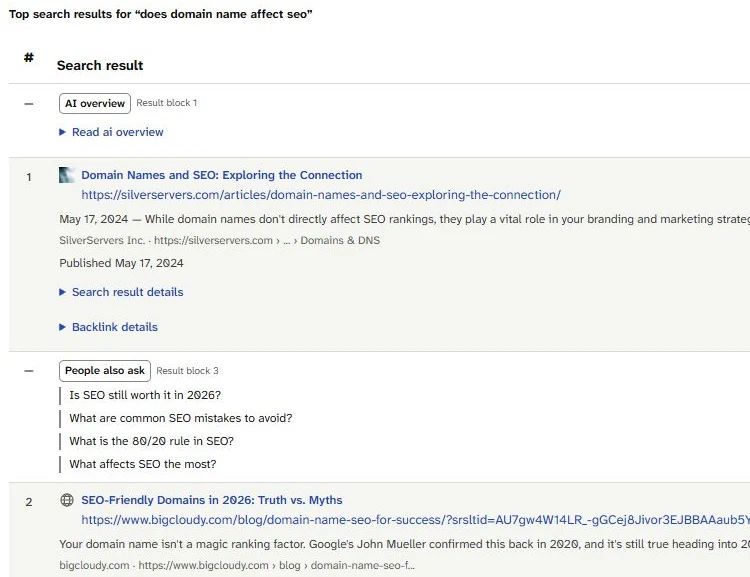
Read it from the top, the way the page was laid out: the AI overview first, then the first ordinary result, then four People also ask questions, then the second result. Ordinary results get a position in the # column; the extra parts get a dash there and a Result block number instead.
SearchCub numbered 11 blocks on this page. The AI overview was block 1 and the first ordinary result block 2. People also ask took block 3, so the second result became block 4, and results 2 to 9 filled blocks 4 to 11. That is why a result's position and its block number differ: the position counts only ordinary results, while the block number counts every part in the order it appeared.
The parts of this page
The SERP overview header
The header above the table sums up the page before you read a single result:
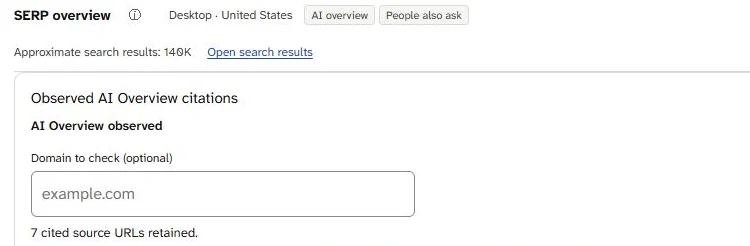
The header says which results these are, United States desktop, and which extra parts the page had: an AI overview and People also ask. The box below it counts the cited pages SearchCub kept from a shortened copy of the overview: 7 for this search.
The features list (AI overview, People also ask) is the quickest summary of a page. It names the extra blocks, not the ordinary results.
Approximate search results: 140K is the search engine's rough count of matching pages. SearchCub's tooltip says plainly that "this is not keyword demand or website traffic".
Open search results opens the same search on Google, so you can compare SearchCub's copy with the live page.
SearchCub's own note on SERP overview describes the job of this panel: to see which pages rank, compare them, and "identify the search features your content could appear in". The rest of this post does exactly that, one part at a time.
Organic results
Organic results are the ordinary, unpaid results. Google now calls each one a text result, a name that replaced the older terms web result and plain blue link. Result 1 shows the usual parts: a title link ("Domain Names and SEO: Exploring the Connection"), the page's address, a snippet that opens with a date ("May 17, 2024 — While domain names don't directly affect SEO rankings ..."), the site's name and a published date.
The table also has four link columns, to the right of the crop above. The first, Domain rank, is SearchCub's 0 to 100 score for the "relative authority of the result's overall domain, based on its links". Result 1's site scores 40, in what SearchCub calls the moderate band.
Five of the nine results came from sites with a Domain rank between 15 and 42, including results 1 and 2. The other four, Reddit, LinkedIn, Quora and IONOS UK, scored between 71 and 99.
AI overview
An AI overview is a generated summary that Google shows above the results for some searches. Google says AI Overviews are shown only when its systems decide one would add something to classic Search, which is why they often don't appear (Google: AI features and your website). This page had one, in block 1; click Read ai overview to see the text SearchCub kept.
The Observed AI Overview citations box counts the cited pages SearchCub kept, which may not be all of them: "7 cited source URLs retained" for this search, on siteguru.co, searchenginejournal.com, quora.com, wix.com, orbitmedia.com, safaridigital.com.au and youtube.com. None of the seven was one of the nine ordinary results. To look for your own site, type its domain into Domain to check (optional). This page's evidence was shortened, so for a domain that is not on the list, SearchCub reports that its citation status "cannot be determined from the available evidence".
People also ask
People also ask is a block of questions related to the search. Google calls it a related questions group, and opening one of its questions reveals a featured snippet (Google: Visual Elements gallery). A featured snippet is a regular result from a web page with its format reversed, "showing the descriptive snippet first" (Google: featured snippets).
On this page the block held four questions: "Is SEO still worth it in 2026?", "What are common SEO mistakes to avoid?", "What is the 80/20 rule in SEO?" and "What affects SEO the most?". None of them is about domain names. People also ask can drift away from the exact search, so treat it as a list of nearby questions rather than headings you must cover.
Parts this page did not have
Many searches show more parts than this one. On 4 October 2026, the results page for how to make cold brew coffee listed five:

Look at the last three: Short videos, Video and Related searches. A how-to search for a drink brought parts the domain question did not, because the parts on a results page follow the search.
Video and Short videos hold videos rather than pages. On the cold brew page, the Video block listed YouTube videos from Building Feasts, Everyday Beans and Beck's Farmhouse Coffee and one from Facebook, and results 2 and 3 were an Instagram reel and a Pinterest pin. Google says a video result has a better chance of appearing when the searcher wants a video (Google: Visual Elements gallery), and that videos can appear on the main results page, in Video mode, in Google Images and in Discover (Google: video SEO best practices).
Related searches are other searches. On 7 October 2026 the
what is seopage listed eight after its last ordinary result, such as "What is seo and how does it work" and "What is SEO youtube", and theseo vs ppcpage listed "Seo vs ppc reddit" and "Seo vs ppc cost". Google describes the block as a group of searches by other people that relate to the original search; clicking one opens another results page.Ads are paid results. None of the results pages used in this post included ads in SearchCub's data. Google says "for most searches, we show no ads at all", that ads are clearly labeled, and that "no one can buy better placement in organic Search results" (Google: how ads work on Google Search).
Other parts appear in SearchCub's features list when a page has them. Pages checked on 4 October 2026 also listed Images (
cold brew coffee ratio), and Perspectives and Discussions and forums (on page seo checklist).
Which parts a small blog can appear in
Here is the realistic picture for a blog without a big name, set against what the example page showed:
Organic results. Can a small blog appear there? Yes. What it takes: a page that answers the search and that Google has indexed. On the example page: five of nine places went to sites with Domain rank 15 to 42.
AI overview. Can a small blog appear there? Yes, as a cited page. What it takes: Google says a page "must be indexed and eligible to be shown in Google Search with a snippet" (Google: AI features and your website). On the example page: seven cited pages SearchCub kept, none of them among the nine results.
People also ask. Can a small blog appear there? Yes, as the answer under a question. What it takes: a clear answer to that exact question on your page, though Google's systems pick the page to show and you can't mark yours as the answer (Google: featured snippets). On the example page: four general SEO questions.
Video and Short videos. Can a small blog appear there? Only with a video. What it takes: a video with its own page; for video features Google advises "a dedicated watch page for each video" (Google: video SEO best practices). On the example page: not on this page.
Related searches. Can a small blog appear there? No. What it takes: nothing to earn, because they link to other searches, not to pages. On the example page: not on this page.
Ads. Can a small blog appear there? Only by paying. What it takes: an ad budget. On the example page: none.
For most blogs the realistic targets are the first three, and all three start with the same thing: a page that answers the search clearly. For AI features, Google says AI Overviews and AI Mode have no extra requirements of their own and need no special optimization (Google: AI features and your website). One setting can keep a site out: Search Console's Search generative AI control lets a site exclude itself from these features, and including the site is the default (Search Console Help: Search generative AI control).
Related searches still help, just not as a place to appear. Google suggests paying attention to them while you look for topics to write about on your site. The cold brew page's "How to make cold brew coffee starbucks" is a topic, not a slot to win.
To turn a results page into a plan for one post, follow SearchCub SERP analysis. For the basics a page needs before it can appear anywhere, read what is SEO. And for the question the example page asks, see does your domain name affect SEO.
What one results page cannot show you
A results page is a snapshot: this one is United States desktop results on 7 October 2026. Google notes that the same result can look different on a desktop computer and on a phone, or from one country to another, among other factors (Google: Visual Elements gallery). Check your own search in your readers' region, and check it again before you plan around a part that might not stay.
Your next step
Open Keyword overview, search the topic of your next post and scroll to SERP overview. Write down the features it lists and the parts in Top search results, then mark the ones your blog could realistically appear in: an ordinary result, an AI overview citation or a People also ask answer.