- Keyword Research
- Tutorial
Keyword Research for Personal Finance Blogs: How-Tos First
Editorial responsibility: SearchCub
In a personal finance keyword list, nearly every search can come back tagged Informational, so read the CPC beside each search's wording to see which ones businesses pay to win, and give your first posts to the practical how-tos you can document with your own spending. The example below is one real list of saving searches, seeded with how to save money in SearchCub's Keyword ideas. Once calculators, product searches and off-topic rows are crossed out, each remaining row gets one test: can your own figures or an expert source stand behind it? The answers set the writing order, which here starts with groceries.
Treat this guide as the money-blog companion to keyword research for bloggers, whose six steps suit any blog. Besides the flat intent tags, money has one more complication: Google counts it among the topics where a page can seriously affect its readers, which changes what you can credibly publish.
Search one money topic
In Keyword ideas, select Keyword and enter a money task in your readers' own words, here
how to save money.Set Region to your readers' main country (United States in this example), then click Search.
Check the Keyword set. On 8 October 2026 this search returned 100 rows, and the table noted More matching keywords are available. Counts in this guide cover only those 100 rows, and the keyword figures are SearchCub's estimates of US searches.
Each row shows Monthly searches (the estimated monthly average for your region), Difficulty (0 to 100 for how hard the unpaid results are to enter; under 30 counts as Easy) and CPC, the estimated average price an advertiser pays for one click on a search ad for that row, in US dollars. SearchCub's help text calls CPC "an advertising estimate, not the cost of using SearchCub." It is not what a post on your blog would earn either. The seed row itself, how to save money, shows 18,100 searches a month, difficulty 22 and a CPC of USD 5.65.
Why the intent tag barely helps
In this money list the intent tag barely varies: 95 of the 100 rows are tagged Informational and nothing else. Only five carry another tag: two app names, two money-saving books and one search about earning money as a teenager.
So read the words and the CPC together. To bring the expensive rows to the top, open Filters and sorting, set Sort results to CPC: High to Low and click Apply filters. A few rows from the top, the middle and the low end of that sort show what the price adds:
how to save money on car insurance(480 monthly searches). Intent: Informational. CPC: USD 58.04. What the pair tells you: The most expensive click in the set, about 30 times the grocery row. Advertisers pay most to reach this reader.financial literacy for young adults(390 monthly searches). Intent: Informational. CPC: USD 17.17. What the pair tells you: Broad and costly to advertise on; a whole subject, not one task.how to save money for a house(2,400 monthly searches). Intent: Informational. CPC: USD 6.22. What the pair tells you: A saving goal that sits close to home buying.digit savings app(140 monthly searches). Intent: Navigational, Transactional, Commercial. CPC: USD 4.44. What the pair tells you: Someone looking for one company's app.how to save money on groceries(5,400 monthly searches). Intent: Informational. CPC: USD 1.91. What the pair tells you: A household question with little advertising money around it.money saving book with envelopes(170 monthly searches). Intent: Transactional. CPC: USD 0.31. What the pair tells you: A shopper buying a product, even though the click is cheap.how to save money on heating(170 monthly searches). Intent: Informational. CPC: USD 0.07. What the pair tells you: The lowest CPC in the set (two rows have no CPC estimate).
Neither column decides on its own. The Informational tag did not make car insurance a casual how-to, and a cheap click did not make the envelope book a writing topic. A high CPC beside an Informational tag means businesses pay to reach that reader, so open the row's results page before you commit and see whose pages are already there.
Whether to buy ads on any of these rows is a separate decision, which SEO vs PPC works through. Traffic value shows how the same CPC figures put a price on the visits your existing pages already get.
Cross out the rows that are not posts
Before you choose, remove the searches no article of yours can answer well. In this set they fall into four groups:
Calculators. The two biggest rows are
living expenses calculator(60,500 a month, difficulty 68) andbudget calculator(22,200, difficulty 53), followed by50/30/20 rule calculator(1,900) andbudget calculator based on income(590). These searchers want a working tool. Unless you build and maintain one, a written post leaves the search unanswered.One company's product.
oportun savings app(170) anddigit savings app(140) are tagged Navigational, Transactional and Commercial: the searcher wants that app.is cash app savings interest monthly or yearly(480) is tagged Informational, but only the company's own terms can answer it, and those terms can change. Link the company's page if you mention the product.Products to buy.
money saving book with envelopes(170, Transactional) andmoney saving challenge book(260, Informational and Commercial) come from shoppers. The challenge itself is different:100 envelope challenge(4,400 a month, difficulty 4) is yours to write about once you have done it.Not about saving money.
how to save my money tree(210),how to save a money tree(170) andhow to save a money tree from dying(170) are about a houseplant; typetreein Exclude words under Filters and sorting and apply it to drop them.how to earn money as a teenager online(1,900) andways to make money as a teenager online for free(1,000) are about earning, which deserves its own search.
Borrowing and banking are missing from this list: no keyword among the 100 loaded mentions a credit card, a loan or a bank. If you write about them, run a separate Keyword search for each.
Open the row you could write
Take the largest specific how-to that is left. Here it is the grocery question: type groceries in Include words under Filters and sorting and click Apply filters to find it.
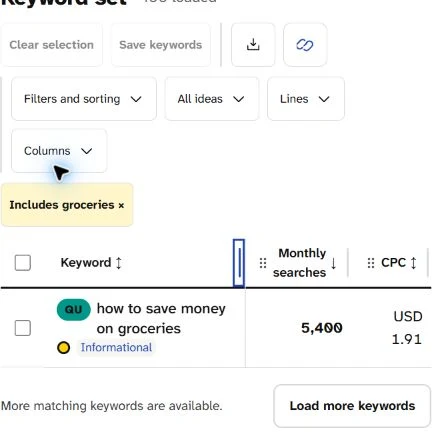
One row survives the filter: an Informational how-to averaging 5,400 searches a month, with a CPC of USD 1.91. A practical question with little advertising money around it is the kind your own spending can answer.
Click how to save money on groceries and its Keyword analysis opens.
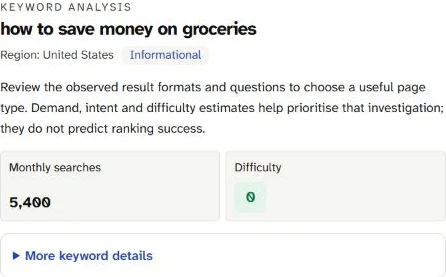
Informational, 5,400 monthly searches and difficulty 0 in the United States. The line under the tag is SearchCub's reminder to judge the results page and its questions before you choose what kind of page to write.
Then check two things the headline figures hide.
One page, four wordings. Under Related keywords · 4, SearchCub lists how to save money at grocery store, how to save money grocery shopping, how to save money on food shopping and how to save money on groceries. The panel shows each at difficulty 0, and SearchCub's estimates give all four the same 5,400 searches, CPC and 12-month trend. SearchCub's note on Monthly searches warns that related keywords can share one estimate, so their volumes shouldn't be added together. Plan one page for all four phrasings, and don't count them as 21,600 searches.
Shared figures run through this list: 29 of the 100 rows share those figures with at least one other wording, such as how to save money on electric bill and how to save money on power bill at 1,300 each.
The months behind the average. Open More keyword details for the Search trend (monthly searches) chart. From September 2025 to May 2026 the grocery question sat between 2,400 and 2,900 searches a month. It jumped to 12,100 in June and 22,200 in July 2026, then fell to 5,400 in August, which is why the table's % change reads -76%. Past 12 months searches is 64.3K, and June and July alone account for more than half of it. The chart holds no earlier summer to set that spike against, so there is no telling yet whether it returns; judge the post by the ordinary months, not the summer peak.
Read the results page
The analysis ends with the SERP overview, the results page SearchCub checked for this search (US, desktop, 8 October 2026). An AI overview came first, then eight ordinary results, with People also ask and Discussions and forums blocks between them and Related searches last.
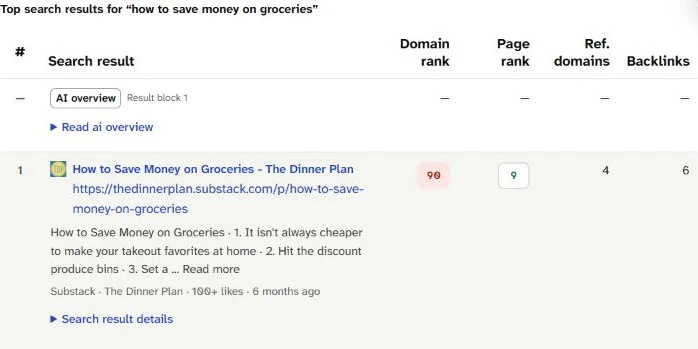
First below the AI overview: The Dinner Plan, a Substack newsletter showing 100+ likes and 6 months ago. Its own page had 4 referring domains and 6 backlinks in SearchCub's data.
Beyond the newsletter, the results fall into two kinds. Four frame their advice around real people: a Reddit thread in r/Frugal with 100+ comments, NYT Cooking's "How Our Readers Are Saving Money on Groceries", The Kitchn's "We Asked 50 Families for Their Best Grocery Budget Tips" and a YouTube video from Under the Median about "11 simple shopping habits that have helped our family save money for years". Three are numbered tip lists: from a housing authority (25 tips), RaiseRight (13) and a credit union (15). Judging by their titles and addresses, all eight are advice articles, discussions or a video.
Links were thin across the page. NYT Cooking's page had the most, 19 referring domains, and it sat third. The People also ask box asked about amounts, not methods: "What is the 5 4 3 2 1 rule for grocery shopping?", "Is $1000 a month on groceries a lot?", "Can you live on $200 a month for food?" and "Is $50 a week enough for groceries for one person?" Three of the four ask whether an amount is enough or too much, and that is where a money post turns into advice. The related searches add versions for one person, with coupons and for eating healthy.
Money advice needs your numbers or an expert source
Google puts money among the subjects it calls "Your Money or Your Life", or YMYL. Its guidance on creating helpful content explains that for topics that could make a real difference to someone's financial stability, health or safety, its systems give extra weight to content that shows strong E-E-A-T: experience, expertise, authoritativeness and trustworthiness (Google: creating helpful content). What is E-E-A-T explains the four qualities and why trust matters most.
The same page notes that one page may help through the experience behind it and another through the knowledge it passes on, and one of its self-check questions asks whether content is "written or reviewed by an expert or enthusiast who demonstrably knows the topic well". For a money blogger, that becomes a test for every row you kept:
Your numbers. You can show what you did: grocery receipts before and after a change, a bill you lowered, the envelopes you filled. Write it as what happened in your household, with the figures, and let readers judge what fits theirs.
An expert source. Taxes, insurance, investing and retirement turn on rules and products you don't control. Write about them only if that is your field, or with the official source cited and the post reviewed by someone qualified.
Neither. With no experience to show and no expert to check you, leave the row for later.
The grocery questions show where the line falls. "Is $1000 a month on groceries a lot?" depends on the household asking. Answer it with what your own household spent and why, and name the source of any average you compare against, rather than telling readers what they should spend.
Decide what to write first
Order the posts by that test: what your own spending can prove comes first, what an expert source can support comes next, and the rest waits. For this set:
Saving money on groceries, for the four grocery wordings (5,400 a month each, difficulty 0, USD 1.91). It is the largest specific how-to in the set, its results page leans on people's own experience, and your receipts can answer its People also ask questions. The related searches suggest sections for one person and for coupons.
One household bill you have cut. Start with
how to save money on electric billandhow to save money on power bill(1,300 each, difficulty 16), with the two winter versions (260 each) as a section.how to save money on water bill(390, difficulty 0), five air-conditioning wordings (390 each) andhow to save money on heating(170) are smaller posts, for bills you have actually lowered.A goal you are saving for, such as a wedding (three wordings at 590, difficulty 5, USD 1.52), a car (
how to save money for a car, 1,300, difficulty 0, USD 8.79) or a house (how to save money for a house, 2,400, difficulty 0, USD 6.22). Document the plan as you follow it. The car and house clicks cost advertisers several times the grocery click, so open their SERP overview before you write.Posts that need an expert source, held until you can meet the test above:
how to save money on taxes(210, difficulty 23),how much money to save for retirement(320, difficulty 20),how to invest and save money(140, USD 9.34) andhow to save money on car insurance(480, USD 58.04).The broad topic last.
how to save moneyitself (18,100 a month, difficulty 22) covers everything above. Write it once the specific guides exist, as the page that links them together.
Your next step
Your first post should look like the grocery row: a specific household how-to that your receipts or bills can answer. Find yours with a search in Keyword ideas for your readers' Region, then check its SERP overview for the questions already there. Anything on tax, insurance, investing or retirement must pass the expert-source test first, or wait. As a final check, set Sort results to CPC: High to Low and look at the SERP overview of any row near the top before you commit: businesses pay most to reach that reader.
Budget cooking is a topic of its own: keyword research for food bloggers takes one dish from search to writing order.