- Informational
7 Keyword Research Mistakes That Waste Your Time
Editorial responsibility: SearchCub
Keyword research wastes time when you chase impressive numbers without checking who needs the page, what they want, and whether you can answer better. These seven mistakes turn a long keyword list into a weak publishing plan. Use the fixes to make a decision sooner.
1. Choosing a popular topic before choosing a reader
“Coffee” might attract your attention; “how to dial in espresso with a hand grinder” describes someone you can help. Starting with the broad topic encourages you to collect phrases that have little connection to your experience or business.
Write one sentence before searching: “This page helps ___ do ___.” Then list what you can contribute: an example, a tested process, photographs, or a useful comparison. Google's people-first content guidance asks whether content serves an intended audience and adds original value. Use that as a filter before comparing numbers.
2. Treating monthly searches as future visitors
Search volume estimates how often people search a phrase. It does not tell you how many will see your result, click it, or become customers. A large estimate can make a weak opportunity look certain.
In SearchCub, read Monthly searches as demand context. Open the keyword and inspect its monthly history for spikes or declines. Google's historical metric definitions explain how location, averaging periods, and seasonality affect search estimates.
Compare relevant alternatives. A smaller audience with a clear problem may deserve your time more than a broad phrase you can barely address.
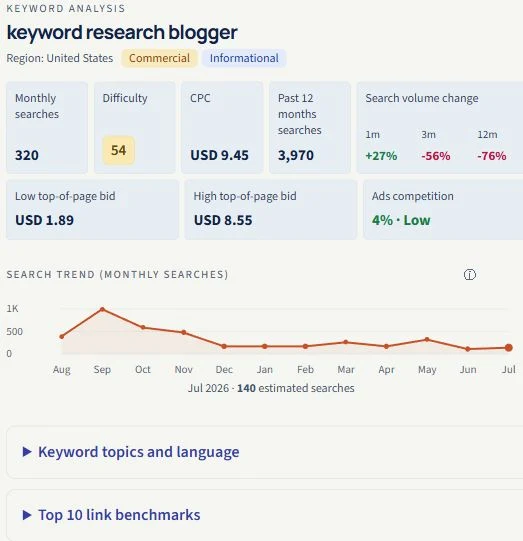
In this U.S. example captured on 14 September 2026, the average is 320 searches while July shows 140. Check the history before treating the average as steady demand.
3. Using a difficulty cutoff as an automatic decision
Keyword difficulty estimates organic ranking difficulty. SearchCub displays a 0–100 score when available; it is not your personal chance of success. A cutoff cannot account for everything you know about the topic or the competing pages.
Compare Difficulty among phrases serving the same reader. Then inspect the results before rejecting the harder phrase or accepting the easier one. Ask what your page would do better: explain a missing step, supply firsthand evidence, or answer a more specific question. If the score is unavailable, leave it unknown.
4. Mistaking cheap advertising for easy SEO
Low CPC can look like an overlooked opportunity. But CPC estimates the cost of a paid-ad click; it does not measure how difficult the organic results are to outrank. Low CPC also does not establish that nobody advertises on that phrase.
Keep the jobs separate: volume helps assess demand, difficulty helps compare organic competition, and CPC adds advertising context. For an informational article, start with the reader's need and organic results. Use the volume and difficulty comparison to weigh those signals together.
5. Deciding on an article before opening the results
A phrase can sound ideal for a blog post while the returned pages mostly offer products, calculators, or local services. You can spend hours outlining the wrong kind of page if you look only at the keyword table.
Open the keyword analysis in SearchCub and inspect the search results. Read several pages. Note the task they serve, their format, and what remains difficult for the reader. Choose a page format you can deliver usefully. The SERP analysis walkthrough shows how to turn that inspection into a brief.
6. Comparing numbers from different markets or periods
A country estimate and a worldwide estimate answer different questions. So do a monthly average and one month's recorded estimate. Putting them in the same shortlist without their context creates a misleading ranking.
Set Region to your intended audience before searching in SearchCub, and keep it unchanged while comparing candidates. Record the region and research date beside your shortlist. When checking history, compare matching months or periods. Treat missing values as unknown, and avoid adding related keyword volumes together: their estimates can overlap.
7. Creating a new page for every keyword
“Coffee grinder cleaning” and “how to clean a coffee grinder” may need the same answer. Creating near-duplicate posts for every variation scatters useful information and gives you more pages to maintain. Group overlapping phrases by the reader’s task. Improve one existing page when it already serves that task; create another only when the question or required format is meaningfully different.
Choose one primary phrase and save it to a SearchCub list, signing in if prompted, or export selected results. In your writing notes, record the reader, the page's promised answer, and the evidence you need to create it. Give other candidates a next action: research later, improve an existing page, or discard. Stop when you can explain what you will publish and why.