- On-page SEO
- Tutorial
How Many Keywords Should You Use per Page for SEO?
Editorial responsibility: SearchCub
Give each page one task and let it rank for every wording of that task: there is no right number of keywords per page, and the count is a result, not a target. On one real blog, in SearchCub's estimates for the United States, one page ranks for 114 searches and another for 9. Below, you will see why in Domain overview, learn what secondary keywords are, and get a test for when a new wording needs a page of its own.
Why there is no right number
A page doesn't rank for a list of keywords you hand it. It ranks for the searches it answers, and people word the same need in many ways. Google's SEO Starter Guide says its systems "can understand how your page relates to many queries, even if you don't explicitly use the exact terms in them" (Google SEO Starter Guide).
So plan by task: the one thing a reader wants to do or know when they land on the page. One task per page, and the number of keywords follows from how many ways people ask for it.
Primary keyword: the wording you build the title and opening around. How to choose a primary keyword for an existing page shows how to pick it.
Secondary keywords: the other wordings of the same task. A page can rank for them by answering the task well, without each phrase squeezed in; repeating them is the opposite mistake, covered in keyword stuffing.
A different task: a different page.
The example: one blog, pages with 1 to 114 keywords
The worked example is productiveblogging.com, a blog about blogging, looked up in SearchCub's Domain overview for the United States. The keyword table was retrieved on 4 October 2026 and the Pages tab comes from the saved result of 3 October. It is a third-party site, so every figure is SearchCub's estimate from search data, and no affiliation is implied.
Step 1: Find wordings that share a page
Open Domain overview, choose Domain, type the domain, choose United States as the Region and click Search.
On the Overview tab, scroll to the keyword table. The Ranking page column shows which of the site's pages ranks for each search.
Read down that column and look for a URL that repeats.
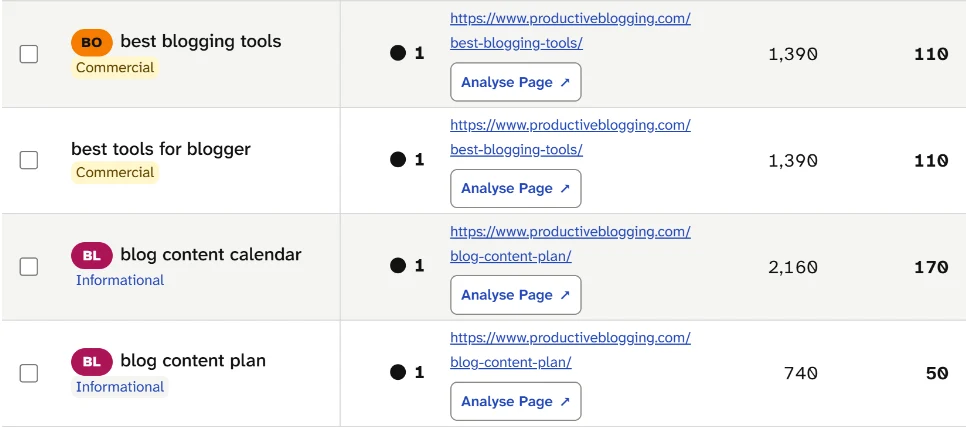
Read the Ranking page column. Two wordings of a tools search share /best-blogging-tools/, and two wordings of a planning search share /blog-content-plan/, all at position 1. Different words, one task, one page each.
That is what secondary keywords look like when they work: blog content plan (50 searches a month) needs no page of its own, because the page that ranks first for blog content calendar (170 a month) ranks first for it too.
Notice the matching figures on the first pair as well: 110 searches a month and 1,390 over the past 12 months for both wordings. SearchCub's help text for the column warns that "Repeated estimates for related keywords are not additive." Read the pair as one search of about 110 a month, not 220.
Step 2: Count the keywords each page ranks for
Open the Pages tab. Its Ranking keywords column gives the "Number of known organic keywords ranking for this page in the selected region". Here are eight of the 25 pages loaded for the example:
Page | Ranking keywords |
|---|---|
/how-do-blogs-make-money/ | 114 |
/beginners-guide-seo/ | 72 |
/how-much-do-bloggers-earn/ | 52 |
/blogging-explained/ | 42 |
/blog-content-plan/ | 9 |
/best-blogging-tools/ | 8 |
/make-money-with-mediavine-ads/ | 6 |
/why-your-blog-needs-a-usp/ | 1 |
Neither end of the range is a verdict. /blog-content-plan/ ranks for only 9 keywords and still holds first place for both wordings in the screenshot. The money page's 114 include many wordings of one question, and step 3 shows three of them. A large count tells you how widely a task is worded, not how well the page is doing.
To see the keywords behind a count, click Analyse Page on that row. It opens the page in Page analysis, and how to find the keywords a specific page ranks for walks through that report.
Step 3: Split only when the task changes
A new wording needs its own page only when it asks for a different result. The same site shows where that line falls. All five searches below come from the keyword table of 4 October:
how to make money blogging. Monthly searches (US): 2,400. Position: 3. Ranking page: /how-do-blogs-make-money/.how to monetize a blog. Monthly searches (US): 590. Position: 2. Ranking page: /how-do-blogs-make-money/.do bloggers make money. Monthly searches (US): 390. Position: 3. Ranking page: /how-do-blogs-make-money/.how much do bloggers make. Monthly searches (US): 480. Position: 3. Ranking page: /how-much-do-bloggers-earn/.how much blogging can earn. Monthly searches (US): 480. Position: 3. Ranking page: /how-much-do-bloggers-earn/.
The first three ask how a blog makes money, so one page carries all of them, including the yes-or-no wording. The last two ask how much bloggers earn, and a second page answers them; in the Pages tab, its title promises statistics from a blogging income survey. Two tasks, two pages, and each ranks on page one for its own searches.
Use three questions on any new wording:
Would the answer on your existing page satisfy this search?
If yes: it is a secondary keyword: keep it on that page.
If no: go to the next question.
Would the searcher expect the same kind of page, such as a how-to, a list or a calculator?
If yes: add what is missing to the existing page.
If no: check the results page before you decide.
Does it ask for a different result, such as numbers instead of steps?
If yes: plan a separate page.
If no: keep it on the existing page.
Resist one page per wording. Google's spam policies describe doorway abuse as pages "created to rank for specific, similar search queries" (Google spam policies). To sort a whole keyword list into pages, use how to group keywords into topics and map them to pages. If two of your pages already rank for the same task, keyword cannibalization shows how to decide between them.
What the counts leave out
These counts are SearchCub's estimates from third-party search data for one region. They cover the keywords found in that data for each page, not every search a page appears for, and one keyword can be counted on more than one page.
Your next step
Open Domain overview with your own domain and the Region where most of your readers live. On the Pages tab, take the page with the most Ranking keywords and click Analyse Page. Write that page's task in one sentence, then sort its keywords into two lists: wordings of that task, which the page should keep answering, and different tasks, which belong on another page. For the full page report, start with how to find the keywords a specific page ranks for.